Requests and online booking
The customer describes the fault on a public form, adds a photo and picks a suitable day; in online booking only the slots of technicians available for that service and area are offered.
For services that install, maintain and repair at the customer's site. No separate software to install: online requests and booking, job assignment and calendar, the technician's phone, checklists and signatures, quotes, customer units and maintenance contracts come ready.
No credit card, nothing to install.
Who it's for
The same software, set up for your business: each line of business has a page describing its own flow.
From seasonal maintenance to emergency breakdowns, every job on the calendar and on record.
AC and boiler service softwareWarranty, workshop and legal deadlines on the same job.
Appliance repair softwareContracted units, checklists and response times on record.
Contract maintenance softwareHighlights
The customer describes the fault on a public form, adds a photo and picks a suitable day; in online booking only the slots of technicians available for that service and area are offered.
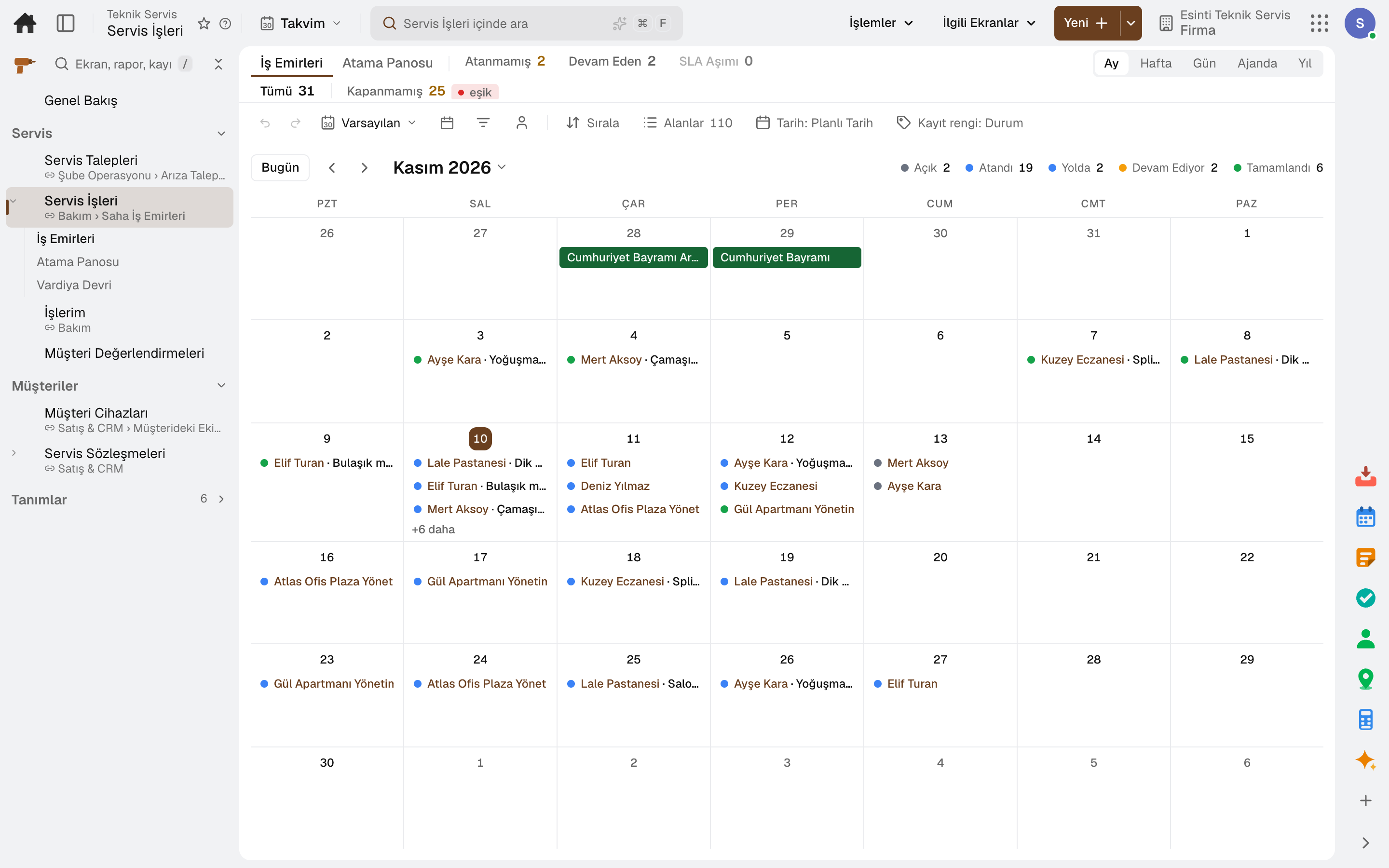
A service job is opened, assigned to the team and scheduled on the calendar; SLA targets and shift handover are on the same screen.
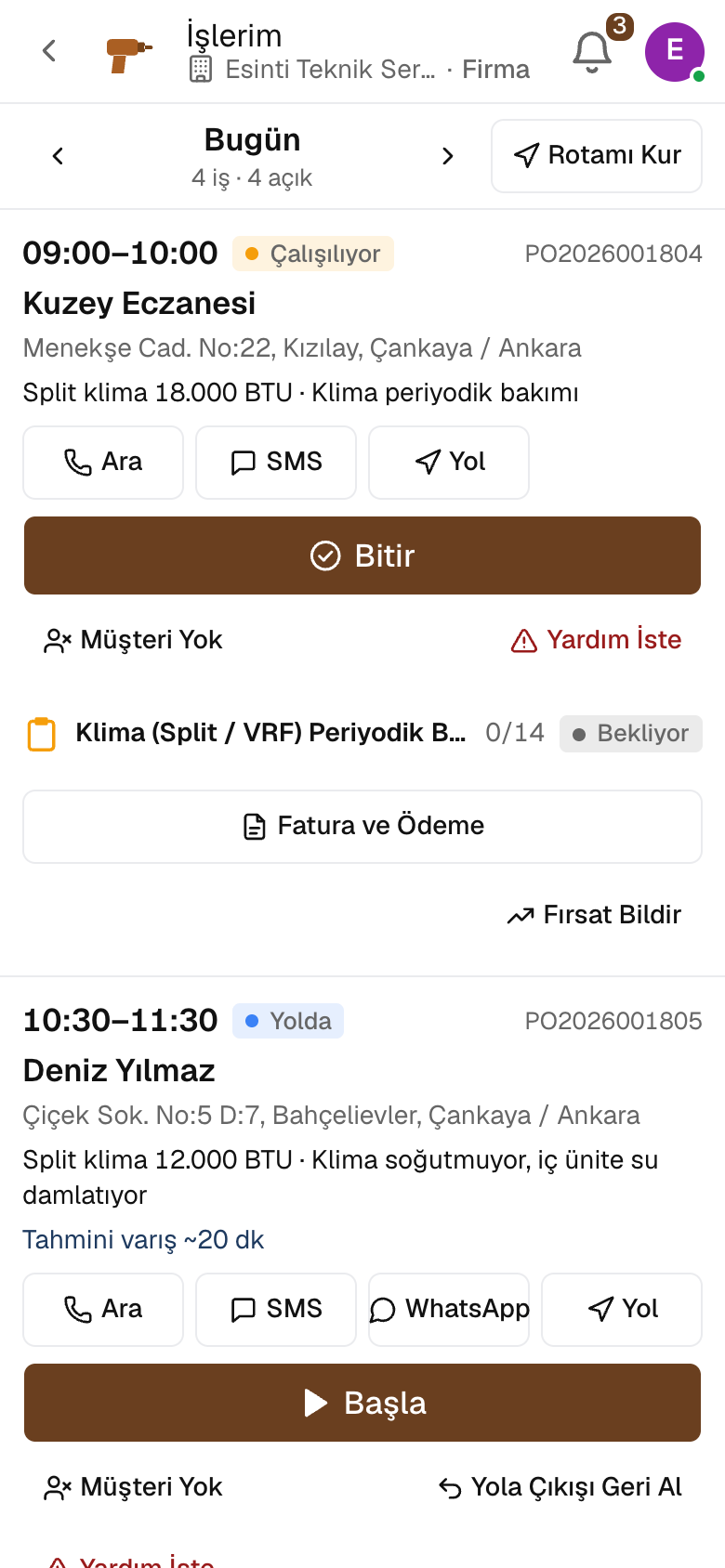
The technician sees jobs on the phone in appointment order, calls the customer with one tap and gets directions to the address.
The job runs on a checklist filled in step by step: measurement, photo and signature. An unfinished checklist does not close the job, and a non-conforming answer turns into a new request.
The technician builds an estimate with options on site; estimate and job templates bring lines from the price book, and the job's lines go on the invoice.
A device placed with the customer is recorded with its installation date, loan or rental status and deposit; the maintenance contract is managed by scope and term, and the customer rates the completed job.
A day
Every step works on the same data: a record entered in one step is never keyed in again in the next.
The customer writes in through the form or books an appointment; the dispatcher enters requests that come in by phone.
The request becomes a service job, is assigned to a technician and lands on the calendar with its appointment.
The technician taps On My Way, Start and Finish, and completes the checklist, photos and signature.
The job's lines go on the invoice; cash or bank transfer payments are posted to the customer's account.
When the service is complete, the customer rates it from the job page; the rating shows with the technician and the unit.
As you grow
As your technicians, units and customers grow, you carry on in the same account. Spare parts stock, purchasing, sales and accounting share the same data; a record entered in one place is never entered again in another.
Maintenance management software
Breakdowns reported by QR, maintenance plans from the calendar.
5 sub-modulesSales and customer management software
One customer record from opportunity to invoice.
16 sub-modulesInventory and warehouse management software
Every product's location, batch and movement at your fingertips.
9 sub-modulesAccounting software
In the journal the moment the invoice is issued; no waiting for month end.
13 sub-modulesFrequently asked
Yes. In online booking the customer chooses the service; the slot opens for as long as the service takes and only technicians who can do that job appear available. A customer whose address is outside the service area leaves a request.
No. The "My Jobs" screen opens on the phone; the technician sees the day, the customer, the service address and the device there.
Steps and photos wait on the phone and are sent when the connection returns; the same record is never written twice.
The quote goes to the customer's job page; the customer picks an option and approves with a signature or asks for changes.
Yes. The technician sees the warranty on site; warranty claims to the manufacturer, faulty part returns and the monthly warranty reconciliation run from the job.
Yes. You can take your data out at any time via Excel, CSV or the API.
Free for 15 days
Every app is open for 15 days. No credit card, no installation; your team signs in from the browser.
Try it free for 15 days; no credit card needed. We reply to your questions within one business day.