Skip to content
Lidyos
Production & Inventory

Lidyos InventoryInventory and warehouse management software

Every product's location, batch and movement at your fingertips.

Warehouse operations in one app, from material masters, goods movements, counts and valuation to storage bins, picking, packing and dock appointments. Batch, serial number and, where needed, expiry date travel with every movement.

  • 9 sub-modules
  • 24 modules at the same price

Industry packages: Lidyos Build · Lidyos Farm · Lidyos Fashion · Lidyos Logistics · Lidyos POS · Lidyos Restaurant · Lidyos Retail · Lidyos Service

Industries: Machinery, metal and automotive suppliers · Textiles and apparel · Chemicals, plastics and cosmetics · Food and beverage · Agriculture and livestock · Retail and store chains · Grocery stores, corner shops and greengrocers · E-commerce and omnichannel sales · Wholesale and distribution · Restaurants and cafés · Patisseries and bakeries · Construction and contracting · Vehicle and equipment rental

Roles: Purchasing specialist · Production planner · Maintenance technician · Warehouse manager and warehouse worker · Shipping planner and driver · Cutter and sewing operator · Agronomist · Field service technician
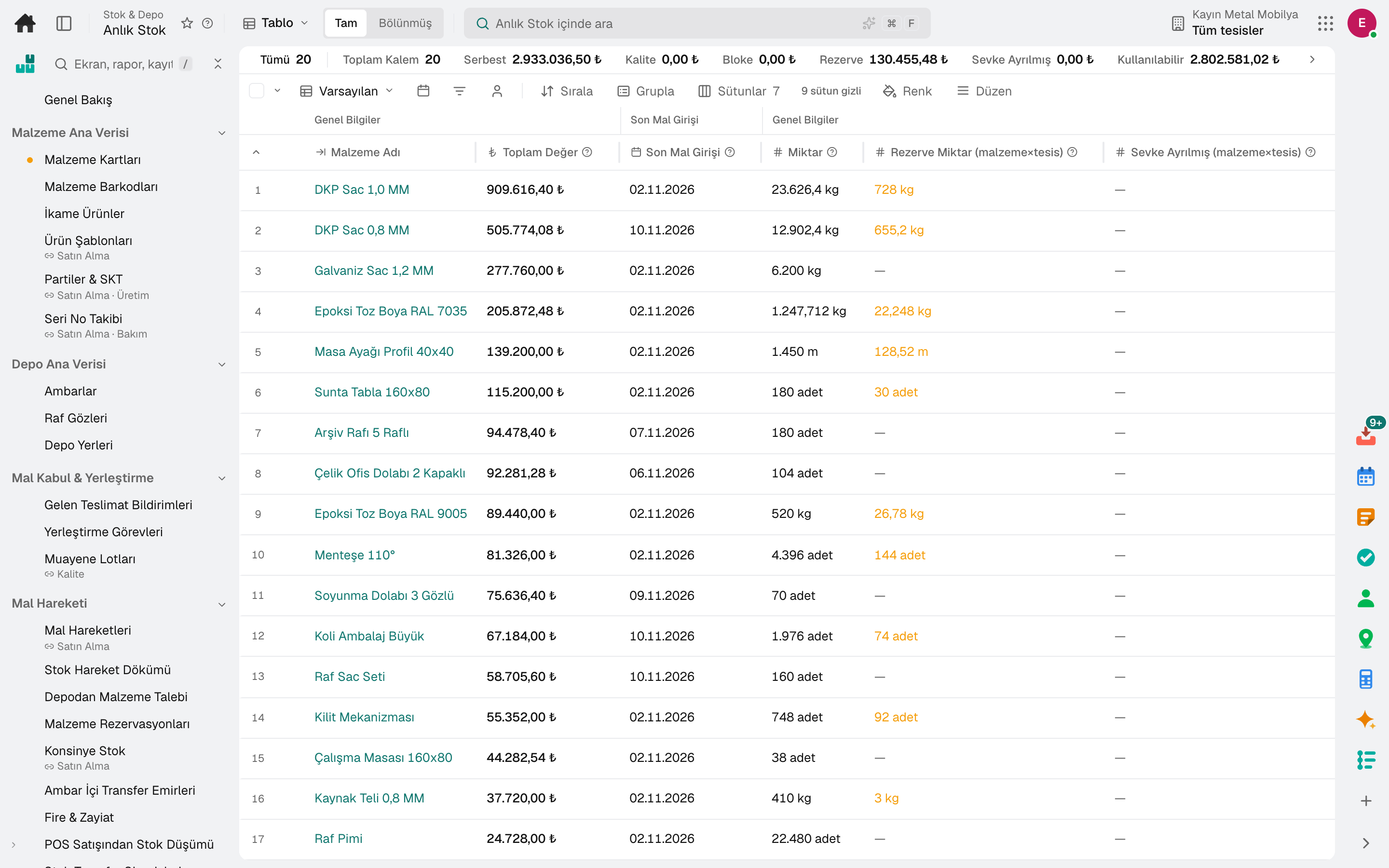
Current Stock
Screen in the product
  • Current Stock

What is it, and why do you need it?

What is Lidyos Inventory for?

Paper count sheets, handwritten delivery notes and "the system says it's in stock, but it isn't" are expensive: sales are lost, excess stock ties up capital, and after a complaint it takes hours to find where a batch went.

Lidyos Inventory records every movement with its batch and serial number. Picking waves and handhelds run the floor, cycle count differences show up instantly, and reorder points and safety stock are calculated from consumption.

Scope: Runs material stock, goods movements, counting and valuation, together with storage bin, picking, packing and yard operations.

Highlights

What can you do with Lidyos Inventory?

01

Goods movements and counts

Goods receipts, transfers, reservations, returnable packaging, cycle counts and count documents; POS sales are deducted from stock.

02

Bin-managed warehouse

Storage bins, putaway strategies, putaway and replenishment tasks, internal transfers and cross-docking rules.

03

Picking and shipping

Picking waves and tasks, handheld terminals, packing and handling units, pallet and crate labels, loading and delivery notes.

04

Yard and dock

Vehicle check-in, dock appointments, time slot grid, gate events and yard map.

05

Stock planning

Reorder points, safety and maximum stock thresholds; forecast-based replenishment suggestions, buffer stocks and markdown suggestions.

06

Traceability and valuation

Batch traceability, ABC and slow-mover analysis, stock balance as of a date; stock valuation and material period closing.

07

Period stock reconciliation

Opening, purchases, returns, transfers, production, till consumption and wastage are compared with the count on one line per material; the gap between the calculated closing and the count shows the unexplained loss.

08

Consignment stock

Consignment stock owned by the supplier is tracked; the liability arises as it is consumed.

09

Demand sensing

Recent actual issues and open sales orders are compared with the weekday average; materials that deviate stand out as critical or needing attention.

Process

Lidyos Inventory from start to finish

The menu flows in this order; each step's sub-modules are below.

  1. 01Master Datamaterial · warehouse · yard settings
  2. 02Goods Movement & CountingMIGO · goods receipt · internal movement · cycle count
  3. 03Picking & Dispatchwave · picking · packing · handling unit
  4. 04Yard Operationsdoor · slot · trailer · driver · warehouse routines
  5. 05Stock Planning & AnalysisMRP · forecast · ageing
  6. 06Period & ValuationMBEW · close · GR/IR

Sub-modules

Lidyos Inventory: 9 sub-modules

This list is generated from the product itself; it grows as new functions are added to a sub-module. Master data and settings are the shared ground of every module and are not counted as sub-modules.

Goods Receipt & Putaway

  • Direct Flow Rules & DecisionsCross-docking rules and decisions: the Rules tab defines for which supplier/customer/material/quantity range direct flow is permitted (auto-apply, require approval, priority); the Decisions tab approves, applies or cancels the decisions GENERATED from the rule that matches the goods receipt document — a decision is not opened manually, it is created by the engine via “Evaluate”. The first two links of the cross-docking chain (RULE → DECISION → day plan → task tracking).
  • Inbound Delivery NotificationTracks the delivery arriving at the warehouse (ASN): vehicle arrival, line-item acceptance/rejection, cold chain measurement, and putaway to the rack. The stock record is posted in the Goods Movement screen under Purchasing.
  • Putaway TasksConverts goods receipt line items into putaway tasks, assigns them to the operator, and obtains their confirmation.
  • Inspection LotsCreates quality inspection lots and records results.

Goods Movement

  • Sales Without RecipeLists items sold at the register in the period that produced no stock deduction: the menu item is not mapped to a material, or the product has neither a recipe nor stock at this facility. The recipe opens from the row, and you go to the material card.
  • Goods MovementRecords and lists goods receipt, goods issue and transfer movements. A delivery note PDF/photo can be read with AI and transferred to the goods receipt form (+ New › Fill from Document).
  • Material Document ListLists and filters material documents at ROW level; document entry is done on the Goods Movement screen.
  • Warehouse Material RequestRequests material from the warehouse through a storefront: shows the plant's unrestricted stock with categories and cards, and converts the cart into a cost center reservation. The warehouse issue is performed on the Reservation screen.
  • ReservationReserves stock material for production or a project.
  • Consignment StockTracks consignment stock owned by the supplier and creates the payable as it is consumed.
  • Transfer OrderCreates and approves transfer orders for goods movements within the warehouse.
  • Returnable PackagingTracks the circulation of returnable packaging/pallets: customer and supplier balances, aging and stock movements.
  • Scrap & LossSets aside spoiled or unhygienic products as scrap waste.
  • POS Consumption PipelineDeducts recipe-based stock consumption according to POS sales.
  • Stock Transfer OrderCreates and ships stock transfer orders between facilities. Replenishment planning from the central warehouse to multiple branches in a single run is on the Stock & Warehouse › Forecast-Based Replenishment Suggestions screen; this screen redirects there.

Count

  • Stock TasksCalendar-bound stock tasks: every day or on selected days at a set time, opens a count document for the facility or creates a transfer request from the source facility for materials below threshold; the last run and the opened document appear on the row.
  • Physical Inventory DocumentCreates physical inventory count documents and processes the count results.
  • Opening Bin Stock EntryAt go-live, introduces the stock sitting in the warehouse as an opening balance into rack bins; moves it between bins, reserves/blocks it, and reconciles the rack record with the ledger. Does not touch the accounting ledger (valuation/FIFO) — that side is the job of goods receipt and inventory count.
  • Cycle CountingRuns cycle counts planned by ABC class; compares system and counted quantity by shelf and records the difference with its reason.

Picking & Dispatch

  • Handling Unit HierarchyShows the nested packaging (HU-in-HU) hierarchy of handling units in a tree.
  • WavesGroups picking jobs into waves.
  • Picking TasksManages the job of picking products from the warehouse for shipment.
  • RF TerminalGives the warehouse operator the next most suitable task (picking · putaway · replenishment · transfer) and obtains its confirmation in the field.
  • Bin Replenishment TasksGenerates and tracks rack replenishment tasks from the reserve area as the fixed picking bins empty out. It is DIFFERENT from the Forecast-Based Replenishment Suggestions screen, which generates purchase/transfer suggestions.
  • Pack / HUPACKING STATION: boxes the picked products and CREATES the handling unit (HU — carton/pallet) HERE; packing suggestion, bulk handling unit grid, handling unit closing. The shipment-based view is in the «Handling Units» screen.
  • Handling Unit Licence PlateManages the permanent license plate (SSCC) identities of pallets and crates.
  • Loading & Goods IssueManages the process of loading the packed shipment onto the vehicle.
  • Delivery Note / OutputCreates and prints the shipment delivery note.

Yard Operations

  • Driver FeedbackCollects driver feedback and complaints.
  • Gate Event MonitorTracks the plant's gate vehicle entry and exit records.
  • Yard MapMonitors the yard on a live map: zone map (zone card, occupancy, last movement — source: gate entry record), trailer location history (dock at ramp, start/finish loading) and gate events · active visits · zone occupancy KPIs.
  • Gate BlacklistHolds vehicles and drivers not to be admitted to the site; gate entry checks this list.
  • Check-inManages vehicles on site in a single list: pre-registration, gate check-in, waiting queue, dock grid; dock assignment, loading, and exit via the Operation Window.
  • Dock AppointmentGives vehicles a loading/unloading dock appointment.
  • Slot BookingsManages vehicle reservations in the time slot grid generated from the template; a slot that reaches capacity does not accept new reservations. The calendar view shows reservations in the weekly/daily hourly grid.
  • Warehouse RoutinesLists, by branch, the opening/closing/shift routines field staff must perform today; tap a card, answer the template questions and complete with photo + signature.

Inventory Planning

  • Buffer ManagementSets up demand-driven (DDMRP) material buffers and calculates red/yellow/green zones; these zones are the order trigger and target thresholds of Replenishment Suggestions.
  • Stock ThresholdsManages material × plant reorder point, safety stock and maximum stock thresholds; calculates thresholds from consumption, applies suggestions and takes the material into planning.
  • Multi-Echelon InventoryCalculates safety stock in tiers across the distribution centre → store network: a store covers only the transit time, while the centre covers the vendor lead time with pooled variability; compares the result with a single-tier approach and writes it to the plant thresholds.
  • Network DesignDesigns the supply network with scenarios: facilities (today's plants and warehouses + candidate locations) and annual demand with cost assumptions are built from the period's outbound deliveries; the solver decides which facilities stay open and which facility serves each customer at the lowest total cost (transport · fixed facility · operating). Scenarios are compared side by side on cost, service level, average distance and CO₂; the map shows assignments and the demand's centre of gravity.
  • Forecast-Based Replenishment ProposalsGenerates replenishment proposals from consumption (POS · shipments · production · transfers) and the net position for materials planned by forecast (MRP type VV); an approved proposal is bridged to a purchase requisition or a stock transfer order. Bulk Branch Replenishment, which plans replenishment from the central warehouse to several branches in one run, shares a scarce material's proposals among the branches and turns the plan into stock transfer orders, is also on this screen. Reorder point (VB/V1/V2) materials fall under Production ▸ MRP Run.
  • Supply Chain AgentsSupply chain agents scan planning data every morning and, when they find a problem, write a proposal with a concrete action: a material whose stock is down to a few days but whose replenishment proposal awaits approval, a purchase order past its delivery date, an order due soon but not confirmed by the supplier, an outbound delivery past its planned date that hasn't shipped, a batch nearing its expiry date. The proposal also lands in the Inbox; when approved a task is opened for the purchasing, stock, logistics or sales team, and when rejected it is closed with a reason. If AI is available, it adds a priority and a short assessment to the proposal.
  • MarkdownScans batches nearing their expiry date with a FEFO sell-down projection (Waste Risk) and generates discount proposals from the expected waste — the rate comes from the Sales › Shelf-Life Discount rule, or from the remaining shelf-life band if there is no rule; transfers an approved proposal into a sales price rule draft (the price never changes on its own).
  • Demand SensingCompares the actual outflow of the last few days (POS · shipments · production · transfers) and the open sales orders of the coming days with the day-of-week average; highlights critical/attention materials with the deviation and a traffic light (exception workbench).
  • Forecast SettingsForecast engine settings: weather and calendar (holiday/event) demand multipliers, school holiday and local event periods, material group taxonomy (semantic groups).
  • MRP RunRuns material requirements planning (MRP); the MRP list produced by the runs and the comparison of two runs are sections of the same screen.

Stock Analysis

  • Current StockShows the CURRENT stock of a material broken down by plant, storage location, batch and stock type; its source is the FIFO layers. For a balance as of a cut-off date, use the Stock Balance as of Date screen.
  • Stock BalanceCalculates the stock balance AS OF THE SELECTED CUT-OFF DATE by counting back from material movements; for the current view, use the Current Stock screen.
  • Stock in Transit AnalysisTracks stock in transit during transfers between plants: its quantity, value and how many days it has been in transit. The Transfer Shipment Tracking section shows the rows together with the transfer order and opens receipt on arrival.
  • Bin Stock QueryLists stock details broken down by storage bin × batch × stock type in read-only mode; it does not create records, corrections are made on the opening entry screen on the Warehouse side.
  • Batch TraceabilityShows the trace of a batch/lot from procurement to sale.
  • ABC AnalysisClassifies materials into ABC classes by value and usage frequency; each run is recorded with its period and applied to the materials after review.
  • Slow MovingIdentifies slow-moving and non-moving stock; each scan is recorded as a run, and the action (block · discount · return · promotion) is taken from the run.
  • Bin Slotting OptimizationPlaces materials into rack zones by picking velocity and suggests re-slotting. It is DIFFERENT from the value-based ABC Analysis screen.
  • Warehouse ProductivityReports the actual warehouse performance per operator from transfer order timestamps.

Period & Valuation

  • Period Stock ReconciliationCompares, on a single line per material, the opening of the period, purchases · returns · transfers · production · disassembly · POS consumption · waste buckets and the count; the difference between the calculated closing and the count shows the unexplained loss.
  • Fiscal PeriodOpens and closes the materials management fiscal period.
  • Inventory ValuationFIFO layers, period-end moving average snapshot and stock ledger ↔ accounting reconciliation.
  • Material LedgerPeriod-end actual costing run: revalues closing stock from standard to actual cost.
  • Price UpdateMarks and releases new standard prices; on release, the stock revaluation journal entry is posted.
  • Invoice VerificationMatches the supplier invoice against the order and goods receipt and verifies it; tracks invoices that end up blocked.
  • Goods Receipt / Invoice ReconciliationReports open GR/IR differences between goods receipt and invoice; shows aging buckets by supplier (0-30 · 31-60 · 61-90 · 91+ days) and offsetting documents on the same screen.

Warehousing Services

  • Warehousing ContractsContracts with customers whose goods you store: pallet-day, m³-day, goods receipt and goods issue rates and a monthly minimum fee; at month end occupancy and movements are measured and a draft service invoice is issued per contract.
  • Customer Goods OccupancyThe space a customer's goods occupy in the warehouse each day: pallets, volume and quantity. Measured automatically overnight; the storage fee is invoiced from these rows.

Material Master

  • Material MasterDefines material master data with all its views.
  • Material BarcodeAssigns barcodes and EAN numbers to materials.
  • Substitute ProductDefines substitute and alternative products for a material.
  • Product TemplatesManages reusable product templates; in request/transfer/count forms, fills in the line items, the par suggestion, and the default account assignment with one click.
  • Size AssortmentsDefines a fixed quantity ratio between sizes (assortment / pack); in the matrix entry of document lines it is multiplied by the number of packs to fill in the quantities.
  • Size ProfilesDefines a product group's ordered size set and core sizes; in a store, a size-run break where there is no core size is counted as a break.
  • Batch MasterDisplays and updates the master data of existing batches.
  • Serial Number TrackingAutomatically tracks the location and status of serial-number-tracked materials based on goods movements.
  • Stock Movement TypeDefines the ledger direction, value/quantity update and reversal type of stock movement types.

Warehouse Master Data

  • WarehouseDefines warehouses with rack management; rack bins and storage locations are linked to a warehouse. Needed only for warehouses where tracking at rack/bin level is required.
  • Bin / LocationDefines the rack bins in the warehouse and their capacities; each bin is linked to a warehouse.
  • Storage LocationDefines storage locations within the plant (main warehouse · cold room · raw material · vehicle); stock balance is kept on the plant + storage location axis, and a new warehouse is created from here.
  • Putaway StrategyDefines the rules for which bins incoming goods will be put into.
  • Resources / ForkliftManages warehouse staff and equipment resources.
  • Warehouse AutomationAMR fleet, cube storage (AutoStore), pick-to-light and sorter connections: picking tasks in the warehouse types they serve are sent to the system, and when the system finishes, the confirmation is posted automatically under the same rules as an operator confirmation.

Yard Master Data

  • Zone Master DataDefines the plant's yard zones by code, type and capacity; the zone map and slot templates use these definitions.
  • Slot TemplatesDefines recurring appointment slot templates.
  • Dock Master DataManages loading docks and their occupancy.

Frequently asked

About Lidyos Inventory

First in, first out — or first expired, first out?

The picking strategy — FIFO, FEFO or minimum remaining shelf life — is chosen per material group and plant. Markdown suggestions are generated for batches nearing their expiry date; prices don't change on their own.

Can we work with handheld terminals?

Yes. Picking, counting and putaway are done on the handheld; screens opened before still open when the connection drops, and sync when it comes back.

In a recall, can we find where each batch went?

The Batch Traceability screen traces a batch in both directions, from raw material to customer; the recall record in Quality uses this list.

Close next month end without a reconciliation marathon.

Try it free for 15 days; no credit card needed. We reply to your questions within one business day.