Skip to content
Lidyos
Finance & Accounting

Lidyos AccountingAccounting software

In the journal the moment the invoice is issued; no waiting for month end.

Every movement from sales, purchasing, banks and payroll produces its own journal entry. From e-invoicing to the statutory books and from business partner tracking to consolidation, the ledger is in one place; cost and profit centre accounting live in the same app.

  • 13 sub-modules
  • 24 modules at the same price

Industry packages: Lidyos Auto · Lidyos Build · Lidyos Care · Lidyos Estate · Lidyos Farm · Lidyos Fitness · Lidyos Hotel · Lidyos Logistics · Lidyos POS · Lidyos Rental · Lidyos Restaurant · Lidyos Retail · Lidyos Service · Lidyos Trade

Industries: Agriculture and livestock · Retail and store chains · Grocery stores, corner shops and greengrocers · E-commerce and omnichannel sales · Wholesale and distribution · Restaurants and cafés · Patisseries and bakeries · Hotels and lodging · Dealer and franchise networks · Services and project businesses · Construction and contracting · Real estate and property management · Gyms and studios · Vehicle and equipment rental

Roles: General manager and board · Finance manager · Accountant · Sales representative · Purchasing specialist · Payroll specialist · Branch manager · Franchise and dealer manager · Lawyer and legal counsel · Project manager · External accountant · Internal auditor and risk specialist · Property and site manager · Receptionist and room attendant

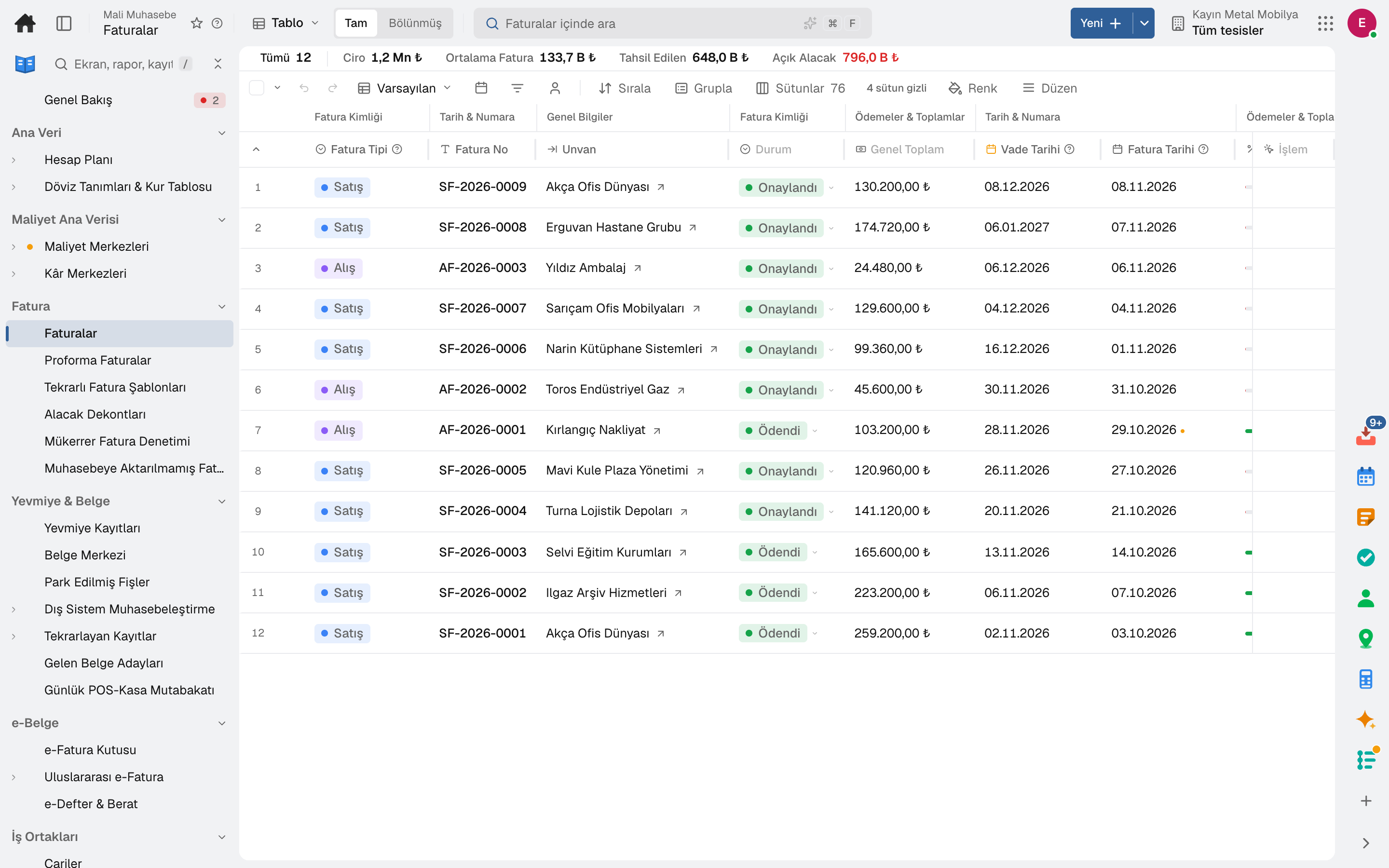
Invoices
Screen in the product
  • Invoices

What is it, and why do you need it?

What is Lidyos Accounting for?

In most businesses, accounting hears about the work days after it happens: the delivery note goes to the invoice, the invoice to Excel, and Excel to the accounting program. Every hand-off means both delay and error, which is why month-end close takes weeks.

Lidyos Accounting isn't a separate program; it is the ledger of every module. It posts invoices, bank movements, POS collections and payroll entries itself; the accountant reviews, reconciles and manages the close. Cash, receivables and profitability are visible without waiting for month end.

Scope: Runs invoices, business partners, banks, period close and financial reporting, together with cost centre, profit centre and product costing (management accounting).

Highlights

What can you do with Lidyos Accounting?

01

From e-invoicing to the statutory books

EN 16931 e-invoices are issued as UBL or CII, and incoming XML is read. In Türkiye the e-Fatura and e-Arşiv inbox, e-Müstahsil receipts and e-Adisyon run from the platform in line with GİB; e-Defter and its certificate are generated and signed on the platform, and you upload them to GİB.

02

Business partner and collection tracking

Open items, collection tracking, customer risk and credit limits, doubtful receivables (VUK 322-324) and payment proposals on the same business partner card.

03

Bank and cash reconciliation

Bank accounts, cash desks, corporate credit cards, POS settlements and the cheque and note portfolio; bank reconciliation matches movements with records.

04

Taxes and returns

VAT, advance tax, corporate tax and withholding returns, VAT withholding and withholding tax; the tax calendar shows deadlines in advance.

05

Period close

FX revaluation, accruals, depreciation runs, intercompany reconciliation, period locks and consolidation run with a closing task list.

06

Management accounting

Cost and profit centres, budget planning, distribution cycles, product costing and the profitability cube; no separate cost accounting program needed.

07

European e-invoice formats

An invoice issued to a customer abroad is generated to the European e-invoice standard (Peppol BIS, XRechnung, Factur-X/ZUGFeRD) and checked against the rules; XML received from a supplier is read and passed to the e-invoice inbox.

08

Duplicate invoice check

Purchase invoices are scanned for signals such as the same invoice number, near duplicates, the same order and round amounts; a finding does not block the invoice, the decision is the user's.

09

Collections tracking

Expected collections and upcoming due dates on one screen; staged payment reminders and due-date reminder e-mails are produced by the rule of the dunning procedure.
Process

Lidyos Accounting from start to finish

The menu flows in this order; each step's sub-modules are below.

  1. 01Documents & e-Documentsinvoice · journal · receipt · e-Fatura · e-Defter
  2. 02Business PartnersFI-AP/AR · collections · payments · open items · credit
  3. 03Bank & CashFI-BL · cards · POS · instruments · reconciliation
  4. 04Fixed AssetsFI-AA · depreciation · leasing
  5. 05TaxFI-TX · VAT · withholding · returns
  6. 06Period Closingaccruals · valuation · OB52 · consolidation
  7. 07Management AccountingCO · cost centres · profit centres · internal orders · product costing
  8. 08Financial Statements & Reportsreport studio · profitability · audit log
  9. 09Master Data & SettingsFI

Sub-modules

Lidyos Accounting: 13 sub-modules

This list is generated from the product itself; it grows as new functions are added to a sub-module. Master data and settings are the shared ground of every module and are not counted as sub-modules.

Invoice

  • InvoicesCreates purchase and sales invoices with their line items; tracks due date, payment status and the approval flow. An invoice PDF or photo can be read with AI and transferred to the form (+ New › Fill from document).
  • Proforma InvoicesIssues pro forma invoices to customers from sales quotations (closed when the quotation becomes an order) and keeps vendor pro formas, turning them into a purchase invoice in a single step.
  • Subscription InvoicesHolds the template for periodic invoices such as subscriptions, maintenance and services; running the template produces the actual invoice for the period. Rent invoices are not issued from here but from the accrual run of the lease contract: Real Estate › Rent Accruals for property you let out, Financial Accounting › Leased Assets › Rent Accruals for property you rent.
  • Progress InvoiceIssues a partial (progress) invoice for contracting jobs based on the progress-payment percentage.
  • Credit MemoIssues a credit memo to a customer for a price difference with no goods returned; goods returns go through Customer Return (RMA).
  • Suspicious / Duplicate InvoiceScans purchase invoices with 6 deterministic signals (same invoice no., near duplicate, same order, below approval threshold, round amount, outside working hours); a finding does not block the invoice, the decision belongs to the user and is preserved on rescan.
  • GL CompletionLists invoices that have been approved but have no journal accrual posted and posts the selected ones to the ledger with one click; even if the operation is repeated, no duplicate entry is created.

Journal & Documents

  • New TransactionManually creates a new journal entry/accounting transaction (record).
  • Document CentreSearches, filters and opens all accounting documents (invoice, voucher, journal entry) on a single screen; cancels a wrong document with a reversal (storno).
  • Parked EntriesApproval queue of manual entries entered with a document type that requires approval: the entry is not posted until approved; a rejected entry is corrected and sent again.
  • Accounting CenterTurns movements sent by external systems (e-commerce · marketplaces · subscription billing · reservations) into journal entries by rules: a movement arrives via API or Excel and is recorded once by source + external number; the rule sets the debit · credit · VAT accounts, the business partner and the dimensions by type and attribute; a run posts one document per day, you can drill from the document to the movement, and a run is undone with a reversal.
  • Incoming Document CandidatesQueues PDF invoices that arrive by email at the company's invoice address or a linked mailbox, using AI reading; once the business partner is selected and approved, it creates a draft purchase invoice.
  • Daily Cash ReconciliationCompares the branch's end-of-day POS sales with the counted cash; records the difference, the amount deposited to the bank and the escalation status.

e-Documents

  • e-Invoice BoxManages incoming and outgoing e-Invoice/e-Archive documents via the e-invoice integrator.
  • International e-InvoicingProduces sales invoices issued to customers abroad in the European e-invoicing standard (EN 16931: Peppol BIS 3, XRechnung, Factur-X/ZUGFeRD), checks them against the rules and sends them through a Peppol access point, by email or by uploading to the portal; reads XML received from a supplier and transfers it to the e-Fatura inbox.
  • e-Ledger & Berat (GİB)Generates the monthly journal and general ledger books as XML in the Revenue Administration (GİB) format and signs them with an e-ledger certificate.
  • e-Producer ReceiptIssues an e-Producer receipt for purchases from producers (farmers).
  • e-Check (POS)Creates an electronic restaurant bill document from POS sales.

Business Partners

  • Business PartnerKeeps suppliers, customers and employees in a single business partner record; manages balance, contact and bank information.
  • Trade NetworkConnects you with suppliers and customers who use the same product, with consent on both sides: invitation code and email, accept or reject, suspend, end and test the connection. An approved purchase order you send to a connected supplier lands in their «Incoming Orders» box; their acceptance or rejection comes back to your order as a confirmation. The other company doesn't see your records; it sees only the document you send, your company name and your tax number. Every step of the connection is kept in an unchangeable trail on both sides.
  • Collection TrackingTracks expected collections from customers and upcoming due dates; the generated tiered payment dunning notices (letter, formal notice) and due date/collection reminder e-mails are in sections of the same screen. The dunning run is an action of the list; the level rule is in Definitions › Dunning Procedures.
  • Deduction ManagementDetects short-payment differences when a retail chain/dealer pays an invoice incompletely; matches legitimate promotion deductions with claims/turnover bonuses and hands the disputed amount over to collection.
  • Open ItemsLists the not-yet-cleared debit and credit items of business partner accounts; the collection and payment entries that clear these items in due date order (FIFO) are in sections of the same screen.
  • Customer CreditKeeps customer credit limits; tracks risky customers, blocks and GM/Board limit changes on the same screen. Control areas are in Definitions.
  • Doubtful Receivables (VUK 322-324)Accounts for doubtful receivables as provision/worthless/collected, and manages the business partner's financial status (concordat/bankruptcy) and offsetting/interest accrual.
  • Payment ProposalCreates an automatic payment proposal for payables that are due.
  • Down PaymentSingle ledger for supplier and customer advances: request, payment (accounting + bank transaction), offsetting against an invoice or unlinked, and reversal.

Bank & Cash

  • Bank ReconciliationReconciles the bank statement with ledger, invoice, loan and cheque transactions on the matching desk; suggestions, differences and undo are on the desk. Statement import and recently processed bank transactions are sections of the same screen.
  • Bank AccountsDefines bank accounts; manages IBAN, GL account code, balance, and authorized signatories — cash desks are a separate screen.
  • Bank ConnectivityDirect connection with the bank: Test Bank, SFTP (host-to-host), bank API (Berlin Group) and EBICS channels; statements, intraday balances and payment status reports arrive automatically, and a payment file goes to the bank in one click; every file stays traceable in the communication log.
  • Company Credit CardsManages corporate credit cards and their limits; card requests, transaction disputes, the period statement (debt), and card spending/payment movements are sections of the same screen.
  • Cash DesksManages cash desks and their balances; cash desk movements, which post cash receipts and payments in the daily cash book and reflect the balance in accounting, are a section of the same screen.
  • POS TerminalsDefines POS devices and linked bank accounts.
  • Cheque BooksManages cheque books and cheque number ranges.
  • Cheques & NotesTracks received and issued cheques/promissory notes in the portfolio, runs due-date transactions; analyzes the portfolio by due date, bank and risk.
  • POS Collections & SettlementRecords POS terminal collections and transfers them to the bank account on the value date.

Fixed Assets

  • Fixed AssetsRecords fixed assets, calculates their depreciation and keeps the asset register; the movement schedule showing annual acquisitions, depreciation and disposals as a matrix table, impairment provisions, asset transfer and investments in progress are sections of the same screen; the asset's legal, tax and IFRS valuation areas (parallel values · area depreciation) are in the asset detail.
  • Leased AssetsLease contracts for the stores, offices, warehouses, vehicles and equipment you rent: lease terms, escalation (CPI · fixed %), withholding tax and VAT, stamp duty; the rent for the period is posted to the ledger in Rent Accruals, and the lessor's invoice is closed in Invoice Matching. A lease taken onto the balance sheet is measured from the IFRS 16 Valuation on the lease contract card (initial recognition · monthly unwinding · FX revaluation · maturity classification · termination on early exit).

Tax

  • VAT ReturnCompiles the period VAT in the official return format and prepares the amount payable or carried forward.
  • Advance Corporate Tax ReturnCalculates the taxable profit from the quarterly commercial profit and derives the provisional tax payable after offsetting prior quarters.
  • Corporate Tax ReturnDeducts provisional tax and withholding offsets from the tax calculated on annual taxable profit and determines the amount payable or refundable.
  • Tax CalendarTracks tax return and tax payment due dates as a calendar/list; keeps the amount, declaration and accounting account per line item, posts the payment to the ledger with a Z56 journal entry and reconciles the VAT line item with the ledger.
  • Debt Restructuring (7440/7326)Splits tax/Social Security (SGK) debt restructured under an amnesty law into installments; generates the recognition, installment payment and default journal entries.
  • Tax Base IncreaseRecords an increase of a prior year's tax base under an amnesty law: the tax and stamp duty payable are accrued as non-deductible expenses (KKEG) (Z58) and can be reversed with a reversal entry if needed; the year's KKEG total is summarised for the tax return attachment.
  • WithholdingCalculates and tracks income and corporate tax withholding deducted from payments.
  • Withholding Tax ReturnSummarizes withheld taxes periodically in the withholding tax return format.
  • Reverse Charge VATCalculates the portion of VAT declared by the buyer in purchases subject to VAT withholding.

Accruals & Valuation

  • Inventory ImpairmentSets aside an impairment provision for stock line items whose market value falls below cost.
  • Revenue Recognition (IFRS 15)Holds the revenue contract for multi-element sales (licence + installation + support, subscriptions, bundles): performance obligations, price allocation by standalone selling price, recognition at a point in time or over time; each period's journal entry moves amounts from deferred revenue/contract asset to revenue (IFRS 15 / TFRS 15).
  • Expected Credit Loss (IFRS 9)Calculates the IFRS 9 expected credit loss allowance for trade receivables with a provision matrix: open sales invoices are put into overdue buckets, the bucket rate (with a forward-looking adjustment) is applied and the difference from the previous allowance is posted to the journal (increase 654/129, decrease 129/644). Doubtful receivables for tax purposes (VUK 323) are on a separate screen.
  • Period-End ReclassificationPeriod-end reclassification runs: receivables/payables short-term/long-term, bank loans 400→303, negative bank balances 102→300, prepaid expenses/income 280→180 and the GR/IR clearing account. The 436→336 classification of the lease liability is at month-end under IFRS 16 (Leased Assets › Rent Accruals).
  • FX RevaluationRevalues open items in foreign currency at the period-end rate (UNREALIZED exchange rate difference); bank loan principal is valued in Bank Loan Reports › Foreign Currency Valuation, and realized exchange rate differences are in the Treasury screen.
  • Exchange Rate Difference EntriesLists the REALISED foreign exchange gain/loss entries on foreign-currency invoice payments (read-only); the unrealised period-end revaluation is on the adjacent Period-End FX Revaluation screen.
  • Inflation Adjustment (VUK 298)Revalues fixed assets and accumulated depreciation with the domestic producer price index (Yİ-ÜFE) coefficient and posts the difference to inflation adjustment profit or loss.
  • Goods Receipt / Invoice ReconciliationReports open GR/IR differences between goods receipt and invoice; shows aging buckets by supplier (0-30 · 31-60 · 61-90 · 91+ days) and offsetting documents on the same screen.

Period Closing

  • IntercompanyMatches and offsets the open invoices that group companies have issued to each other; compares the account balance of the two companies against each other per account group and shows the entries that explain the difference and have no counterpart in the other ledger.
  • Closing ChecklistRuns the monthly period close step by step: trial balance check, accruals, FX revaluation, checklist and lock; a company administrator reopens a closed period with a reason; once its e-ledger certificate is uploaded, only a platform administrator can.
  • Opening BalancesLoads opening balances for business partners, cash (bank · cash desk · card), stock, cheques and the remaining balance sheet accounts from a file, foreign-currency partners and accounts included, and in a mid-year transition also the income statement accounts with their amounts accumulated since the start of the year: the preview shows the voucher lines, the balance and skipped records; the opening voucher is posted against the 199 balancing account, and the opening is complete once 199 reaches zero; undone with a Z99 reversal.
  • Period-End RunsPeriod-end runs: cash (cash desk/bank) balance carry-forward, bulk depreciation and year-end profit/loss transfer (690 → 590/591 → 570/580).
  • Shadow PeriodWhile the old system runs in parallel during migration, loads the old system's trial balance at each month end and compares it with ours account by account; differences above tolerance become a task for accounting, and the task closes itself when the difference is cleared. Does not touch the ledger.
  • Posting Period LocksPosting period locks: in the company × ledger × module × month cell, OPEN / SOFT / CLOSED / ARCHIVE; enforced by the voucher's account type (fixed asset, customer, vendor, stock, bank, tax).
  • Data ArchivingData archiving: reports the annual journal entry volume and period closing status; treats closed years past the waiting period as archive candidates and downloads the year's ledger copy as CSV.
  • ConsolidationConsolidates group companies: calculates equity method, translation difference, goodwill and intercompany elimination entries and posts them to a separate consolidation ledger; consolidation groups (parent company, upper group, currency) and member companies (ownership percentage, method, membership period) are sections of the same screen.
  • Account CertificationHas the balance sheet account balance explained with reconciling items; certifies it with preparer/approver segregation and risk level.
  • CO Period LockOpens or locks plan and actual record entry for the cost accounting period.

Planning & Budget

  • Cost Center PlanEnters the annual plan by cost center × expense type with 12 period columns; versioning, copying, publishing and plan/actual variance are fed from here. Plan versions, rolling forecast & scenario comparison and the cost center plan/actual report are sections of the same screen.
  • Budget Roll-UpDistributes budget entry tasks to cost center owners; tracks who has entered, who is late and the approval status.
  • Driver-Based PlanningDerives a plan with a formula from drivers (number of branches, average turnover); resolves the dependency order and writes the result to the plan.
  • Internal OrderCreates internal orders to collect event and investment costs; the periodic budget and usage of the orders, the transfer of costs to target objects, plan/actual comparison and order types are in sections of the same screen.

Cost Allocation

  • Distribution CyclesDistributes expenses to cost centers at defined rates, or assesses them to targets using an assessment cost element; the last run result of the executed cycles is in a section of the same screen.
  • Activity TransferPosts activity consumption between cost centers as actuals.
  • Cost RepostingMoves the cost of a posted journal entry row to another cost center.

Product Costing

  • Cost EstimateCalculates the standard cost of a product from the recipe and routing.
  • Activity RateDefines the planned hourly rate for a work center and activity type.
  • Period-End ClosingManages period-end WIP, variance, and order settlement posting runs; the WIP report for open orders and the variance analysis for completed orders are in sections of the same screen.
  • Material LedgerPeriod-end actual costing run: revalues closing stock from standard to actual cost.

Financial Statements & Reports

  • Report StudioOne screen for ready-made financial reports: trial balance, balance sheet, income statement, ratio, cash and tax review reports run with parameters; the Trial Balance & P&L section shows the leading ledger's trial balance and the P&L summary. Designing your own report is in Analytics › Report Catalogue (Report Designer).
  • Profitability CubeQueries the contribution margin (CM1/CM2/CM3) cube by dimension; revenue is fed automatically from POS.
  • Record Change LogShows, at field level, who changed which record and when (tables tracked by database triggers; clicking a row opens the record's timeline). The complete business history of a record is in the Change History in the record's details; it is separate from GRC Internal Audits.

Master Data

  • Chart of AccountsDefines and manages the accounting (GL) accounts in the uniform chart of accounts; chart of accounts definitions (TDHP · IFRS · country chart) and country chart mappings are kept in sections of the same screen.
  • Currency Master & Rate TableDefines and updates currencies, exchange rate types and the daily exchange rate table; it is the source of the period-end valuation rule.

Cost Master Data

  • Cost ElementDefines expense and revenue cost elements; cost element groups, which group cost elements for reporting, are in a section of the same screen.
  • Statistical Key FiguresDefines the statistical key figures used as the basis in allocations; the monthly actual values of the key figures are entered in a section of the same screen.
  • Controlling AreaDefines the controlling area in which cost accounting is performed and the assigned companies.
  • Cost CentresDefines the cost centers where expenses are collected and links them to the hierarchy; cost center groups, which group the centers in a tree hierarchy for reporting, are a section of the same screen.
  • Profit CentresDefines the profit centers where revenue and expense are tracked on a profitability basis; profit center groups, which hierarchically group the centers for reporting, and the actual revenue-expense result of profit centers are sections of the same screen.
  • Activity TypeDefines the activities a cost center provides (machine hours, labor hours); the unit price is entered under Activity Rate.

Setup master data and settings

  • Tax Business PlacesDefines business locations (point of sale, warehouse, production plant) with branch tax/SGK/e-Document identities and title deed/property links.
  • CompaniesDefines and manages group companies (company codes); trading partners that represent the counterparty in intercompany transactions are on a tab of the same screen.
  • Validation & Substitution RulesManages the rules that validate a journal entry before it is saved; substitution rules that fill fields automatically are in Dimension Rules.
  • Document SplittingAutomatically splits journal documents by profit center or segment to produce balanced entries.
  • Default Account AssignmentAutomatically assigns the default cost or profit center based on expense type.
  • TagsDefines central tags and their scopes for freely grouping business partner, bank/cash account and employee records.
  • GL Account DeterminationDetermines which transaction posts to which account of the uniform chart of accounts; allows company-level customization.
  • Document Master + Number RangeDefines document types and automatic document number ranges.
  • Dimension RulesDefines smart rules that automatically fill in other dimensions based on the value of one dimension.
  • Invoice Document TemplatesDefines invoice document templates (HTML + placeholders) and fills them with a selected invoice to preview the output.
  • Tax CodeDefines VAT and withholding tax codes with their rate, account and validity date.
  • Invoice Discount RulesDefines invoice discount rules (percentage/fixed, restricted by business partner and amount) and applies the suitable rule to a selected invoice.
  • Payment TermsDefines payment terms that include a due date and an early payment discount.
  • BP GroupDefines business partner groups (supplier / customer / employee) and the default reconciliation account, payment term, dunning and VAT behavior tied to the group.
  • Payment MethodDefines payment methods such as bank transfer and cheque and bank rules.
  • Dunning ProceduresDefines which dunning level an overdue receivable gets at which delay, the interest rate and the payment/order block; the run is in Collection Tracking.
  • Credit Control AreasDefines credit control areas (organizational unit) and each area's default limit, risk class, warning/block thresholds and default payment term.
  • Tolerance LimitsSets the difference limits accepted when matching payments and invoices.
  • Bank Reporting SegmentsDivides banks into segments for use in cash management reports (cash position) — groups banks, not accounts.
  • Assignment TemplateDefines ready-made allocation templates that split an expense across a cost center, profit center and project at fixed percentages; applied to an invoice line item with one click.
  • Budget Control SettingsBudget object with warning and blocking thresholds per account; purchase requests and orders, service entries, expense receipts, maintenance orders and expense records without an order are checked against these thresholds at the moment of spending. Run Budget Check shows the same decision without writing a record.
  • Settlement SettingsCost transfer (settlement) settings for internal orders and projects: defines on a single screen how cost elements are mapped to the target account during transfer (allocation structure) and the transfer rules (settlement profile).
  • CO Master Data ValidityManages the validity periods and active time slice of cost master data such as cost and profit centers.
  • Status ProfileDefines the status profiles and status sequences of orders and documents.
  • Fixed Asset SettingsClassifies fixed assets by common depreciation and account rules; depreciation keys, which define the depreciation method and rate as a key, and parallel depreciation areas such as legal, tax and IFRS are sections of the same screen.

Frequently asked

About Lidyos Accounting

Can we use our own chart of accounts?

Yes. The chart of accounts, document types, number ranges and account determination rules are set from definitions; opening balances are imported with an Excel template.

We have several companies; can we get a consolidated statement?

Each company's ledger is kept separately. The intercompany reconciliation and consolidation screens produce the group statements.

Can our external accountant sign in?

Yes. Your accountant signs in as an external user and sees only the screens you authorise; external users are not counted towards the fee.

Close next month end without a reconciliation marathon.

Try it free for 15 days; no credit card needed. We reply to your questions within one business day.