Skip to content
Lidyos
Sales & Marketing

Lidyos SalesSales and customer management software

One customer record from opportunity to invoice.

The sales process moves in one record, from customer, opportunity and quotation to order, and from delivery to invoice. Price and discount conditions, dealer orders, promotions, loyalty and sales targets are in the same app.

  • 16 sub-modules
  • 24 modules at the same price

Industry packages: Lidyos Auto · Lidyos Farm · Lidyos Fashion · Lidyos Fitness · Lidyos Rental · Lidyos Retail · Lidyos Service · Lidyos Trade

Industries: Machinery, metal and automotive suppliers · Textiles and apparel · Food and beverage · Agriculture and livestock · Retail and store chains · E-commerce and omnichannel sales · Wholesale and distribution · Dealer and franchise networks · Services and project businesses · Real estate and property management · Gyms and studios · Vehicle and equipment rental

Roles: Sales representative · Marketing specialist · Shipping planner and driver · Real estate agent · Club manager and trainer · Agronomist · Field service technician
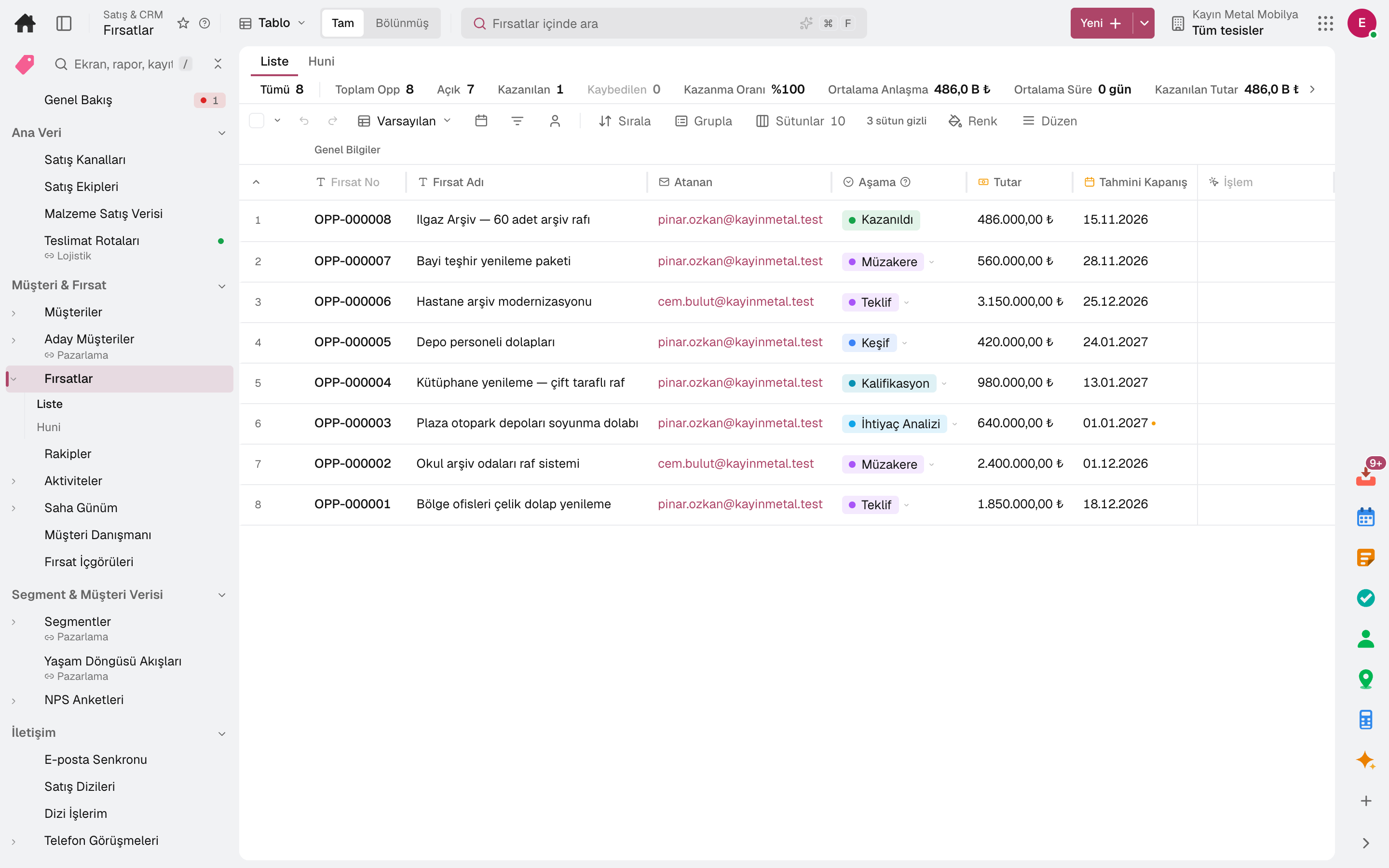
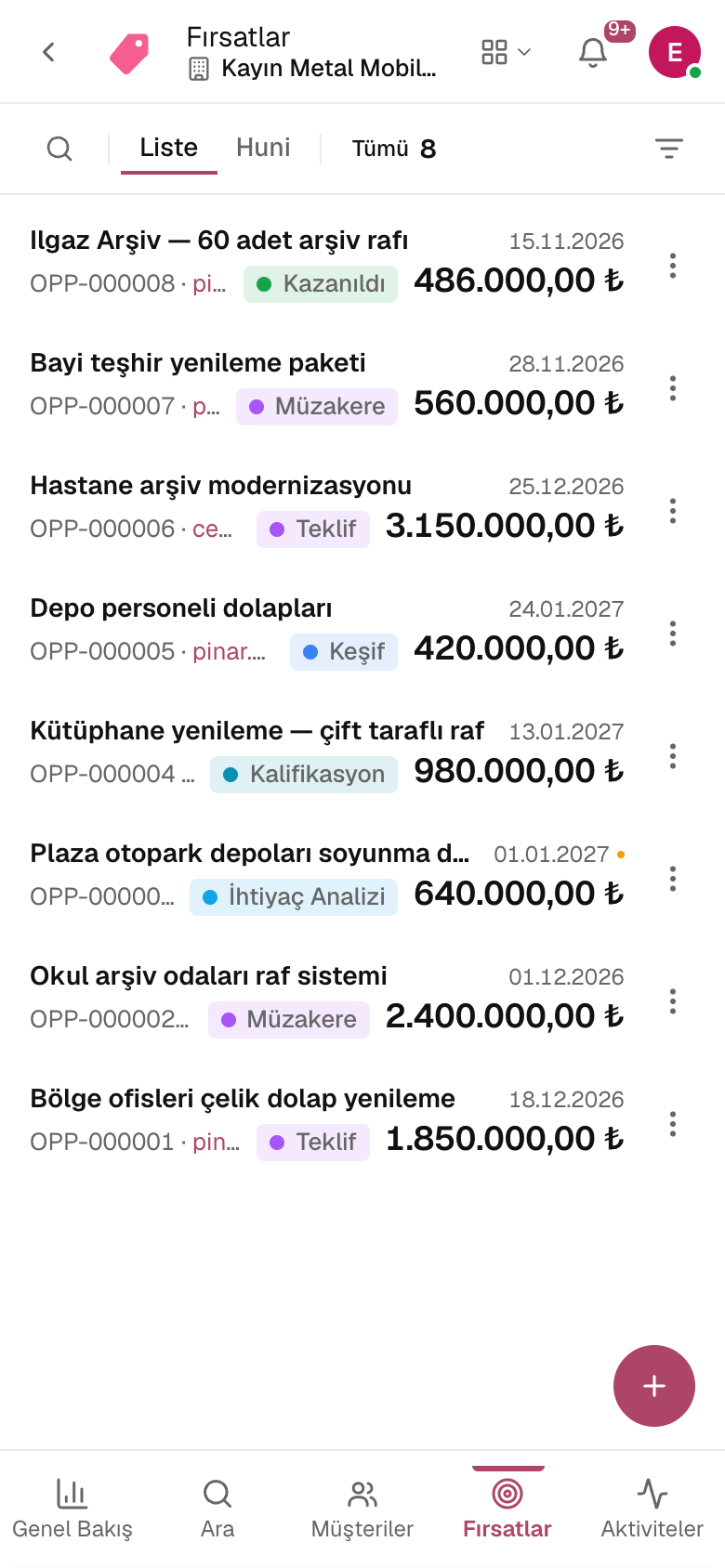
Opportunity 360
Opportunity 360
Screen in the product
  • Opportunity 360

What is it, and why do you need it?

What is Lidyos Sales for?

When the sales team works in a CRM, orders live in the accounting program and the price list in Excel, nobody has the real picture of the customer: which quotation is open, which order is late, which customer is over their limit?

With Lidyos Sales, the customer 360 view shows opportunities, quotations, orders, invoices and support tickets together. Price and discount conditions are applied to the order automatically; stock availability is checked at the moment of ordering.

Scope: Runs sales and customer relationship processes from customers, opportunities, quotations and service to wholesale orders, pricing, delivery and invoicing; and equipment, vehicle and material rental (pick-up, return, late fees, deposits, availability calendar).

Highlights

What can you do with Lidyos Sales?

01

Customer and opportunity 360

Customer, lead and opportunity 360 views; activities, NPS surveys and a single customer identity with personal data consents.

02

Quotations and orders

Sales quotations, quantity contracts, scheduling agreements and sales orders; ATP checks and delivery planning.

03

Pricing and discounts

Price and discount condition records, bulk price revisions, price waterfall and pocket margin, exchange-rate escalation and expiry-date markdowns.

04

Dealer and wholesale sales

Wholesale customers and dealer price lists; a dealer order becomes a sales order directly, and customer volume rebate agreements are in the same place.

05

Promotions and loyalty

Discount engine, basket analysis, competitor price intelligence, loyalty programme and gift cards; segment and lifecycle journeys.

06

Service and support

Support tickets, web chat, customer complaints, service contracts, repairs, warranty and return requests.

07

Wholesale orders

Dealer and wholesale customer orders land in one list from the customer portal, from a link the rep opens on the customer's behalf, or from the screen; where the order came from shows in the source column.

08

Sales room

A page shared with the customer for an opportunity: the customer enters by link, opens the content and completes the steps of the mutual action plan; every move is notified to the rep.

09

Field sales

The day's visit stops on the rep's phone; at each stop the customer's open and overdue invoices and last order are shown, and an order is entered on the customer's behalf.

Process

Lidyos Sales from start to finish

The menu flows in this order; each step's sub-modules are below.

  1. 01Master Data & SettingsSD organisation · code definitions · condition types · templates
  2. 02Customercustomer & opportunity · segment · contact · customer service
  3. 03Proposalpre-sales inquiry · quotation · quotation template
  4. 04Order & DeliveryVA01 · dealer and branch portal
  5. 05Pricing & Promotions
  6. 06Billing & RebatesVF01 · advance · commission
  7. 07After-Sales Serviceinstalled base · service contract · warranty/returns · spare parts
  8. 08Targets & Analyticsquota · forecast · basket · sales information system
  9. 09Rentalorder · availability calendar · rental product · price & channel · reports
  10. 10Car Dealershipvehicle stock · expenses · buy-sell

Sub-modules

Lidyos Sales: 16 sub-modules

This list is generated from the product itself; it grows as new functions are added to a sub-module. Master data and settings are the shared ground of every module and are not counted as sub-modules.

Customers & Opportunities

  • ClientsThe single customer list: business partners with the customer role plus prospects and partners with a CRM profile; a row opens the customer's page (finance, sales documents, CRM profile, contacts, opportunities).
  • Lead 360Tracks lead information and the conversion process on a single screen.
  • Opportunity 360Manages sales opportunities by stage, amount and closing probability; in the funnel view an opportunity moves between stages and is won or lost.
  • CompetitorsThe single record of competitor companies: threat level, strengths and weaknesses; the opportunities they entered and the outcome, price observations, monitored social media accounts, and our staff and candidates who have worked at the competitor. In a price observation, an opportunity and work experience, the competitor is chosen from this list.
  • Activity 360Tracks conversations, calls, and meetings held with the customer.
  • Field DayThe field rep's day on the phone: today's visit plan stops in order, and at each stop the customer's open and overdue invoices, last order, churn risk and items they stopped buying; order on behalf of the customer, start/finish the visit, note and follow-up date (reminder), unplanned visit.
  • ClientelingThe store sales associate's clienteling book: whom to contact today and why (follow-up day, birthday, about to lapse, due to return, new customer), the customer's shopping rhythm, product suggestions and sales that follow a contact.
  • Split SalesRevenue share per person in the sales team: share of open opportunities closing this quarter (raw and weighted by probability), share won this quarter and this year, and overlay credit. An opportunity without defined splits is credited 100% to its owner; the team and splits come from the team and revenue split section of the opportunity record.
  • Opportunity InsightsRanks open opportunities from the riskiest: win probability, the strongest signal, last contact and days in stage. The score is rule-based and explainable: every signal from activities, emails, calls, deal rooms, competitors and stage history shows its contribution to the score and the suggested next step; thresholds are company settings.
  • Deal RoomsDeal rooms shared with the customer for an opportunity, and the customer's engagement: last customer activity, unique visitors, progress of the mutual action plan and overdue steps. A room is set up from the opportunity record; the customer enters with a link, opens content, completes steps and writes messages, and every action is notified to the rep.
  • Deal Room TasksThe shared action plan steps of all open sales rooms in a single list: with room, opportunity, stage, party, owner, due date, subtask progress and comment count. Overdue ones, those due within 7 days and those waiting on the customer are in the top strip; our step is completed from the row, and the "Assigned to Me" filter shows only your own tasks.
  • Partner Deal RegistrationsCustomers registered by business partners: the partner enters the customer and their need from the partner portal, and at registration the customer account, open opportunities, leads and conflicts with another partner's registration are searched. An approved registration becomes an opportunity and enters the protection period, during which another partner's registration of the same customer is not approved; the partner sees the reason for a rejected registration. The partner follows the stage of approved opportunities in their portal.

Segments & Customer Data

  • SegmentsDivides the CRM universe (contact · account · lead) into RULE-based dynamic segments and measures segment overlap; in the Customer Value (RFM) section, divides customers into 11 segments by recency-frequency-turnover score and sets the quintile thresholds.
  • Lifecycle FlowsManages lifecycle flows such as win-back and after-sales; configures record distribution and the trigger threshold.
  • Customer Identity & ConsentUnifies scattered customer data under a single identity and manages Personal Data Protection Law (KVKK) consents.
  • NPS SurveysRuns customer satisfaction (NPS) surveys; closes the follow-up of customers who give low scores in a closed loop.

Communication

  • Email SyncConnects the salesperson's mailbox read-only: incoming and sent messages are read every ten minutes, and a message whose other party is a contact, lead or account in the CRM becomes an activity linked to the open opportunity. Nothing is written to the mailbox; the connection is tested before saving and the password is stored encrypted.
  • Sales CadencesBuilds a step-by-step outreach plan for leads and contacts: automatic or manual email, call, LinkedIn and task steps, with days between steps. A cadence is prepared as a draft and takes enrolments once activated; selecting a row shows the enrolments, the step each one is on and why they left the cadence.
  • Cadence Work QueueManual steps that sales cadences assign to the rep: calls, LinkedIn, tasks and manual emails, due ones first. The outcome of a completed step is written to the activity, and an email step opens its template filled in for the recipient; pending tasks drop off on their own when the recipient replies or a meeting takes place.
  • CallsInbound and outbound PBX calls, calls started from CRM and logged manually: who, when, duration, outcome, note, tags and linked record. Calls with a recording or transcript are analyzed by AI; missed calls gather in Callbacks, the team's live status and ongoing calls can be monitored on the Live Board, and volume and answer rate are in Analytics.

Customer Service

  • ConversationsLive chat on your website, WhatsApp and social media messages in one inbox: when a visitor asks for an agent, the chat goes to an online, available agent (or waits in the queue if nobody is free); take over, reply, transfer, end or turn it into a ticket.
  • Ticket ListHandles raised support requests by channel, status, and priority: assignment, comments, attachments, and SLA tracking. A customer COMPLAINT is a separate ledger (it has its own categories, severity-based SLA, and food safety escalation) — to move a request there, use “Transfer to Complaint Ledger” in the row's Actions menu. The strip at the top of the list summarizes the total, open, urgent, and SLA breach counts.
  • Knowledge BaseThe support team's solution articles: written as drafts and versioned when published. A published article is suggested on a support ticket based on its text, added to the reply and linked to the ticket; public articles can be searched in the company's help centre, where readers vote on whether they helped.
  • Community ForumCustomer community: questions are asked, ideas suggested and members answer each other in the help centre. The team manages the moderation queue and reports, writes official answers, accepts answers, and turns a topic into a ticket or an article.
  • ComplaintsRuns the SERVICE side of a complaint from a customer: category, severity, SLA target, compensation and satisfaction; escalates to a food safety incident and traces the batch backward. A technical/invoice/order question is NOT a complaint — that is the Support Tickets screen; a ticket from there is transferred here with the Actions menu. The product's quality investigation (CAPA, retained sample) is the Consumer Complaints screen in the Quality module — the three are separate processes.
  • Support Workforce PlanningWorkforce plan for the support team: day × hour volume forecast from past weeks, agents needed per hour, the shift plan (manual · copy · automatic) and adherence comparing plan with availability.
  • Conversation QualityConversation quality: scoring tickets and chats with a scorecard, sampling per agent, disputes and a quality dashboard (agent · category · weekly trend).
  • Web ChatLists website chatbot conversations; shows the transcript and the unanswered question (knowledge base gap) report; defines the bot's keyword-triggered automatic reply rules in a section of the same screen.

Proposal

  • Pre-Sales InquiriesManages customer pre-sales requests and related activities.
  • Sales QuotationsPrepares sales quotations for customers and tracks their conversion to orders.

Order & Contract

  • Sales OrdersLists sales orders; tracks status and the shipment process. Third-party orders shipped directly from the supplier to the customer are in a section of the same screen.
  • Sales Contracts (Quantity & Price Agreement)Manages sales contracts with quantity/amount commitments, call-off tracking, and the customer's price list link; the wholesale order price is resolved from here.
  • Scheduling AgreementsManages delivery schedule CONTRACTS (LZ) with customers that include an annual commitment + dated pull-offs; slot/route planning is a separate screen (Delivery Planning).
  • JIT/JIS CallsCollects call-offs from the customer's assembly line (JIT: time + quantity · JIS: vehicle sequence + vehicle number); they arrive automatically via EDI DELJIT or are opened manually. A call-off is taken into production, prepared and shipped with a sequence check (stock issue traced to the customer); missing sequence numbers and late call-offs are flagged.
  • Sales BOMDefines product sets offered together in sales (sales bill of materials).
  • Free GoodsDefines the rules for free goods given on certain purchases.

Delivery & Stock

  • Vendor Managed InventoryWe manage the stock in the customer's warehouse as the supplier: a min–max or days-of-stock target per material; as the customer's stock reports arrive (manually or via EDI), replenishment is suggested taking stock in transit into account, and if the agreement is automatic a sales order opens on its own.
  • ConsignmentOpens customer consignment documents (fill-up · sale · return · pick-up) and tracks their status; fill-up/consumption movements and offsetting are carried out from flow operations.
  • Direct Store DeliveryVan sales route: goods loaded onto the vehicle are sold to customers stop by stop (van selling) or orders are collected (pre-selling); on return, the remaining goods and waste are counted, reconciliation posts an invoice and stock issue per customer, and the driver's cash is compared with the expected amount.
  • Delivery SchedulingPlans shipping and delivery dates.
  • Picking StrategiesDefines rules that determine which stock is picked first in warehouse picking (FIFO/FEFO/SLED, minimum shelf life) by material group and plant; the picking itself is done in the warehouse wave. A rule here overrides the storage type's default picking strategy (Storage Bin Master Data › Storage Types); if no rule matches, the storage type applies, then the storage location's default, and FEFO if none is set.
  • ATP CheckChecks stock availability (ATP) for an order and provides a delivery date.

Dealer & Branch Portal

  • Wholesale OrdersCollects dealer and wholesale customer orders in a single list: an order from the customer portal, from a link the representative opens on behalf of the customer, from an order e-mail, from the external API or from the screen — where it came from is in the Source column. An order awaiting approval goes to the Approval Center; an approved order is taken into production from here, and its delivery and invoice follow the sales order's path. A branch's request for goods from the head office is in Branch Orders.
  • Branch OrdersOrders for goods the branches request from the head office (branch replenishment): the branch sends its cart from the storefront, the head office approves; if the branch is the head office's own facility, a stock transfer order opens automatically, and if needed it is taken into production item by item. Dealer and wholesale customer orders are in Wholesale Orders.
  • Portal AnnouncementsShort messages a wholesale customer sees in the customer portal before ordering: title, text, image and button. For all portal customers, a customer group or selected customers; with a publishing period and once or daily display. A removed announcement disappears from the portal immediately.

Pricing

  • Price ListsThe sales price list: dealer orders, sales orders, quotations and the customer portal take prices from here. It is built for the customer from the linked contract or from the customer's sales data; a customer without a link is priced from the valid general list. Tiered pricing is given with a minimum quantity; a list whose end date has passed is the pre-order catalog in the portal.
  • Price RecordsManages condition records for the direct sales channel's base sales price (PR00), the intercompany transfer price (PI01) and the retail/POS price (VKP0, VAT included — POS · QR menu · shelf label read from this record); a user with access to Branch Operations enters the POS price in Price & Stock › POS Price Records. Order in sales orders and quotations: the customer's contract list › customer-specific price record › general wholesale price list › general price record.
  • Discount Condition RecordsDefines tiered discount condition records by customer, material and category (can be narrowed by sales organization, distribution channel, plant and maximum quantity); applied in orders and quotations after the base price is found, its effect depends on the pricing procedure mode; does not enter the POS price (for POS see Promotions › POS Campaigns).
  • Markdown / Shelf-Life DiscountSets the discount rate of a product nearing its expiry date by the remaining days (material · category · plant); Stock › Markdown Suggestions takes the rate from this rule, and an approved suggestion is applied in orders and at the POS until the expiry date and only up to the quantity at risk of spoiling (the rest at list price).
  • Price Waterfall (Pocket Margin)Deducts all discounts from the list price and shows the pocket price and pocket margin by customer and product, and from the order item the negotiation difference against the list price.
  • Competitor Price IntelligenceRecords competitor and market prices by product and calculates our price index (us ÷ competitor): whether a product is expensive, cheap or competitive against the competition.
  • Price Revision (Bulk)Creates a bulk price change as a draft, submits it for approval, and applies it; apply = rollover (the old rule is closed, the new rule is opened, history is preserved). A simulation that shows the turnover and margin impact of the change on past sales volume before applying it is in a section of the same screen.
  • Rate Escalation ProposalsLists price escalation suggestions generated by a monthly scan when the exchange rate change exceeds the threshold in active foreign-currency contracts, and records the human decision (convert to revision / reject); the contract price does not change automatically.
  • Promotion (Discount Engine)Defines and applies sales promotion and discount rules: order promotions, the register's campaigns (including QR menu and kiosk) and single-use coupon codes; the combined calendar of sales and trade promotions and warnings about overlapping dates on the same target are a section of the same screen.

Loyalty

  • Loyalty ProgrammeManages loyalty card, points, rewards, and referral programs.
  • Gift CardsSells prepaid gift cards, tracks balance movements (load/spend/refund) in a ledger, and shows the total outstanding liability.

Billing & Rebates

  • Rebate Agreements (Customer)Defines and calculates customer turnover bonus agreements; settlement runs that periodically post accruals to a credit memo are in a section of the same screen.
  • Intercompany BillingRuns sales between group companies: intercompany order from delivery, internal and external invoice, reconciliation and offsetting; reports intragroup profit.
  • Billing PlanDefines the staged billing plan for a project or subscription.
  • Sales Rep CommissionDefines sales representative commission rules (flat, tiered, margin) and tracks their accruals.
  • Subscription Plans & BillingManages subscription plans, contracts, periodic billing and payment tracking in one place; invoices of contracts with an automatic payment mandate are charged to the payer's saved card automatically.
  • Down PaymentSingle ledger for supplier and customer advances: request, payment (accounting + bank transaction), offsetting against an invoice or unlinked, and reversal.

After-Sales Service

  • Service ContractsManages customer service and maintenance contracts by scope and duration.
  • Repair, Warranty & Return RequestsManages product repair, warranty, and return (RMA) requests; the return document is opened in Returns Management and the amount is reflected from there.
  • Spare Parts CatalogsShows the saleable parts of a product model with numbered markers on exploded-view drawings: parts come from the bill of materials (one drawing per assembly), with price and stock on the row; service teams and dealers pick a part from the drawing and turn it into a sales order, and the serial number finds the product's catalogue, its installed parts and the customer it is installed at.
  • Installed BaseRecords equipment placed at customers (coolers, cabinets, machines) with customer, point and address; installation/removal dates, loan/rental status and deposits are tracked here, and breakdown reports and service quotations are opened from this record.

Targets & Analytics

  • Sales TargetsSets the sales team and period targets.
  • Sales ForecastTwo forecasts on one screen. Collaborative Forecast: the period's sales forecast across the team tree — quota (Sales Targets), won, commit, best case, pipeline and forecast against quota; a manager adjusts the team's Commit and Best Case figures with a reason. Statistical Forecast: future months and a confidence band from the monthly revenue of won opportunities and quotes, by moving average or linear regression. The opening tab is the company's forecast method setting.
  • Sales ContestsDated sales contests and a leaderboard: the metric is amount won, opportunities won or opened, or activities completed; all teams or selected teams compete. Person and team rankings are calculated automatically from the work; if no target is entered, the quota in Sales Targets for the amount won becomes the target.
  • Basket AnalysisCalculates which products are sold together from checkout tickets and sales documents (orders · invoices without an order); shows what is most often bought with a product (cross-sell) and gives a "Frequently Bought Together" suggestion on orders and quotations.
  • Sales Information System (SIS)Reports on sales using the standard analyses of the Sales Information System (SIS).

Rental

  • Rental OrdersThe flow of a rental: reserved → Hand Over (parts · meter · fuel · deposit, driver requirement for vehicles) → on rent → Take Back (delay · damage · km difference are calculated) → invoice and deposit refund. The strip at the top counts rentals to be handed over, returning and overdue today; it opens another screen's pending work (notification · expense · missing item) by its count. On the record, the product's capacity in that period is checked — if it does not fit, it is not saved.
  • Rental CalendarAvailability calendar: one row per product, one bar per rental — planned pick-up–return and actual. The bar of an overdue rental extends to today.
  • Rental NotificationsReporting rented vehicles and the people using them to the authorities: rental started at pick-up, driver changed when the driver changes during the rental, vehicle returned at return — one row for each vehicle of a product with official reporting. In Türkiye the Police KABİS has no open web service: the details of a pending row are entered on the KABİS screen and marked Reported here; overdue rows stand out.
  • Vehicle ChargesToll passes (HGS/OGS) of rental vehicles, motorways and bridges, parking and traffic fines: the statement is imported from Excel or entered by hand, and matched automatically by plate and time to the order renting the vehicle at that moment. Charge to Renter adds an expense line to the order (with a service fee if configured) and invoices a returned rental; expenses outside a rental are borne by the company.
  • Rental ProductsWhat is rented, at what price and under which rule: the rental view of the material card. Tracking is by unit (serialized part: vehicle · generator), quantity (chair · tent) or service (additional driver · insurance · delivery); period price, preparation time, late fee, deposit. Vehicle fields (driver requirement · meter · fuel · damage sketch) appear only for unit-tracked products; rare settings are in the "Other" row of each section.
  • BundlesProducts rented together and their quantities — Wedding Package: 10 tables, 80 chairs, 10 covers. In an order, "Add Package" expands each product into its own line: stock, part and period price come from the product itself, and the package discount is applied to these lines. A package sold on the web is shown as a card on the reservation page; its available quantity is calculated from the tightest product. A vehicle cannot be part of a package.
  • Rental ReportsThe outcome of rentals: occupancy and revenue per product, intervals where capacity is exceeded, demand lost on the web page, agency commission and extensions. Each report is measured over its own period and can be exported.
  • EquipmentRecords maintenance equipment with its technical data.
  • Vehicle FleetRegisters and manages the vehicle fleet with license plate, type, and technical information.

Rental Pricing & Channels

  • Price RulesRules applied on top of the rental price: percentage difference by season and by selected days of the week, tiered discount for long rentals, minimum charged duration, counting the daily price by calendar day (evening pickup and morning return are not counted) and shortest / longest rental by season. A rule can be written for a product, a branch and a channel (office · web); the most specific rule applies.
  • Blocked PeriodsIntervals with no pickups or returns, such as holidays, New Year or stocktaking: a new reservation whose pickup or return falls in the interval is not accepted at the office or on the web page, and a rental spanning the interval is not affected. It can be written for a branch and a channel; closing only the pickup or only the return is also possible.
  • Online BookingThe company's public rental page — one per company, created automatically on first opening (not published). The customer chooses the branch, time and "Sold on Web" products and makes a reservation; the advance payment goes to the company's virtual POS, and the order arrives in Rental Orders through the web channel. At the top the page's status and demand for the last 30 days, below four settings sections.
  • Commission PartnersIntermediaries that bring rentals — tour operator, hotel or booking site: their account, the default commission rate on the rental amount (excl. VAT) and whether the customer pays the rent to the partner. When a partner is chosen on a rental, the rate comes from here; commissions are totalled in the Commission Report.

Car Dealership

  • Vehicle StockThe dealership's vehicles for sale: chassis, plate, mileage, damage record, purchase price and expenses charged to the vehicle. Cost is the sum of purchase and expenses; target profit is the sale price minus cost, and stock age is the days from purchase to today. A prepared vehicle is put on sale with its price and is reserved when a deposit is taken. A consignment vehicle belongs to its owner: the dealership sells it on their behalf, invoices only the brokerage fee and pays the owner the amount collected less the commission.
  • Vehicle LeadsProspective buyers from the dealer's showroom (information request, test drive, trade-in valuation, finance pre-application, deposit reservation) and by phone: person, vehicle of interest, consultant and first response time. A new lead notifies the sales team; status moves through In Contact · Appointment Set · Visited Showroom · Sold or Lost.
  • Vehicle AdsListings of vehicles for sale on listing sites and on your website: channel, listing number and address. When a vehicle is sold, returned to its owner or withdrawn from sale, the listing is marked for removal; in Türkiye the listing is given with the authorization certificate number and promotional card details.
  • Warranty ClaimsFaults reported on sold vehicles within the dealership warranty period: notification and delivery day, complaint, faulty part. The last day of repair is calculated in business days and flagged if exceeded; for a fault that is fixed, the days the vehicle could not be used are added to the warranty. The faulty vehicle delivery document is printed from here.

Master Data

  • Sales ChannelsManages sales channels and their targets.
  • Sales TeamsBuilds sales teams as a tree: parent team, manager, sales territory and members. Sales Forecast rolls up the representative's opportunities to the team and the team's to the parent team; a person belongs to one team at a time.
  • Sales TerritoriesBuilds sales territories as a tree and holds the assignment rules (province · district · country · sector · segment · account tier). "Assign by Rules" moves matching accounts to the territory (manual assignment is preserved); if automatic lead assignment is in "territory" mode, a new matching lead goes to the territory's owner.
  • Material Sales ViewDefines the sales view data of materials at the sales organization level.
  • Delivery RoutesDefines delivery routes in one place: facility, transport zones, trip days, transit time, order cut-off time, delivery window and cost. The delivery plan, van sales route, shipment, and the delivery calendar of the branch and customer portal read this route.

Setup master data and settings

  • Support SettingsHelp desk rules: the groups tickets land in and automatic assignment (round robin · by load · by skill), SLA policies setting first response and resolution targets, and macros applying a reply + ticket action in one click.
  • Mail Add-inInstalls the Outlook add-in and Gmail extension: the CRM card of the sender of the open message (account, open opportunity, support ticket, last activity) appears next to the e-mail; save to CRM, create lead and create task in one click.
  • PBX ExtensionsMatches users with PBX extensions: calls from the CRM start from the user's extension, and an incoming call is notified to the owner of the extension. The PBX connection is set up under Integrations.
  • PBX TrunksThe company's operator line and number: the switchboard connects to the line with the operator's SIP account, a call to the number rings the selected extensions all together or in sequence, and if no one answers, voicemail is taken or the call is transferred to another extension. The incoming call is recorded and the customer first hears the KVKK announcement; outgoing calls go out with this number. The line's connection status comes from the switchboard.
  • Deal Room TemplatesHolds the skeleton of a frequently built sales room: title and welcome (with customer, contact, opportunity, representative and company variables), the steps and due dates of the shared action plan, and content. In the opportunity's Sales Room section, "Build from Template" builds the room with this; "Save as Template" on a ready room adds a template here.
  • Pricing SettingsThe pricing engine's three settings on one screen: condition types (base price, discount, surcharge), the record search order of a condition type (access sequence — base price records are searched from the most specific key to the most general in this order) and the pricing procedure that sets which condition is calculated in which order. Only the live procedure in the company setting, in active mode, is applied to documents.
  • Material DeterminationDefines rules that automatically replace the material on an order item with a substitute material; a rule applies to all customers or to a single customer, with a validity period.
  • Listing & ExclusionDetermines which products can be sold to a customer: an excluded material or product category is rejected in that customer's quotation and order; if a valid listing applies to the customer, only the products on the list are sold. An exclusion can be for a single customer or all customers, a listing is linked to a customer; both come with a validity interval.
  • Category & Account DeterminationDefines sales line item/schedule line categories and the rules that determine the accounting account to which sales revenue is posted.
  • Sales Code DefinitionsDefines codes selected in sales documents, such as customer/material price group, account assignment group, VAT class, and block reasons.
  • Quotation Content LibraryKeeps the text, image and video blocks reused in quotations; blocks added to a quotation appear above or below the items on the customer's quotation page.
  • Quotation TemplatesKeeps the skeleton of a frequently given quotation: subject, terms, validity, items, content and acceptance settings; a quotation opened from the template comes prefilled with them.

Frequently asked

About Lidyos Sales

How are dealer and branch orders processed?

Dealer and wholesale customer orders are gathered in one list in Wholesale Orders, and an order awaiting approval lands in the Approval Centre; delivery and invoicing of an approved order follow the sales order route. A branch requesting goods from head office is a separate screen. The price comes from the wholesale price list.

Are promotions applied to orders automatically?

Yes. Promotion and discount conditions are defined with validity dates and calculated on the order automatically.

Are sales rep commissions calculated?

Sales rep commissions and customer rebate agreements are defined on their own screens and calculated from invoiced sales.

Close next month end without a reconciliation marathon.

Try it free for 15 days; no credit card needed. We reply to your questions within one business day.