Skip to content
Lidyos Fitness

Lidyos Fitness featuresGym and studio management software

For gyms, studios and course centres: membership contracts and automatic payment from a saved card, reception and turnstiles, class schedule and bookings, class packs, the member's phone app, the trainer's phone and sales commission. Invoicing, collections and payroll share the same data.

01 / 05

Members and membership plans

The member record holds contact details, home club, emergency contact and access code; membership status, plan and remaining visits come from the subscription contract.
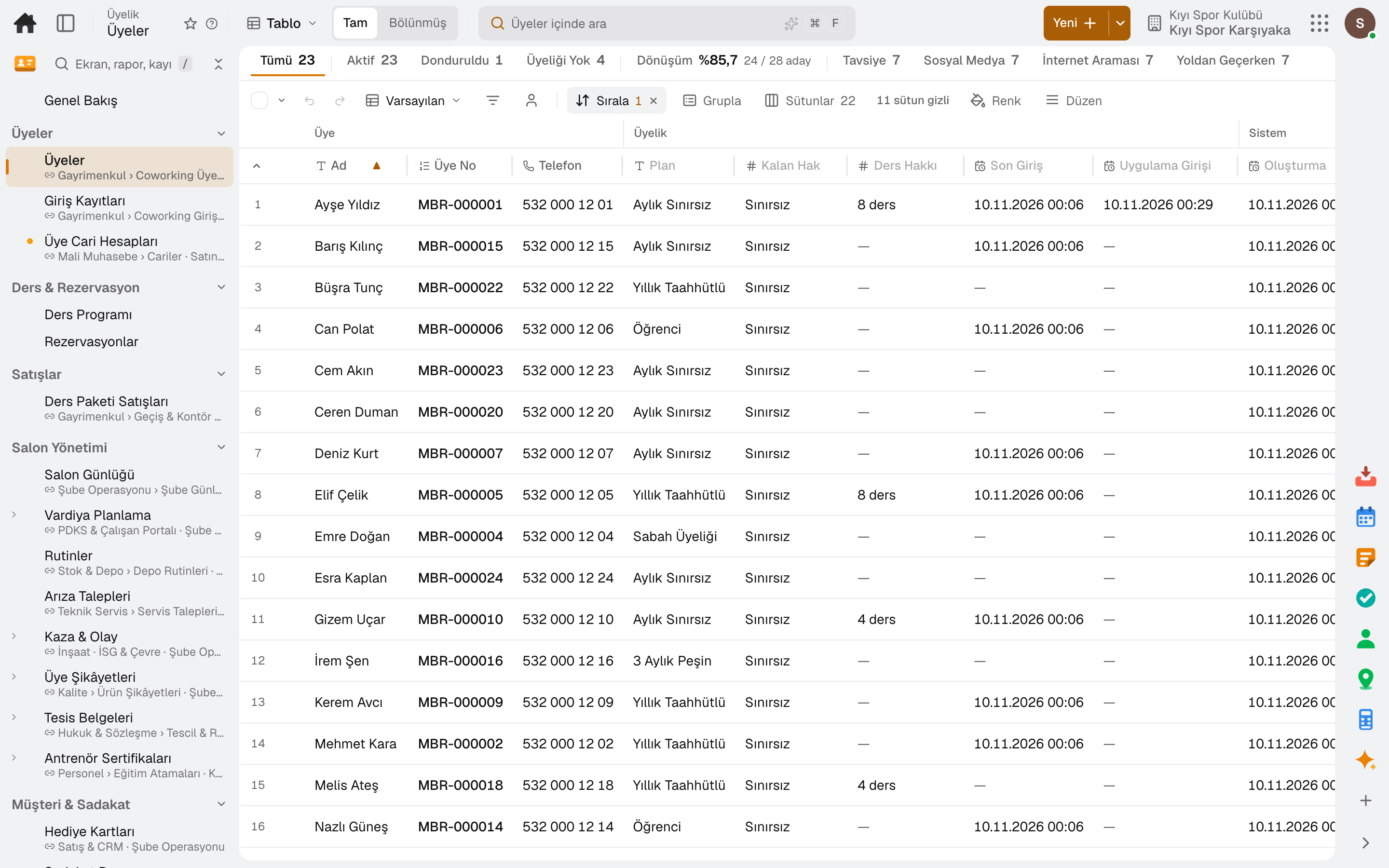
Screen in the productMembersSubscription Plans & BillingCancellation Requests
Members
Member app
Screen in the product
  • Members
  • Member app

Membership plan

Price, billing period, access hours, commitment term and yearly freeze allowance are defined in the plan.

Contract and dues

A membership is a subscription contract; the period invoice is issued automatically and payment tracking is in the same place.

Membership freeze

A membership can be frozen for a while; frozen days are added to the end of the membership.

Family account

A child or spouse is linked to a main account; the main account manages the linked members' classes in the member app.

Cancellation and retention

A cancellation request reaches the manager with the reason for leaving and the retention offer; an approved contract ends at the end of the period.

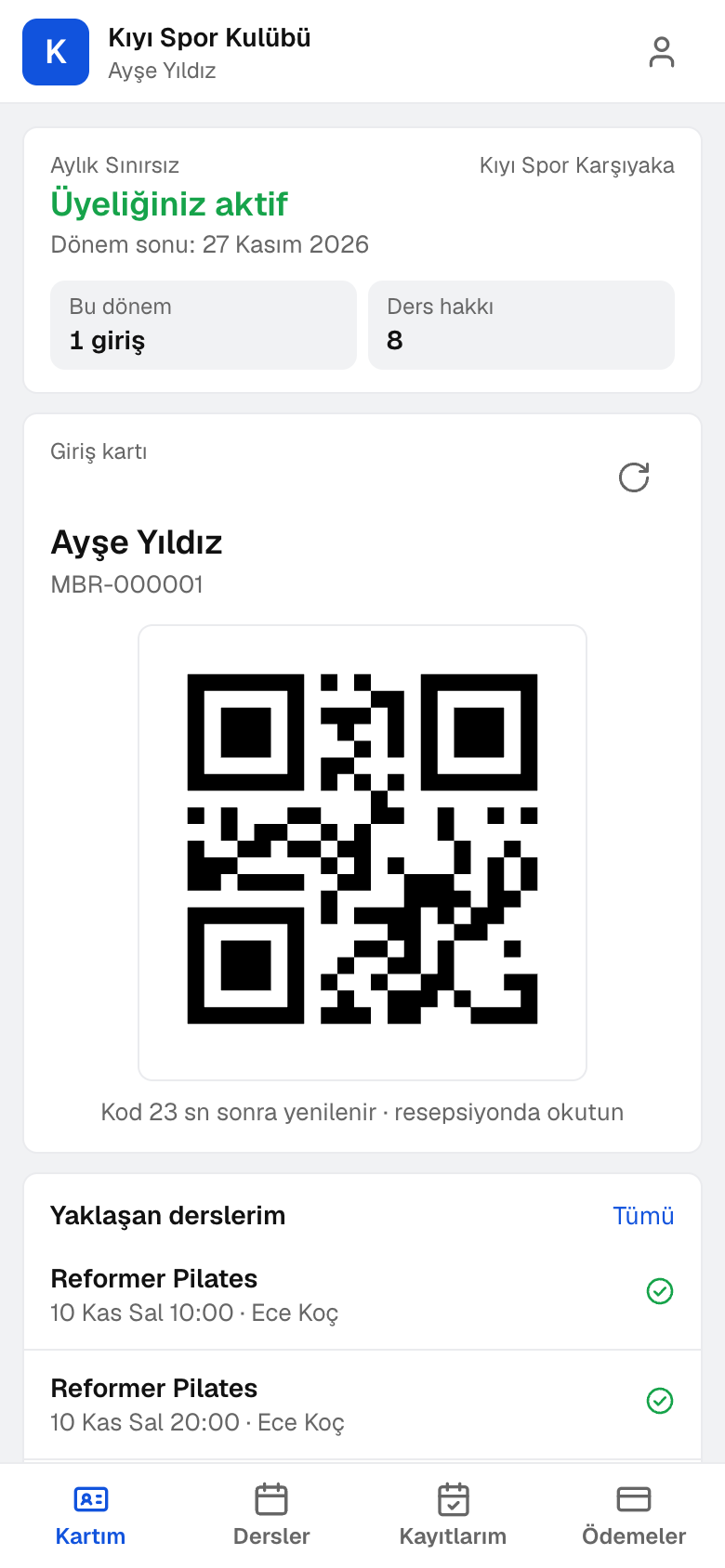
Member app

Members sign in with a code sent to their registered phone or email; they open the door QR code, book classes themselves and see their payments.

02 / 05

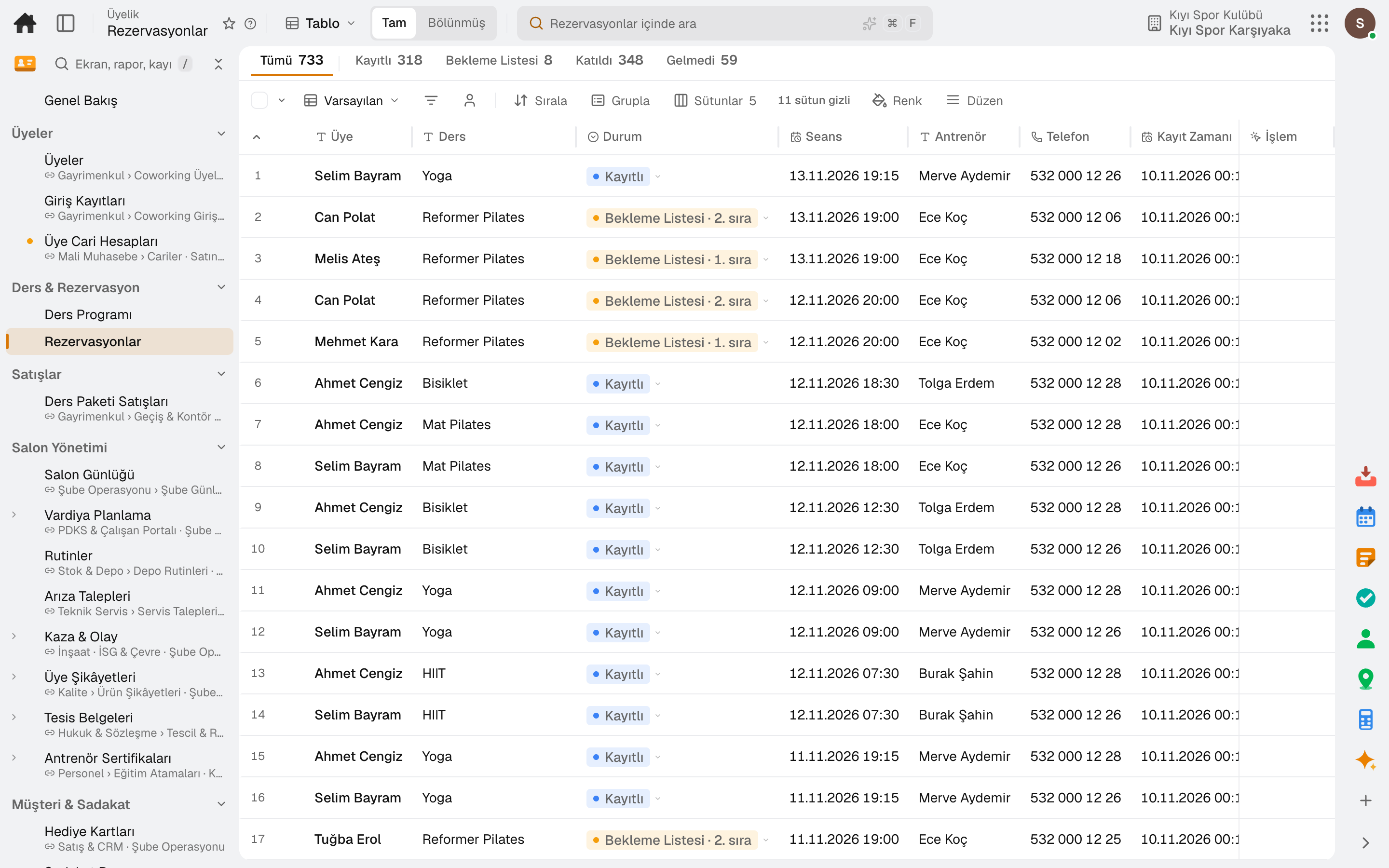
Class schedule and bookings

Group classes on a weekly calendar: each session is opened with its day, time, trainer, room and capacity, and weekly repeats build a series.
Screen in the productClass ScheduleReservationsClassesClass Ratings
Reservations
Screen in the product
  • Reservations

Weekly series

Open a session once and weekly repeats build the series; the class definition suggests duration and capacity.

No double booking

A room or a trainer cannot be booked for two classes at the same time.

Waitlist

If the class is full, the member joins the waitlist; when a booking is cancelled, the next in line takes the spot automatically.

Spot selection

In reformer, cycling or mat classes, the member picks a spot in the room from a map when booking.

Late cancellation and no-show

Late cancellations and no-shows are marked separately; a pack credit is deducted depending on the setting and the class's penalty fee is charged.

Class ratings

Members rate the classes they attend from 1 to 5; a low score reaches the club manager as an alert.

03 / 05

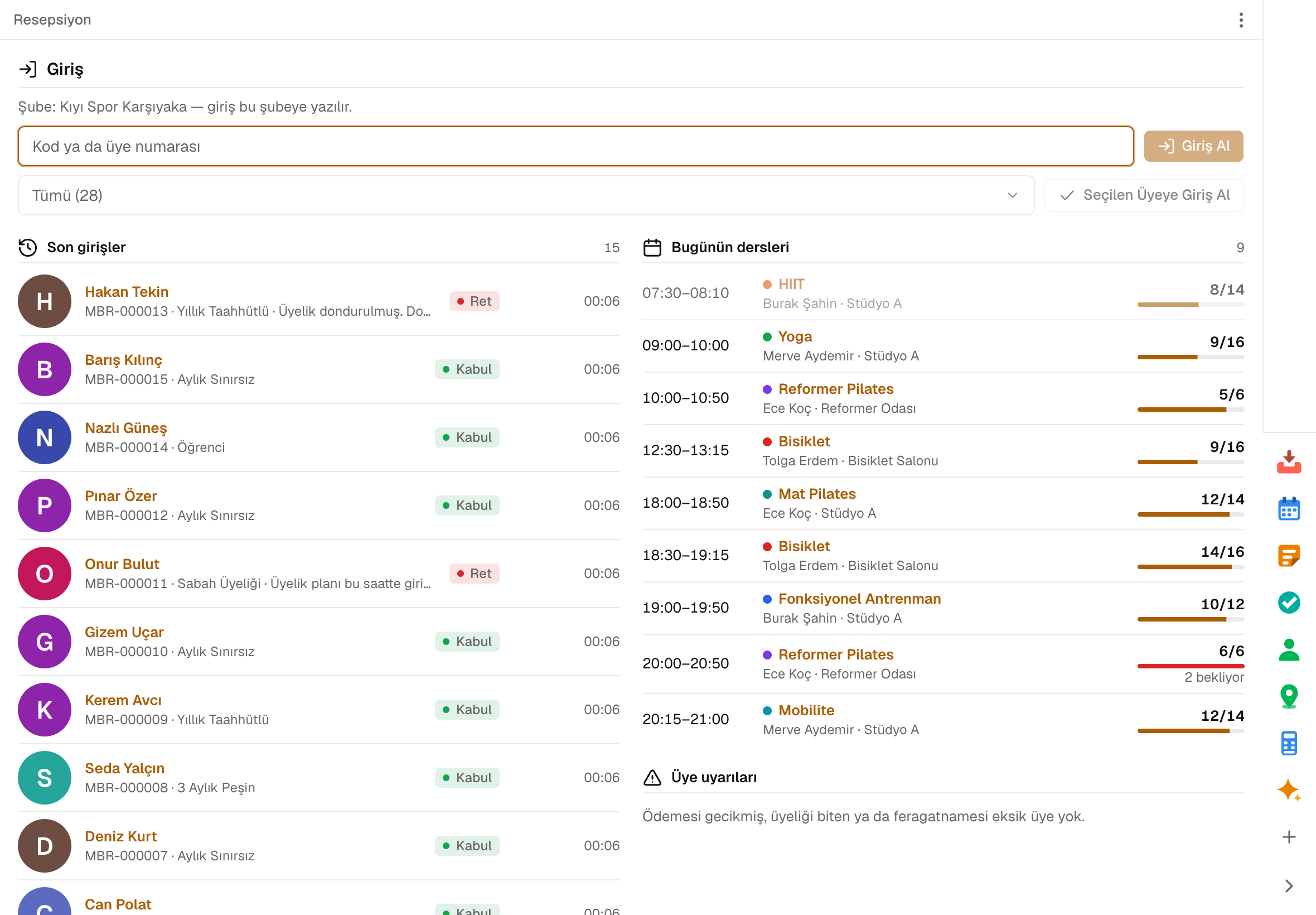
Reception and entry

Scan a code or pick the member by name and the decision shows instantly. Every scan is recorded as accepted, accepted with a warning or denied, with its reason.
Screen in the productFront DeskCheck-insAccess Devices
Front Desk
Screen in the product
  • Front Desk

Scan or pick

Scan the card, member number or the door QR code in the app; members can also be picked by name.

Denial reason on record

Expired, payment overdue, no visits left: the reason for each decision is in the check-in log.

Usage-based plans

Each entry is deducted from the period allowance; entries beyond it are invoiced.

Undo a wrong check-in

A check-in taken by mistake is cancelled and the visit returns to the period allowance.

Access devices

Turnstiles, doors and QR readers are paired with a one-time code and carry no ERP password; the decision follows the same rule as the front desk.

Lockers and loans

Lockers, towels and padlocks are lent to members; the member list shows who has what.

04 / 05

Class packs and payments

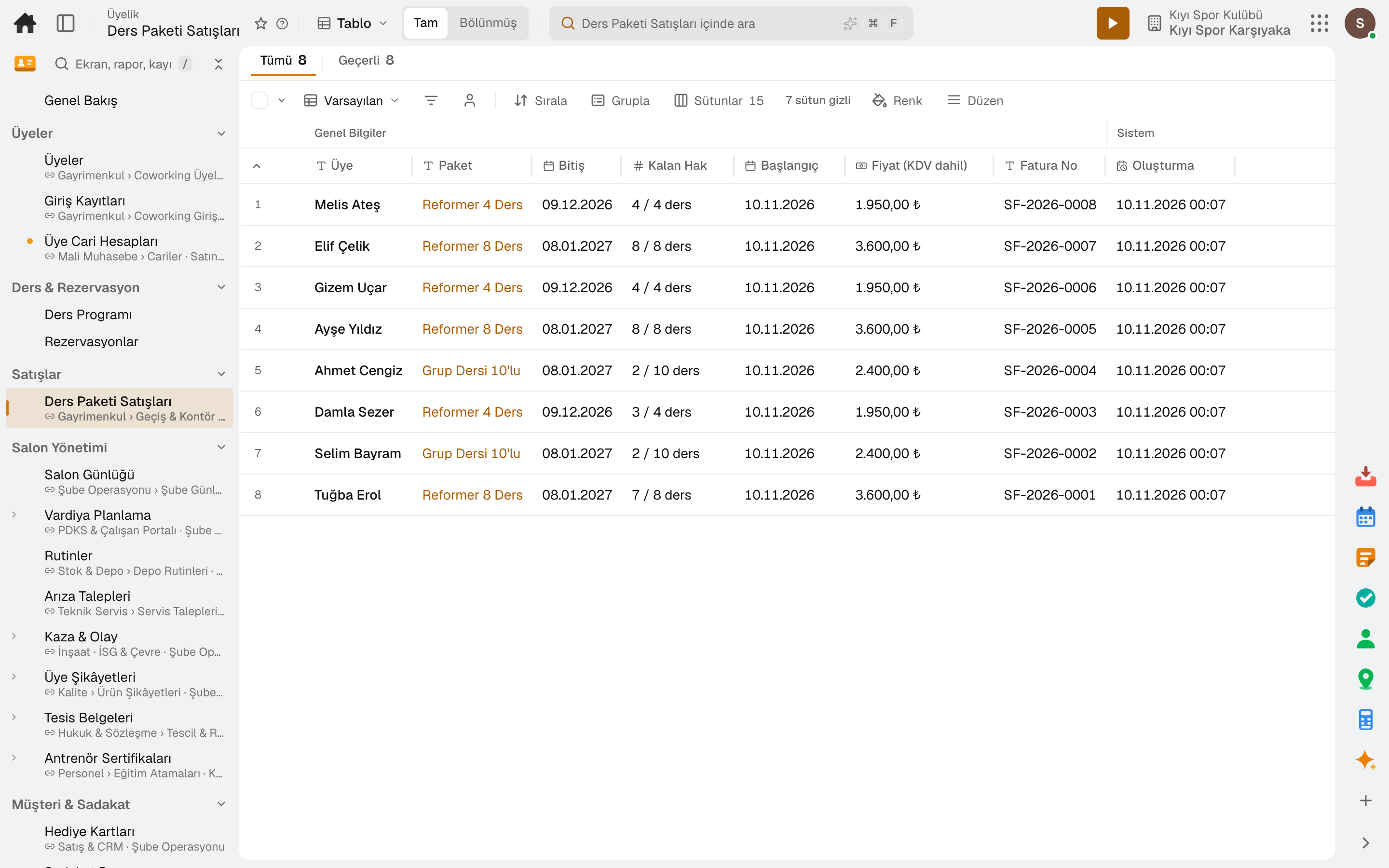
Class packs, day passes and hour credits are sold prepaid. A sale opens an invoice, and a payment taken is posted to the cash desk or bank account.
Screen in the productClass PacksClass Pack SalesAdd-onsAdd-on Sales
Class Pack Sales
Screen in the product
  • Class Pack Sales

Three pack types

Class pack, day pass and hour credit: the credit unit and count, validity in days and the VAT-inclusive price are in the definition.

Limit to one class

A class pack can be limited to a single class; changing the definition does not affect packs already sold.

Remaining credits

Each booking deducts a credit from the pack; remaining credits, validity, invoice and payment trail are on the sale line.

Pack cancellation

An unused pack is cancelled together with its invoice.

Add-on products

Towels, shoe rental and drinks are added with the booking and invoiced to the member's account before the class.

Accounting on the same data

Invoices, payments and the end-of-day till post to accounting; no separate software to install.

05 / 05

Trainers and commissions

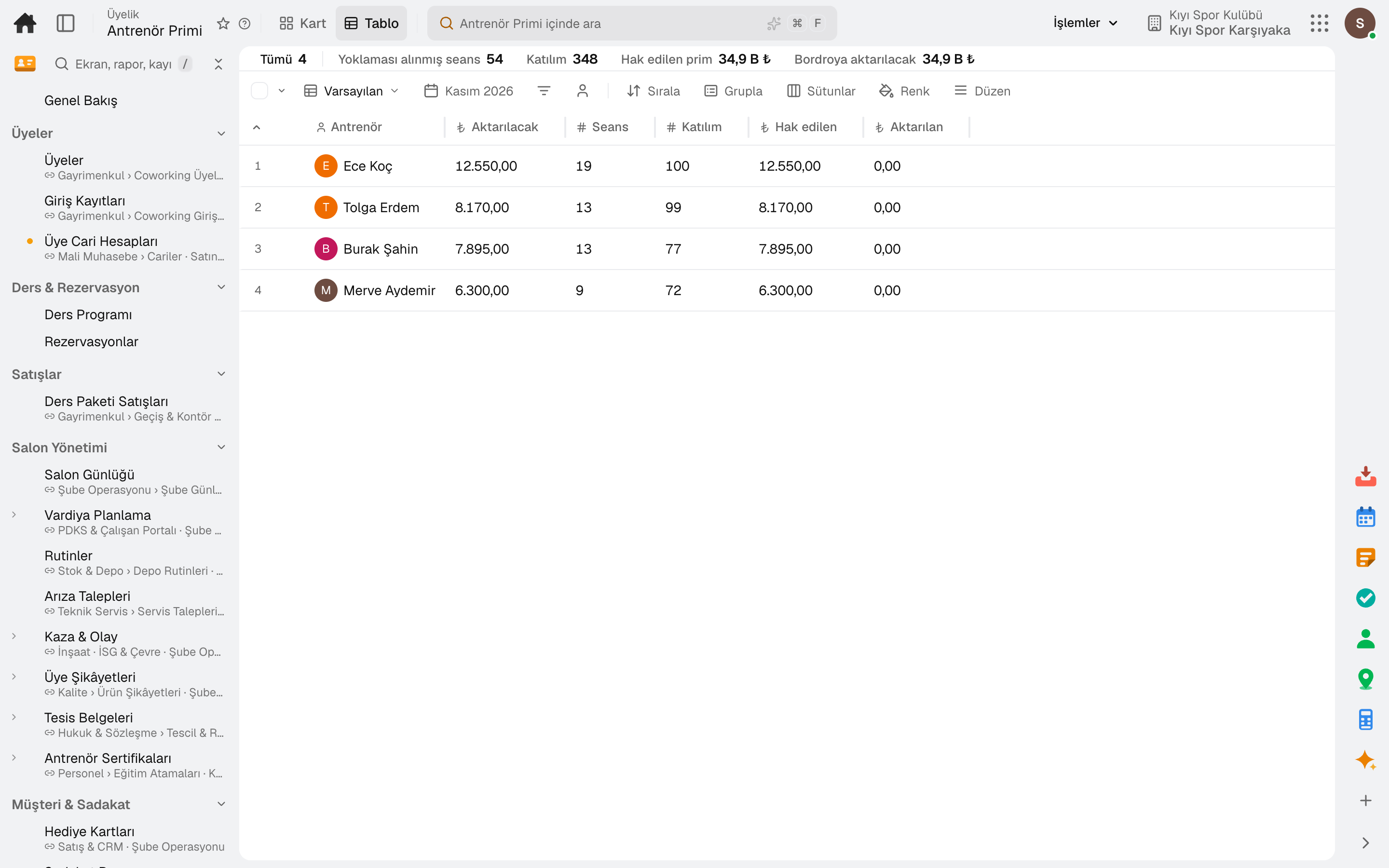
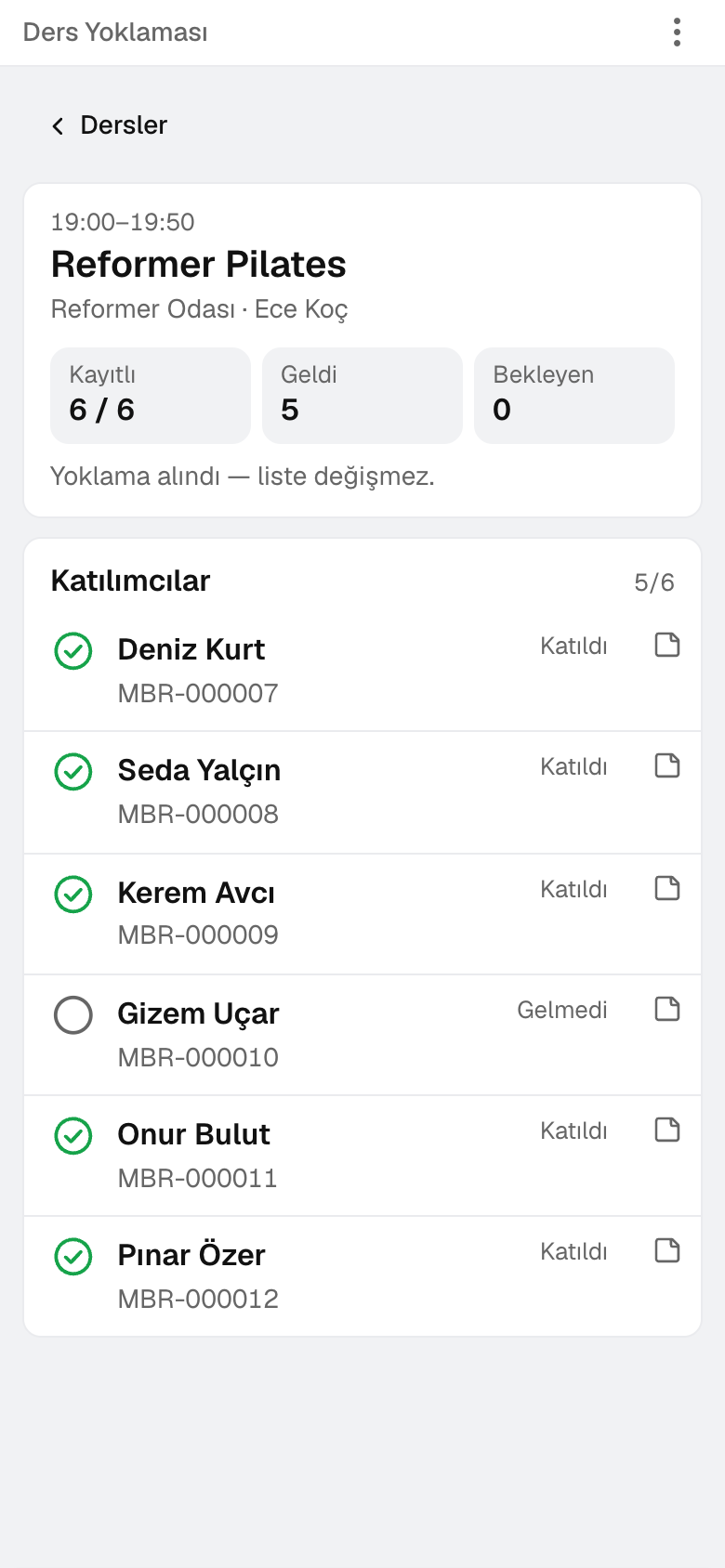
Trainers see the day's classes and attendees on their phone and take attendance with a tap. Commissions are calculated from attendance and sales.
Screen in the productClass Check-inTrainer PaySales CommissionTrainer Pay Rules
Trainer Pay
Class Check-in
Screen in the product
  • Trainer Pay
  • Class Check-in

The trainer's phone

The day's classes and attendees on the phone; a tap checks the member into class.

A look before class

First class, birthday, health note, last pack credit and overdue payment are flagged.

Walk-ins at the door

Waitlisted members are given a spot and walk-ins are added at the door; when attendance closes, checked-in members are marked attended and the rest no-show.

Trainer commission

Calculated from a per-session and a per-attendee rate; Transfer to Payroll posts the difference as additional pay.

Consultant commission

Each consultant's membership and pack sales are tracked against a monthly target; memberships cancelled within 14 days earn no commission.

Sub-modules

Lidyos Fitness: 8 sub-modules

This list is generated from the product itself; it grows as new functions are added to a sub-module. Master data and settings are the shared ground of every module and are not counted as sub-modules.

Members

  • MembersMembers of the gym or coworking space: contact details, club, emergency contact and entry code; membership status, plan and remaining entries are read from the subscription contract. Check-in is done from the row in one click; a membership is frozen for a while and reopened (frozen days are added to the end of the membership). With an automatic payment mandate, membership invoices are charged to the member's saved card automatically; the card is saved when the member pays by card on the payment page. The member app link is sent from the row by SMS or email; the member signs in with a code on their registered phone, opens the door QR and books classes themselves.
  • Subscription Plans & BillingManages subscription plans, contracts, periodic billing and payment tracking in one place; invoices of contracts with an automatic payment mandate are charged to the payer's saved card automatically.
  • Check-insThe decision for every scan: accepted, accepted with a warning or rejected, with the reason (expired, payment overdue, no entries left). A wrongly taken entry is cancelled and the period entry comes back.
  • Cancellation RequestsMembership cancellation requests from the member app: who, which plan, reason for leaving, retention offer and status. The manager approves pending ones — the contract ends at the end of the period and auto-renewal is switched off — or rejects with a reason; those who accept the offer show as "Stayed".
  • Business PartnerKeeps suppliers, customers and employees in a single business partner record; manages balance, contact and bank information.

Classes & Bookings

  • Class ScheduleThe weekly schedule of group classes: sessions are opened with day, time, trainer, room and capacity, and a series is set up with weekly recurrence. A room and a trainer can't be given to two classes at the same time. Members are booked into a session; if it is full they go on the waiting list, and the next in line moves up when a place opens. Taking attendance completes the session.
  • ReservationsClass bookings for all sessions: who is in which class, booked or on the waiting list, attended or not. A booking is cancelled here; the next member on the waiting list takes the place automatically.
  • Class RatingsThe rating (1–5) and note that members give from the app to a class they attended: class, time, instructor and member. The average and rating distribution are at the top; a low rating (2 and below) also goes to the studio manager as an alert. Read-only.

Sales

  • Class Pack SalesPacks sold to members (class pack · day pass · credit hours): remaining credits, validity, invoice and collection trail. On sale a draft sales invoice is opened, and if payment is taken it is posted to the cash or bank account; an unused pack is cancelled together with its invoice.
  • Add-on SalesExtra products added to class bookings: who, which class, when it will be invoiced and status. Before the class (setting) it is invoiced to the member's business partner account and charged to the saved card; it can be removed until then and is removed automatically when the booking is cancelled. Removing an invoiced one cancels its invoice.

Facility Management

  • Gym LogThe branch manager's daily log: opening/closing routines, the day's cash (Z report or manual count), shift handover note and notes from previous days; the figures are in Overview.
  • Shift PlanningCreates the roster by assigning employees to daily shifts. Builds the roster automatically based on workload and constraints; publishes and fills open shifts that have no employee assigned. Shift swaps (offer + manager approval) and employees' weekly availability/preferences are parts of the same screen; the hourly staffing demand forecast from POS sales and the labor cost ratio (plan/actual variance) are read together in the Analysis section for the same location and range.
  • RoutinesLists, by branch, the opening/closing/shift routines field staff must perform today; tap a card, answer the template questions and complete with photo + signature.
  • Fault RequestsCollects maintenance and breakdown requests coming from the field/branch and converts them into work orders — this is the main way to report a breakdown.
  • Accidents & IncidentsRecords and investigates workplace accidents and environmental incidents. In the Root Cause Analysis section, the root causes of incidents are analyzed; in the Frequency Rates section, accident frequency rates of recent years (TRIR · LTIR · DART) are compared side by side, and you can drill down from a row to that year's incidents; in the QR Reporting Points section, QR-coded points for reporting incidents in the field are defined.
  • Member ComplaintsThe canonical register of product complaints from consumers (BRCGS complaint record): records them with channel, place of purchase, expiry date and retained-sample link and ties them to a corrective action. A business customer's defective delivery notice is opened in Nonconformity Records with the "customer" source.
  • Training AssignmentsAssigns the curriculum to employees (per person and in bulk from the catalog), tracks certificates and monitors completion status.

Customers & Loyalty

  • Gift CardsSells prepaid gift cards, tracks balance movements (load/spend/refund) in a ledger, and shows the total outstanding liability.
  • Loyalty ProgrammeManages loyalty card, points, rewards, and referral programs.

Reports

  • Trainer PayTrainer commission from group class sessions with attendance taken: a fee per session and a fee per attending member (the trainer's own fee, otherwise the one on the class definition, otherwise the company setting). Transfer to Payroll writes the period's difference to each trainer as a payroll additional payment; if the same period is transferred again, only the difference goes.
  • Sales CommissionThe selling consultant's membership and class package sales in the month, actual against the monthly target, and the sales commission: a fixed commission per membership, a rate on the package amount excluding VAT (Admin). Cancelled packages and memberships cancelled within 14 days do not count toward commission. Transfer to Payroll writes the difference to each consultant as a payroll additional payment.
  • End of DayTill sessions and Z reports: opening float, sales, collections, count difference; till movements (expense · cash in · tip payout). The Z slip is posted to the selected treasury cash box and to accounting.

Facility Apps

  • Front DeskThe screen where entry is taken: the code is scanned or the member is chosen by name, and the decision shows instantly. On a usage-based plan the entry is deducted from the period allowance, and entries beyond it are invoiced.
  • Class Check-inThe trainer's phone: today's classes and participants. A tap checks a member in; first class, birthday, health note, last credit of a pack and overdue payment are flagged. Waitlisted members are moved to a spot, walk-ins are added; when attendance is closed, checked-in members are marked attended and the rest no-show.
  • RegisterCashier screen: pick a table from the floor plan, tap menu items to add them, take payment and close the check. The fiscal receipt is printed by the fiscal cash register (ÖKC); by default it runs without an ÖKC integration.

POS Settings

  • Menu ItemsProducts sold at the till and their categories. Every product is a material card: name, description, image, barcode, unit, allergens and nutrition claims come from the card; here you set category, VAT-inclusive price, VAT rate, channel and till behaviour. Tags in the Tags column (Spicy · Chef's Choice) appear to guests as filter chips and product badges in the QR menu and kiosk.
  • Staff & PermissionsRegister staff and permission groups: name, phone, branch and PIN on the form (an HR card is opened on save); what they can do at the register comes from their permission group, and a manager PIN is required for anything else. Preset reasons (void · complimentary · discount · waste · refund) are here too.
  • Buttons & ScreensRegister buttons: payment types, the buttons at the bottom of the check screen (Take Payment · Send Order · Cash · Print Bill), Functions and custom actions that only run steps — name, colour, icon, size, order, revenue center and device. A button can run ordered steps (print bill · discount · preset payment · currency · account · coupon · fiscal printer · X/Z report …) and a final step (close check · payment screen · PIN screen); you choose which register screens it appears on and whether it opens the cash drawer, shows on mobile, counts as cash and is included in the shift total. The Screens tab shows how the register will look in the chosen center and device; buttons are reordered there by dragging.

Setup master data and settings

  • ClassesDefinitions of group classes (yoga, pilates, spinning): default duration and capacity. These are suggested when a session is opened and can be changed in the session.
  • Class PacksDefinitions of prepaid packs — class pack, day pass or credit hours: credit unit and count, how many days valid, VAT-inclusive price and VAT rate; a class pack can optionally be restricted to a single class. Changing a definition doesn't affect packs already sold. Each pack is a service material; its price is the Sales price record.
  • Add-onsDefinition of products added at class booking: towel, shoe rental, drinks — price including VAT, VAT, size or number options, restriction to a single class if wanted. Every product is a material, and its price is the Sales price record. Selling in the member app is enabled in Admin.
  • Trainer Pay RulesThe trainer's own fee per session and per attending member; if a class is selected it applies to that class only. Trainer Commission uses first the trainer's class-specific fee, then the all-classes fee, then the class definition, and last the company setting; a fee left blank falls through to the next level. When a fee changes, a new row opens with its effective start date: each session uses the fee valid on its own day, and earlier sessions keep the old fee.
  • Access DevicesTurnstiles, doors and QR readers: a device is paired with a single-use code generated here and carries no ERP password. When a member card, member number or the door QR in the app is scanned, the decision is the same as at reception; on an accepted entry the turnstile opens and the entry is recorded for the device's club. The device is an equipment record in Maintenance: breakdown requests are linked to it, and when the record goes out of service the door doesn't open.
  • Project Goals (OKR)Defines team and individual goals and tracks progress.
  • Sales Rep CommissionDefines sales representative commission rules (flat, tiered, margin) and tracks their accruals.
  • DevicesRegister, kitchen and waiter tablets (connected once on the tablet at the /pos address with an authorised login or QR approval; the ERP password does not stay on the device), POS registers, receipt and kitchen printers, kitchen screens, printing and receipt templates; the print service on the restaurant computer and the queue are in the ⋮ Related menu of Printers.

Sign up your first member today.

Try it free for 15 days; no credit card needed. We reply to your questions within one business day.