Membership and automatic payment
Membership is billed as a subscription; monthly charge from a saved card, retry on failed charges and membership freeze.
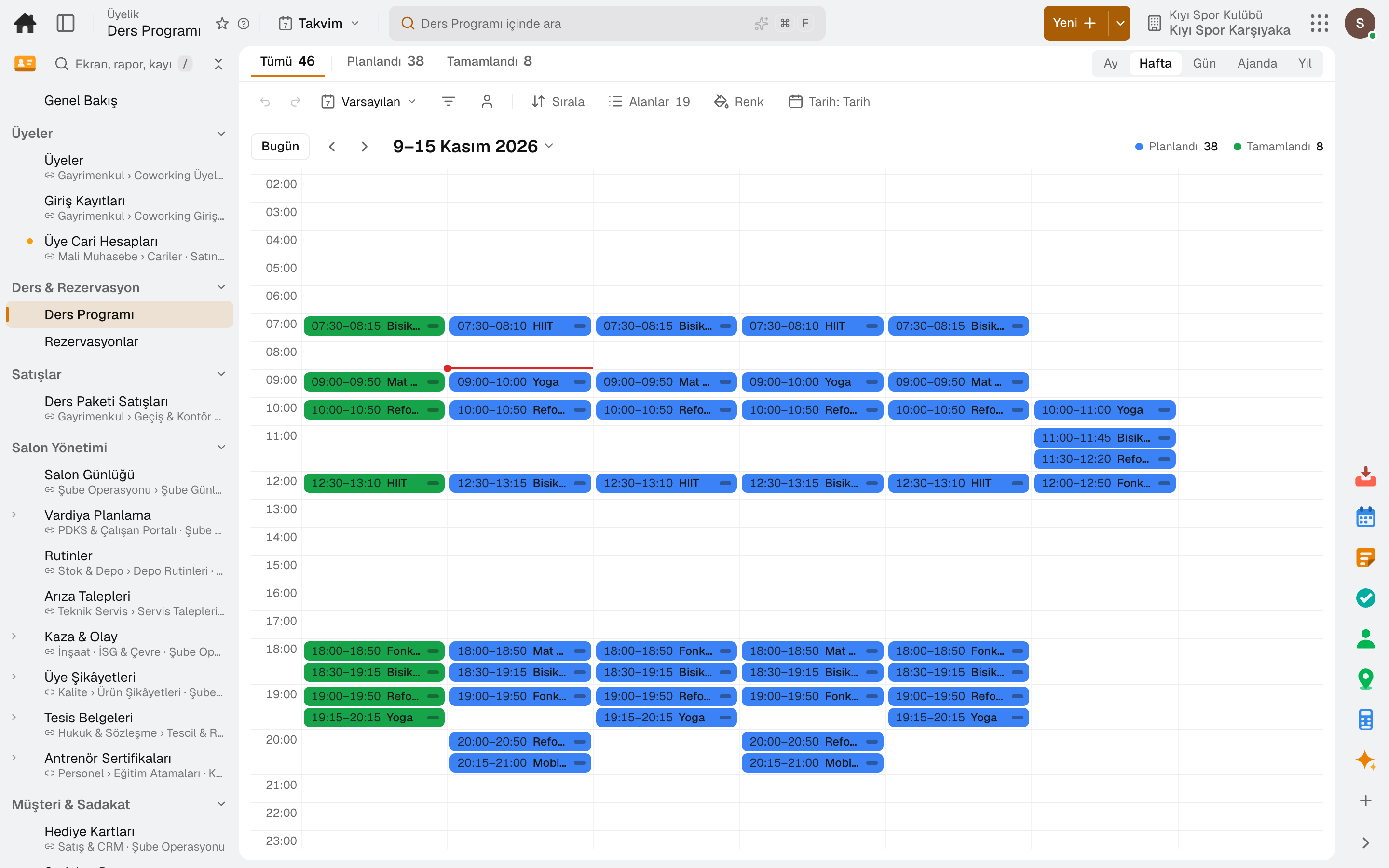
For gyms, pilates and yoga studios: membership plans and contracts, class schedule and booking, check-in at the front desk, class packs, the trainer's phone and commissions. Invoices and payments post to accounting automatically; nothing to install.
No credit card, nothing to install.
Who it's for
The same software, set up for your gym: each line of business has a page describing its own flow.
From the door to dues, everything about a member on one line.
Gym membership softwareIn small classes, capacity, waitlist and pack credits run by themselves.
Pilates and yoga studio softwareFrom the parent's account to the child's class, enrollment and payment in one place.
Course center and sports school softwareHighlights
Membership is billed as a subscription; monthly charge from a saved card, retry on failed charges and membership freeze.
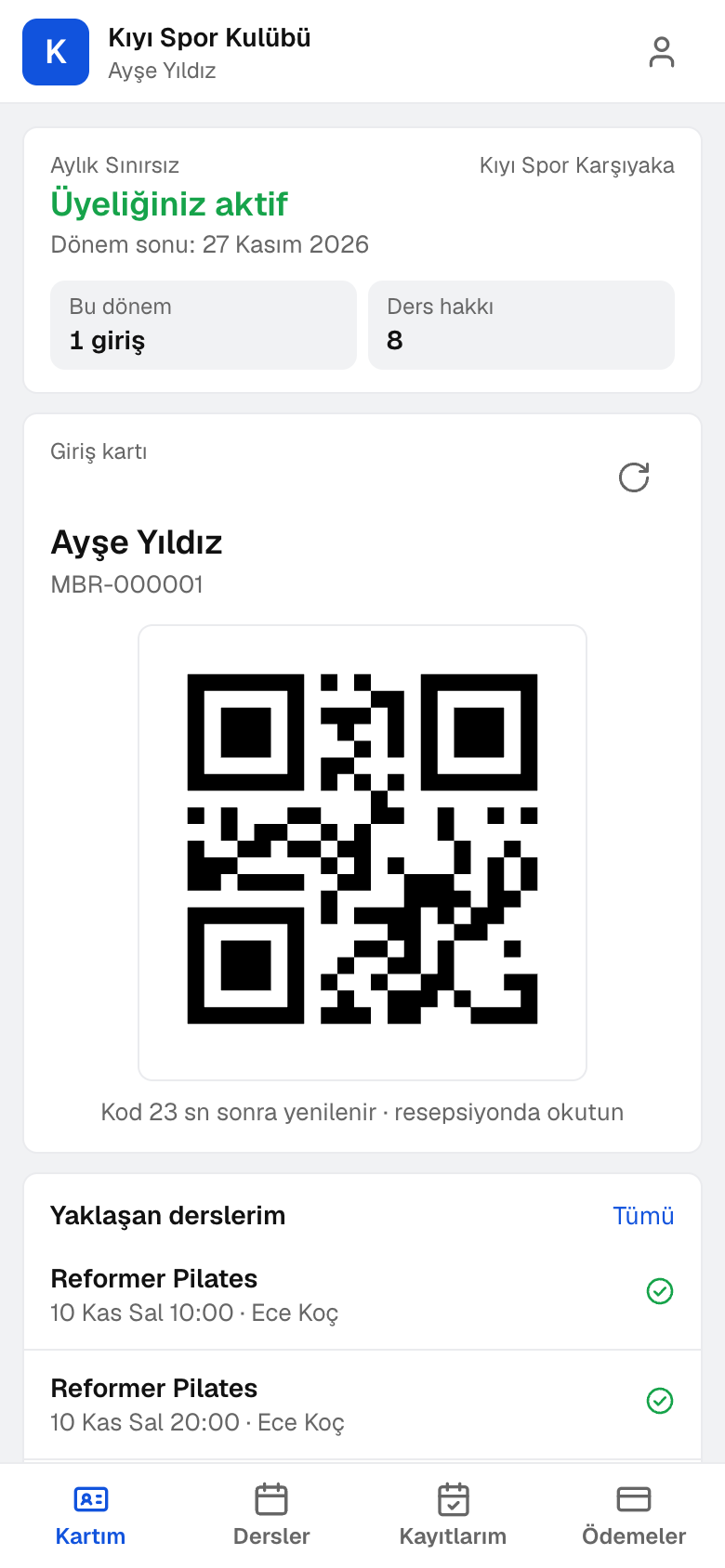
Members check in at reception or with a QR code; turnstiles, doors and QR readers decide by the same rule, and entries are logged.
Sessions are opened with day, time, trainer, room and capacity, and a weekly repeat builds a series; when a class is full the member joins the waiting list, and the next in line moves up when a place opens.
Class packs, day passes and hourly credits are sold prepaid; the remaining credits drop with each booking, and the sales invoice and collection are created automatically.
Members book classes from their phone, open the door QR code, see their payments and request a freeze or cancellation.
The day's classes and participants on the phone; attendance is taken with a tap, and a first class, the last credit of a pack and an overdue payment are flagged.
A cancellation request from the member app reaches the manager with its reason and a retention offer; an approved contract ends at the end of the period.
Towels, shoe rental and drinks are sold together with the class booking.
An adviser's membership and pack sales are tracked against the monthly target; sales commission and trainer commission are transferred to payroll as additional payments. Gift cards and the loyalty programme are in the same place.
A day
Every step works on the same data: a record entered in one step is never keyed in again in the next.
The member scans their code; the decision shows instantly and the check-in is recorded.
The member books a class; if it is full, they join the waitlist.
The trainer takes attendance on the phone; a waitlisted member moves into a freed spot.
A consultant sells a membership or class pack; an invoice opens and the payment is posted to the till.
Dues invoices are issued; trainer and sales commissions are transferred to payroll.
As you grow
Members are looked up across the company: a member of another club in the chain can check in at your door, or a plan can be limited to its home club. Accounting, payroll and branch operations share the same data.
Sales and customer management software
One customer record from opportunity to invoice.
16 sub-modulesAccounting software
In the journal the moment the invoice is issued; no waiting for month end.
13 sub-modulesPayroll software
From timesheet to withholding return, payroll ready every day, not just at month end.
4 sub-modulesRegister, tables, branch orders and shelves on one branch screen.
10 sub-modulesFrequently asked
Yes. The member app opens with a code sent to their phone or email; class booking, cancellation, the door QR code and payments are all there.
Turnstiles, doors and QR readers connect with a pairing code; the decision to open the door comes from the same rule as reception.
Each class has its capacity in its definition; when full, members join the waitlist and the next in line takes a freed spot. Members can also pick their spot from a map.
Yes. Frozen days are added to the end of the membership; the plan defines a yearly freeze allowance.
No. Membership and pack invoices, payments and commissions post to accounting and payroll on the same account.
Free for 15 days
Every app is open for 15 days. No credit card, no installation; your team signs in from the browser.
Try it free for 15 days; no credit card needed. We reply to your questions within one business day.