Till and waiter
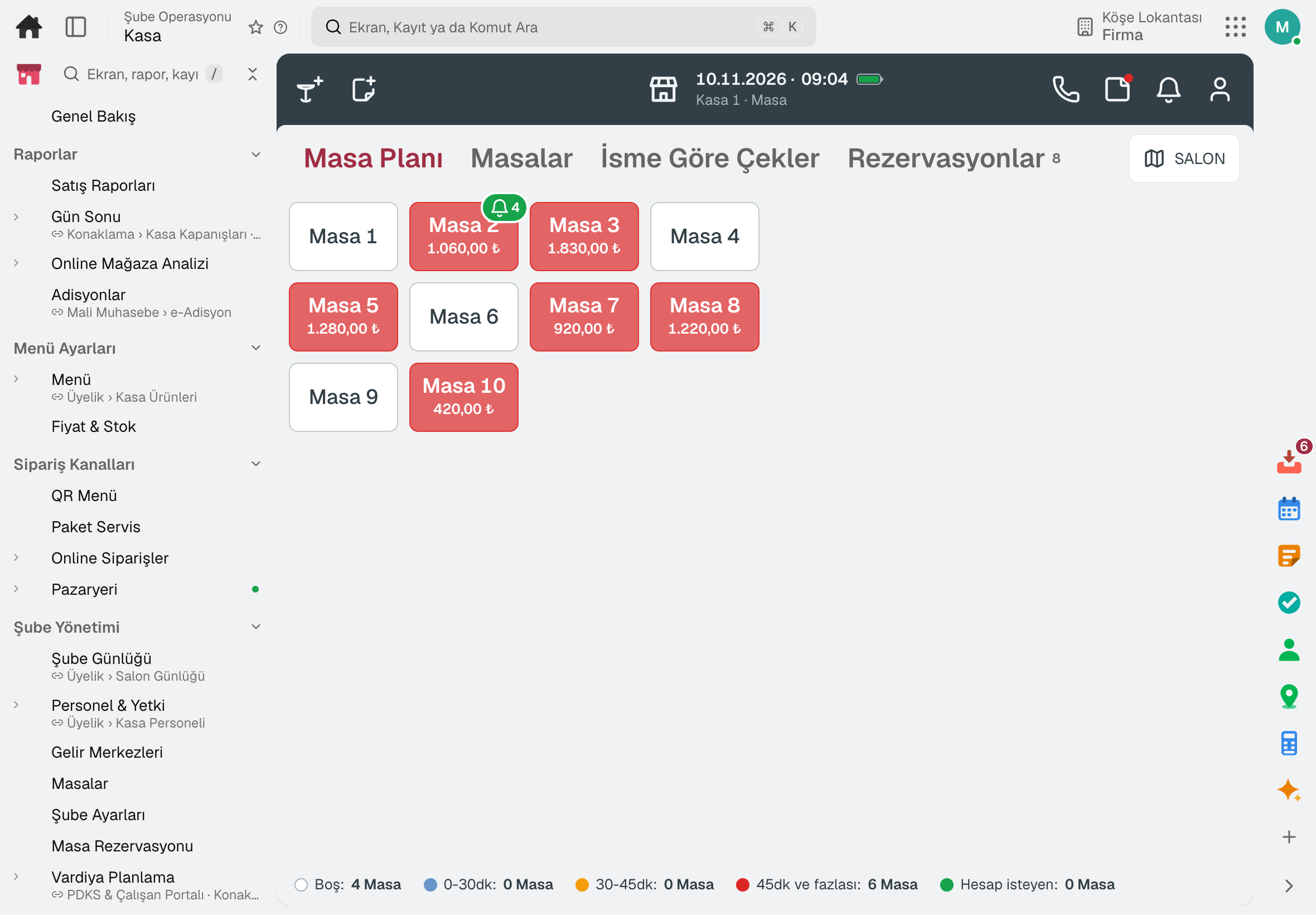
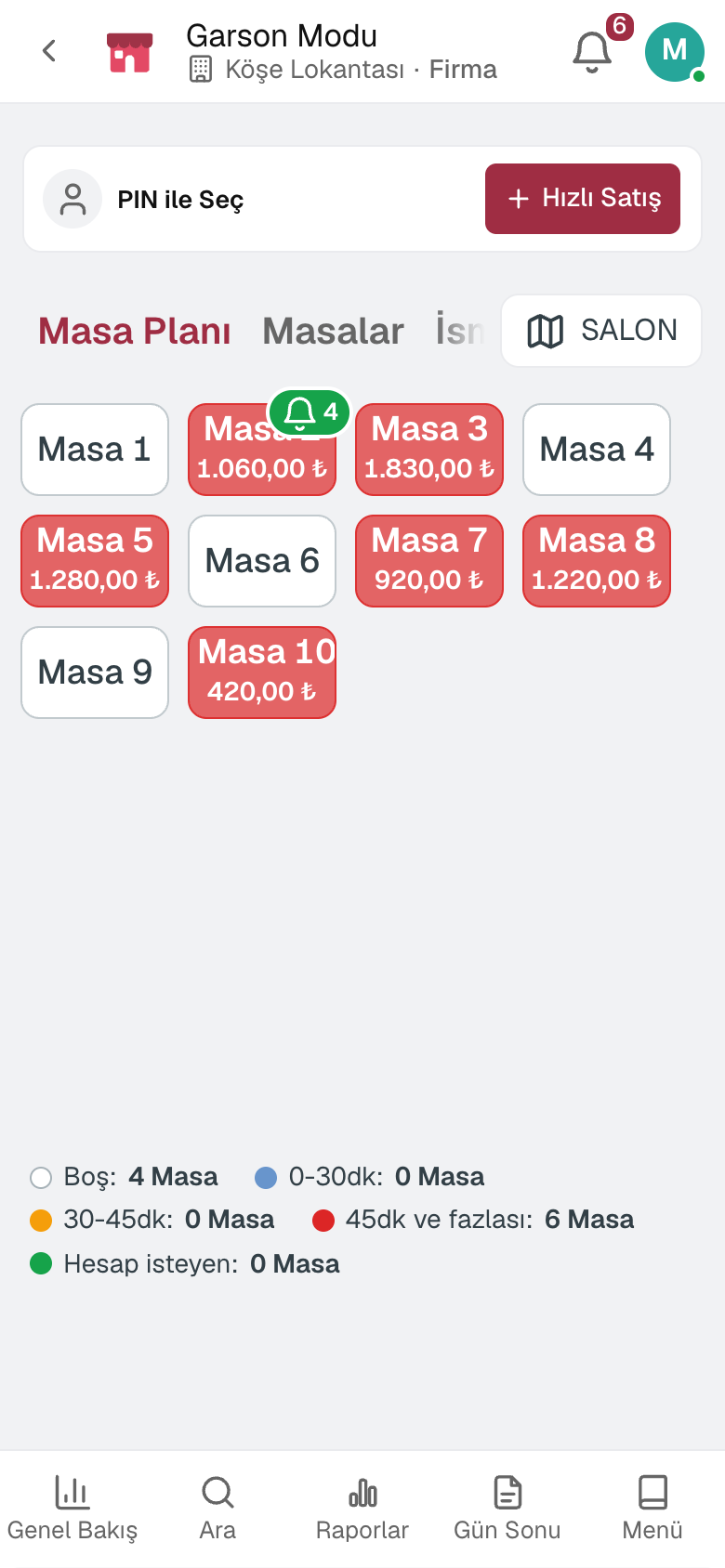
The till works from the table plan; the waiter picks the table on the phone, adds items to the check and sends them to the kitchen.
For restaurants, eateries, cafés and fast food businesses: a till that runs from the floor plan, waiter mode on the phone, a paperless kitchen display, table reservations, delivery and couriers, menu and recipes, end of day and sales reports. Nothing to install; sales are deducted from stock by recipe.
No credit card, nothing to install.
Who it's for
The same till, set up for your style of service: each business type's page describes its own flow and ready-made template.
From counter to door, order number and courier in one flow.
Fast food and delivery softwareOne till for tables and counter: orders go to the bar, the bill is settled at the table.
Café ordering softwareFrom the display case to custom cakes, every order detail on record.
Patisserie and custom cake order softwareHighlights
The till works from the table plan; the waiter picks the table on the phone, adds items to the check and sends them to the kitchen.
Items sent from the till land on the kitchen display in table cards; a tap moves the item on, waiting time is flagged by colour, and it works without a paper printer too.
Menu, product cards and allergen information in one place; menu engineering shows each item's profitability and popularity.
The guest scans the QR code on the table, sees the menu on their phone and orders; the order reaches the till for approval and is added to the check.
Click-and-collect and delivery orders come in from the branch QR code; the courier sees their own orders on the phone, sets off and delivers.
Each product's till price and whether it can be sold today in one list; branch price classes, scheduled price changes and limited portions.
Phone, addresses, orders and spend on the branch's customer card; personal discounts by customer tag, gift cards and the loyalty programme.
The table is picked from the floor plan and the same table cannot be given twice for the same time; waiting list, arrival flow, deposit and no-show history.
An action without permission asks for a manager PIN, and voids and complimentary items are recorded with their reason; the day closes with the Z report, and sales are deducted from stock by recipe.
A day
Every step works on the same data: a record entered in one step is never keyed in again in the next.
The till session starts with the opening cash.
The waiter picks the table on the phone, takes the order and sends it to the kitchen.
Items reach the kitchen display; what is ready is served.
Phone orders are handed to the courier; the evening's reservations wait on the timeline.
The till opens the table from the plan, splits the bill and takes payment.
The cash drawer is counted and the Z report is posted to accounting; the day's sales are in the report.
As you grow
Sales are deducted from stock by recipe; purchasing, shifts and accounting share the same data. When you open a second branch, your menu, customers and past sales stay in place; franchise branches are managed with the Franchise add-on.
Register, tables, branch orders and shelves on one branch screen.
10 sub-modulesInventory and warehouse management software
Every product's location, batch and movement at your fingertips.
9 sub-modulesPurchasing software
From requisition to invoice, every purchase approved and traceable.
10 sub-modulesAttendance, shift and leave software
From shift to timesheet, employees and managers each on their own screen.
9 sub-modulesAccounting software
In the journal the moment the invoice is issued; no waiting for month end.
13 sub-modulesFrequently asked
No. Waiter mode opens on a phone; the order goes straight to the kitchen display and the till.
Yes. The Franchise add-on adds candidates, contracts, revenue declarations and royalties to the same data.
Yes. Item groups are routed to the kitchen or bar printer; the kitchen display works with or without a printer.
No. Checks, items, payments and comps are queued on the device; records are sent when the connection returns.
Yes. Sales are deducted from stock by the item's recipe; the daily food cost percentage is calculated from the same data.
The fiscal receipt is issued from the fiscal cash register; by default the till works without a connection to it.
Yes. You can take your data out at any time via Excel, CSV or the API.
Free for 15 days
Every app is open for 15 days. No credit card, no installation; your team signs in from the browser.
Try it free for 15 days; no credit card needed. We reply to your questions within one business day.