Skip to content
Lidyos
Purchasing & Sourcing

Lidyos PurchasingPurchasing software

From requisition to invoice, every purchase approved and traceable.

Purchase requisitions, quotations and tenders, orders, goods receipt and invoice verification move in one flow. The supplier scorecard, contracts and spend analysis draw on the same data.

  • 10 sub-modules
  • 24 modules at the same price

Industry packages: Lidyos Build · Lidyos Farm · Lidyos Fashion · Lidyos Hotel · Lidyos Restaurant · Lidyos Retail · Lidyos Trade

Industries: Machinery, metal and automotive suppliers · Textiles and apparel · Chemicals, plastics and cosmetics · Food and beverage · Agriculture and livestock · Retail and store chains · Grocery stores, corner shops and greengrocers · Wholesale and distribution · Restaurants and cafés · Patisseries and bakeries · Hotels and lodging · Construction and contracting

Roles: Accountant · Purchasing specialist · Production planner · Quality specialist · Warehouse manager and warehouse worker · Project manager · Site manager · Agronomist
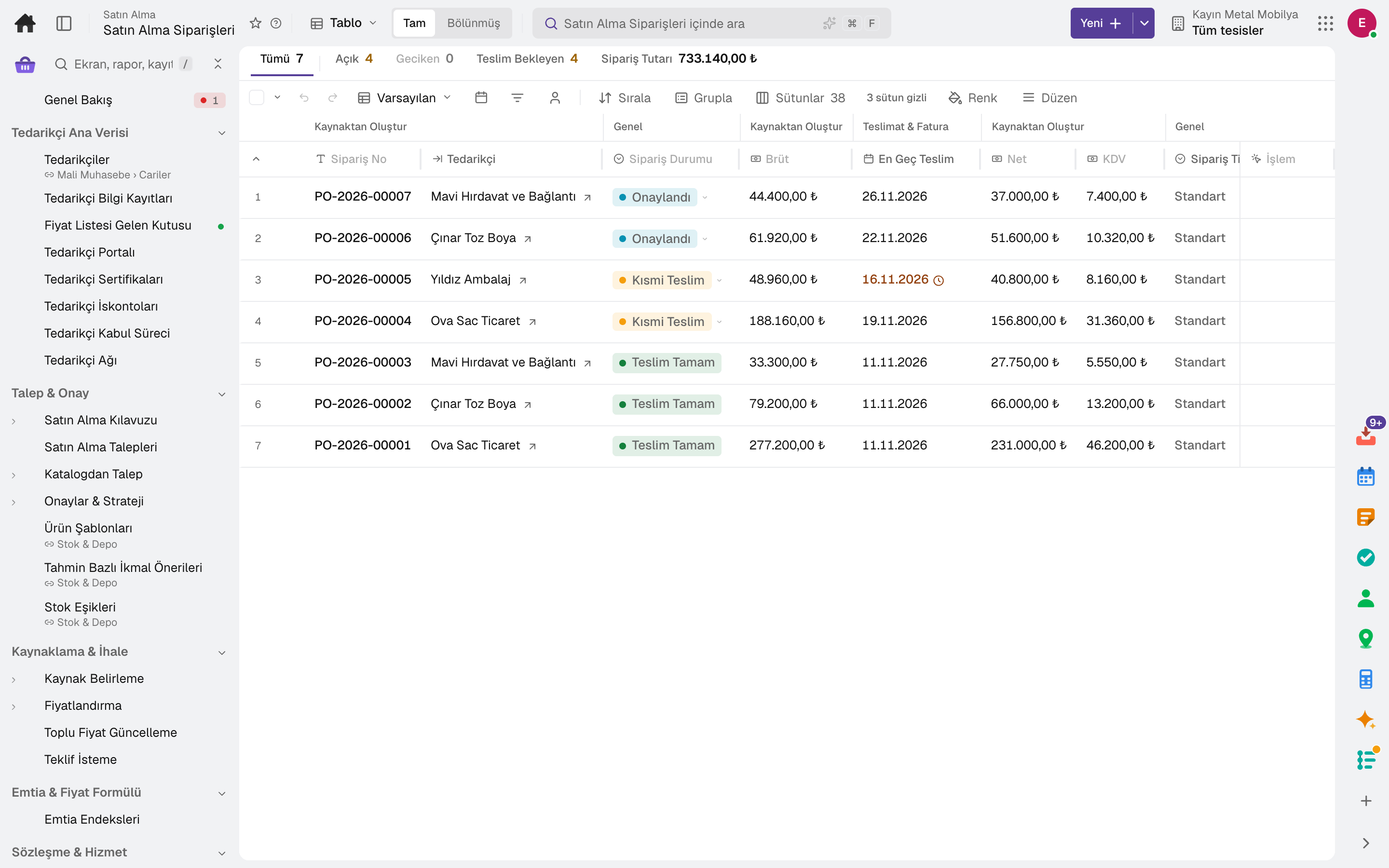
Purchase Order
Screen in the product
  • Purchase Order

What is it, and why do you need it?

What is Lidyos Purchasing for?

Orders placed by phone, purchases without approval, price differences that show up on the invoice: leaks in purchasing look small but add up to a large sum by year end. In a process that runs on paper or email, nobody can find who approved what.

Lidyos Purchasing starts every purchase from a requisition; the approval route is set up automatically based on amount thresholds. Order, goods receipt and invoice are matched; price or quantity differences are caught before payment. Supplier performance is updated with every delivery.

Scope: Runs the procurement process from requisition to order, goods receipt and invoice matching.

Highlights

What can you do with Lidyos Purchasing?

01

Requisitions and approval

Purchase requisitions, approval strategies with amount thresholds, product templates and forecast-based replenishment suggestions.

02

Quotations and tenders

Requests for quotation and comparison, tender awards and reverse auctions; with source determination, which material is bought from whom follows rules.

03

Orders and contracts

Purchase orders, framework agreements, scheduling agreements, service masters, subscription contracts and subcontracting.

04

Goods receipt and invoice matching

Batch, expiry date and serial number at goods receipt; order, goods receipt and invoice are matched and GR/IR differences are tracked.

05

Supplier management

Supplier onboarding, certificates, risk assessment, the supplier portal and a supplier scorecard fed by quality scores.

06

Spend analysis

Spend and savings tracking, maverick buying control, commodity-indexed price formulas and early payment discounts.

07

Utilities and meter tariffs

Electricity, water and natural gas tariffs are kept with their tiers, standing charge, taxes and levies; on acceptance the utility invoice is recalculated with the tariff and checked.

08

Open-to-buy budget

The open-to-buy budget for a period, product group and plant is calculated from planned sales and stock; goods received and open orders are deducted live, and an order over the plan raises a warning or is blocked at approval.

09

Requisition from catalogue

Products picked from a contracted catalogue turn from the basket into a purchase requisition; price and supplier are fixed in the catalogue, and the requisition enters the normal approval flow.

Sub-modules

Lidyos Purchasing: 10 sub-modules

This list is generated from the product itself; it grows as new functions are added to a sub-module. Master data and settings are the shared ground of every module and are not counted as sub-modules.

Requisition & Approval

  • Purchasing GuideEverything that can be bought today in a single list: catalogue, contract, info record and fixed source; price, supplier, stock on hand and policy side by side. From the row you go to the right screen.
  • Purchase RequisitionCreates purchase requisitions for goods and services needed by departments and submits them for approval.
  • SRM Catalogue PurchaseChoose products from the pre-agreed catalog and turn the cart into a purchase requisition; price and supplier are fixed in the catalog, no negotiation needed. On the External Catalogs tab you go to the supplier's own store, and the returned cart is turned into a requisition as well. The requisition follows the normal approval flow.
  • Approvals & StrategyDefines under which conditions a request and an order go to approval and who approves: the strategy looks at amount, facility, material group or currency; the approvers and their order are in the Approvers section. The decision is made in Approvals in the top bar; past approval documents are tracked here.
  • Product TemplatesManages reusable product templates; in request/transfer/count forms, fills in the line items, the par suggestion, and the default account assignment with one click.
  • Forecast-Based Replenishment ProposalsGenerates replenishment proposals from consumption (POS · shipments · production · transfers) and the net position for materials planned by forecast (MRP type VV); an approved proposal is bridged to a purchase requisition or a stock transfer order. Bulk Branch Replenishment, which plans replenishment from the central warehouse to several branches in one run, shares a scarce material's proposals among the branches and turns the plan into stock transfer orders, is also on this screen. Reorder point (VB/V1/V2) materials fall under Production ▸ MRP Run.
  • Stock ThresholdsManages material × plant reorder point, safety stock and maximum stock thresholds; calculates thresholds from consumption, applies suggestions and takes the material into planning.

Sourcing & Tendering

  • SourcingManages the approved supplier source list per material and the quota allocation among suppliers; the recommendation engine section warns about source-quota conflicts and suggests a supplier.
  • PricingDefines supplier price conditions, discount and additional cost rules.
  • Bulk Price UpdateUpdates many material or supplier prices in bulk in a single operation.
  • Category ManagementThe annual category strategy per spend category: spend of the last 12 months, number of suppliers and contracted share come from the classification, and the Kraljic position is suggested; savings, supplier and contract coverage targets are set, sourcing initiatives are planned and tied to Savings Tracking.
  • Request for QuotationRequests price quotations from suppliers and compares the quotations received.
  • Reverse Auction (e-Auction)Runs descending reverse auctions: invited suppliers bid live from the portal (the buyer can bid too), a last-minute bid extends the closing time, the auction closes by itself when time runs out; the lowest bid wins and is converted to an order.
  • Sourcing OptimizationAllocates the bids of a request for quotation to the lowest total cost by share, capacity, dual sourcing, maximum number of suppliers and freight/insurance/customs cost; suppliers' bundle bids (conditional discounts) are taken into account, each constraint shows what it costs you, and the solution is turned into a Tender Award draft.
  • Tender AwardCalculates split award scenarios from RFQ quotations (lowest per line item / single source / limited suppliers); compares costs and converts the selected scenario into a separate purchase order for each supplier.

Commodities & Price Formulas

  • Commodity IndicesHolds the value series of raw material and cost indicators such as sugar, flour, vegetable oil and packaging; feeds index-linked price formulas.
  • Index-Linked Price FormulaLinks a material's price to commodity indices with weights; calculates the price it should be and shows the deviation from the current price.
  • Should-Cost BreakdownBuilds the 1 unit target cost of a material from its elements (material · packaging · labor · machine · energy as quantity × price, price can be linked to a commodity index; overhead and profit as percentages); once linked to a request-for-quotation item, suppliers give a breakdown with the same elements in the portal, and the screen compares each element with the target and ranks the negotiation levers.
  • Commodity Price RiskTracks price risk on raw materials such as sugar, cocoa and milk: compares forecast consumption per index with fixed-price coverage (open orders, contract purchases, hedges); holds hedge contracts and the mark-to-market difference.

Contracts & Services

  • Purchasing ContractsManages quantity- or value-based framework contracts with suppliers; expiry and limit warnings are a tab of the same screen.
  • Agricultural ContractsSeasonal purchase contracts with producers (farmer · grower · cooperative): product, quantity, base price and quality parameters; deliveries are priced by quality measurement, accepted lots go into stock and those below the minimum are rejected.
  • Scheduling AgreementPlans recurring deliveries of a regularly purchased material with the supplier and sends the plan as releases; incoming goods are received in one step from the schedule line.
  • Service MasterDefines purchased services in the standard service catalog.
  • Service EntryRecords the period acceptance of a service or subscription contract (supplier invoice, amount, VAT, meter reading): approval posts the expense, invoicing opens the purchase invoice. One-off services (repairs, consulting) are accepted through the order's goods receipt.

Subscriptions & Meters

  • Vendor Subscription ContractsManages recurring service subscriptions paid to a supplier, such as electricity, water and internet, by period, amount and payment source; the billing cycle and reports are tabs of the same screen.
  • Move-In / Move-OutHandles opening, closing and transfer of branch and property subscriptions.
  • SEPA MandateManages the automatic payment instructions given to the bank: the subscriber number and payee are recognized from the contract, the debit from the statement; an instruction that expires opens a task.
  • Budget BillingManages equal-installment plans for subscription payments and reconciles them at period end.
  • Meter TariffsHolds the electricity, water and natural gas supplier's tariff (tiers, fixed fees, taxes and funds); the subscription's invoice is recalculated and checked against it at acceptance.
  • Meter InventoryRecords meter devices and their technical data.

Orders

  • Purchase OrderCreates and sends a formal purchase order to the supplier. An order confirmation or a proforma PDF/photo can be read with artificial intelligence and transferred to the form (+ New › Fill from Document).
  • Open-to-Buy BudgetOpen-to-buy budget per period × product group × plant: planned sales (or consumption if you wish), markdowns and shrinkage, opening and closing stock are entered; open-to-buy = planned sales + markdowns + closing stock − opening stock. Goods received and open orders are deducted live; an order exceeding the approved plan triggers a warning or is blocked at approval. Lines can be proposed from past issues.
  • SubcontractingGives raw material to a subcontractor and tracks the order for the processed product.
  • Bulk PO MaintenanceChanges the delivery date, payment terms, incoterms, VAT and discount, plant and storage location, tolerances and account assignment across many open orders at once; previews first, sends changes above the threshold for approval and can be reverted in one step.
  • PunchOut CatalogueRedirects to the supplier's own store (cXML/OCI); converts the returned cart into a purchase requisition or directly into a purchase order, depending on the connection's cart target. The catalog stays with the supplier — price/stock are always current, no sync worries.
  • Catalogue Item ManagementDefines products in the supplier catalog, manages their price and validity, and publishes them in the catalog.

Goods Receipt & Stock

  • Serial Number TrackingAutomatically tracks the location and status of serial-number-tracked materials based on goods movements.
  • Goods MovementRecords and lists goods receipt, goods issue and transfer movements. A delivery note PDF/photo can be read with AI and transferred to the goods receipt form (+ New › Fill from Document).
  • Current StockShows the CURRENT stock of a material broken down by plant, storage location, batch and stock type; its source is the FIFO layers. For a balance as of a cut-off date, use the Stock Balance as of Date screen.
  • Batch MasterDisplays and updates the master data of existing batches.
  • Stock Transfer OrderCreates and ships stock transfer orders between facilities. Replenishment planning from the central warehouse to multiple branches in a single run is on the Stock & Warehouse › Forecast-Based Replenishment Suggestions screen; this screen redirects there.
  • Consignment StockTracks consignment stock owned by the supplier and creates the payable as it is consumed.

Invoice Matching

  • Vendor Invoice DeclarationReviews invoice submissions that the supplier creates in the portal from its order; flags rows that deviate from the order and links the approved one to the invoice record.
  • Dynamic Early Payment DiscountCalculates the early payment discount on a sliding scale based on the payment day (buyer's target APR); creates an offer on the purchase invoice, which the supplier accepts/rejects. Continuous yield instead of a static '2%/10 days'.
  • Goods Receipt / Invoice ReconciliationReports open GR/IR differences between goods receipt and invoice; shows aging buckets by supplier (0-30 · 31-60 · 61-90 · 91+ days) and offsetting documents on the same screen.
  • Invoice VerificationMatches the supplier invoice against the order and goods receipt and verifies it; tracks invoices that end up blocked.
  • Down PaymentSingle ledger for supplier and customer advances: request, payment (accounting + bank transaction), offsetting against an invoice or unlinked, and reversal.

Supplier Performance & Risk

  • Forecast SharingShares production's demand forecast with the supplier; the supplier gives a capacity commitment period by period. Periods in which capacity will fall short become visible months in advance.
  • Vendor RiskMonitors supply disruption risks such as single-source dependency, spend concentration and document expiry; risks are closed with a justification.
  • Supplier AssessmentsAssesses suppliers with an ESG, information security, due diligence or prequalification form: the form is chosen from a ready template or from Forms, suppliers are invited, responses are scored; a supplier with a low score is flagged as a signal to Supplier Risk.
  • Supply Chain Due DiligenceRuns supply chain due diligence (LkSG · CSDDD): the year's suppliers are scored by country, sector, due diligence questionnaire and complaints, measures are planned for high-priority ones; the public complaint channel and conflict mineral (CMRT) declarations are here; the annual report is exported as a PDF.
  • Vendor Quality Score (QM)Scores suppliers by quality performance.
  • Vendor Scorecard 360The supplier's periodic scorecard — delivery, price and service are measured from the supplier evaluation, quality from the supplier quality score; it feeds the letter grade, tier and block decision. The evaluation run history is on the second tab, and the evaluation criteria and weights (settings) on the third.

Spend Analysis

  • Procurement CarbonShows the carbon equivalent of purchasing spend by category and supplier (Scope 3, spend-based). Categories with no defined factor are not counted as zero; they are reported separately.
  • Contract ComplianceCompares orders with the contract, info record and source list; tracks off-contract purchase and price overrun findings until they are closed with a justification.
  • Savings TrackingTracks cost improvements from idea to realization; shows targeted, contracted and invoice-verified savings separately.
  • Spend AnalysisBreaks purchasing spend down into hierarchical categories; classifies automatically with deterministic rules and shows category-based distribution and consolidation opportunities.

Vendor Master Data

  • VendorsManages supplier records, contacts and purchasing terms.
  • Info RecordKeeps price and delivery terms for the material-supplier pair in an info record.
  • Incoming Price ListsA price list sent by the supplier by email or uploaded with "Upload from File" (Excel · CSV · PDF · photo) lands here as a draft: lines are matched to a material by our code, the supplier's code, barcode or name and shown next to the current price in the info record. A line you approve is written to the info record with its validity date; a future-dated price is written on that day, and for an unmatched line you choose the material.
  • SUS Vendor PortalLists and closes the portal access granted to suppliers; access is opened from the supplier card.
  • Vendor CertificatesTracks suppliers' documents such as HACCP/ISO/Halal and their validity periods.
  • Vendor DiscountsDefines supplier discount rules based on threshold amounts and periods and tracks the accrual.
  • Vendor OnboardingManages new suppliers' paperwork and acceptance steps through a checklist, based on completion percentage.
  • Supplier NetworkThe profile and documents a supplier enters once in the portal (ISO · halal · SEDEX …): linked automatically to your card with the same tax number, the documents are written to your certificate register and updated as they are renewed; you find new suppliers from network-visible profiles and add them as a card in one step.

Setup master data and settings

  • Vendor Sub-RangeSeparates a supplier's different product lines as sub-ranges.

Frequently asked

About Lidyos Purchasing

Can we set up approval routes ourselves?

Yes. You set who an approval goes to by document type and amount band on the Approval Configuration screen; no code is written.

Can our suppliers sign in to the system?

In the supplier portal they see their orders and submit quotations and invoice declarations; portal sign-ins don't count towards the fee.

Are supplier documents (ISO, industry certificates) tracked?

Supplier certificates are tracked with their validity periods; the supplier document approval queue in the Quality app flags expired documents.

Close next month end without a reconciliation marathon.

Try it free for 15 days; no credit card needed. We reply to your questions within one business day.