Skip to content
Lidyos Hotel

Lidyos Hotel featuresHotel management software

For city and boutique hotels, guesthouses, serviced apartments and short-stay rentals: room plan and reservations, check-in, check-out and guest folio, rate plans, channels and web booking, the guest's stay link, night audit, housekeeping and guest identity reporting. The hotel keeps no ledger of its own; payments go to accounting and check-out to an invoice.

01 / 08

Room plan and reservations

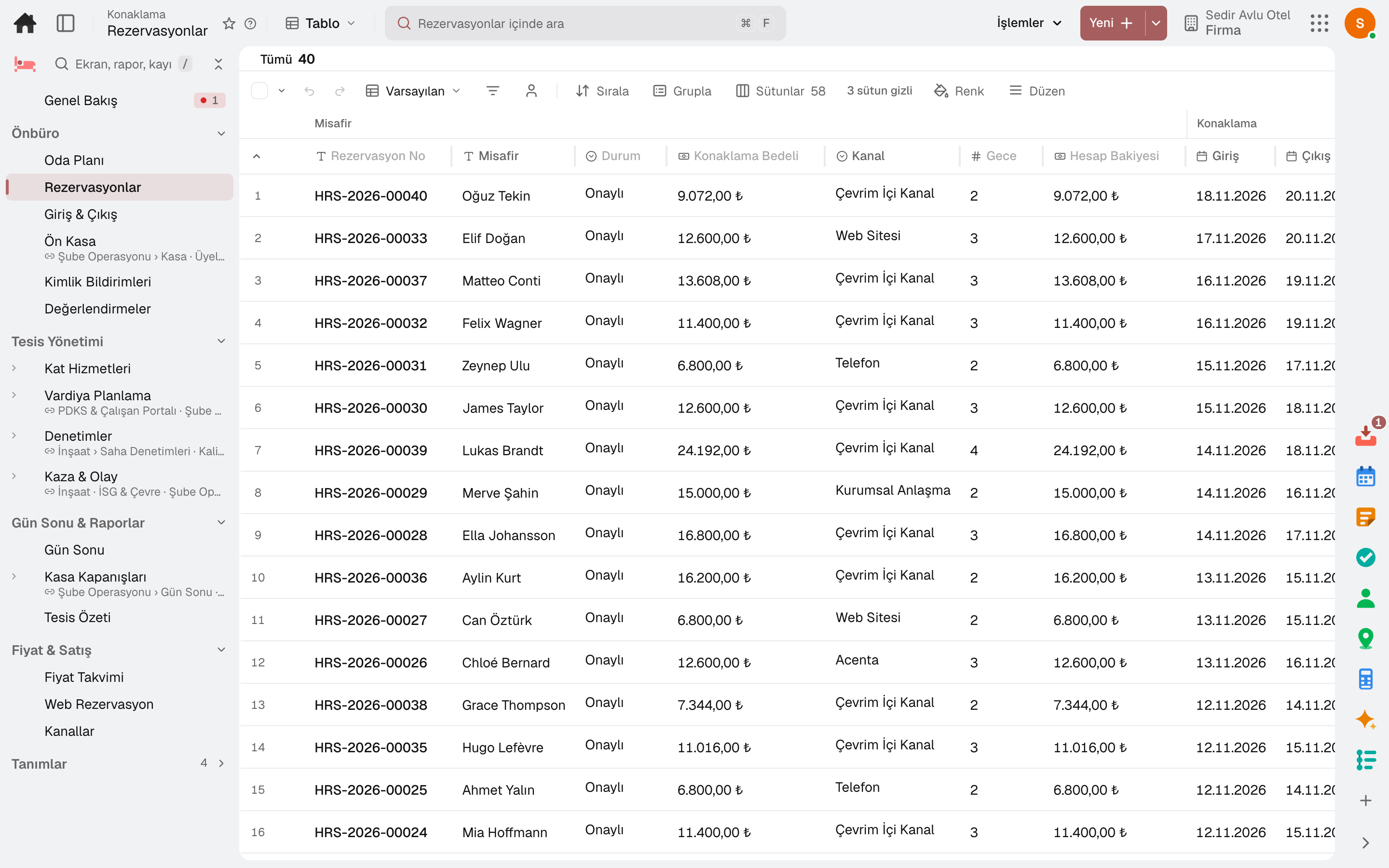
The guest books a room type and the room is assigned later. The rate comes from the plan and is written to each night; if the room type is full, the booking is not created.
Screen in the productRoom PlanReservations
Reservations
Screen in the product
  • Reservations

Room plan

Rooms day by day on a grid; the rooms left per room type each night and bookings without a room on the same screen.

Book from an empty cell

Drag across empty cells on the plan; a booking form opens with the room and dates filled in.

Rates from the plan

The booking's rate is taken from the plan and written to each night; if the room type is full or the room is taken, the booking is not created.

Room assignment and upgrades

A room is assigned by clicking the bar; a free upgrade is recorded with its reason and the rate stays the same.

Automatic room assignment

Bookings without a room can get one automatically in an hourly job; the front desk runs it at once with «Assign Rooms Now».

Cancellations and no-shows

A guest who has not arrived by the arrival date is closed as a no-show; cancellation and no-show fees are invoiced by the plan's rule.

02 / 08

Front desk: check-in and check-out

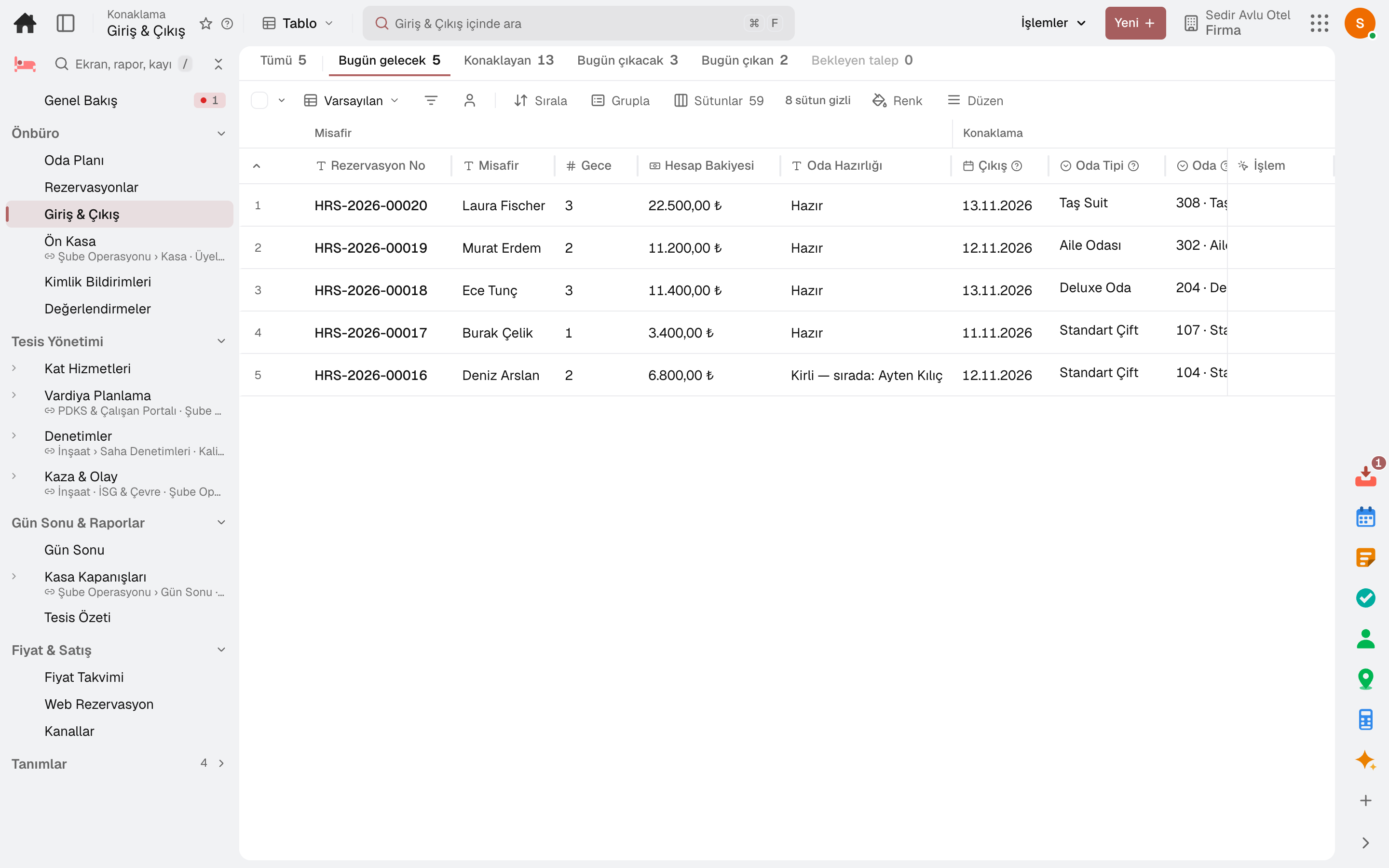
The front desk's day on one screen: today's arrivals, in-house guests and departures. The registration card is filled in, the guest checks in and the room changes if needed.
Screen in the productCheck-In & Check-Out
Check-In & Check-Out
Screen in the product
  • Check-In & Check-Out

Today's strip

Counts of today's arrivals, in-house guests, today's departures and open requests in the top strip; click one to open the list.

Registration card

Guests' identity details are entered before check-in; no check-in without a complete registration card.

Room preparation

The list shows whether the arriving guest's room is ready or still with housekeeping; the front desk can move the room up the queue.

Room move

An in-house guest's room changes; past nights stay with the old room and the old room goes to cleaning.

03 / 08

Guest folio and invoice

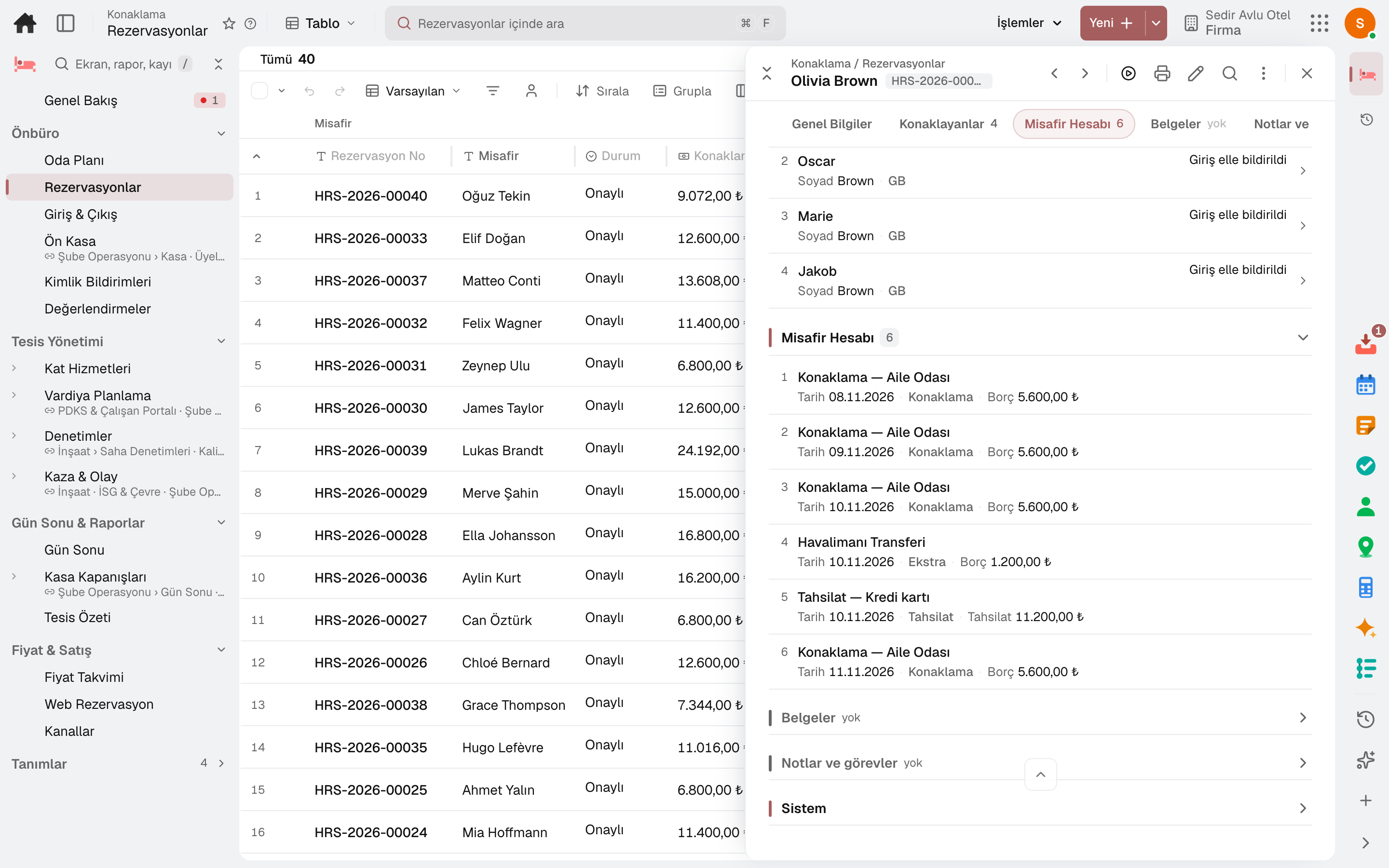
Every booking has a guest folio: nights, extras and payments in one list. Check-out settles the folio and issues the invoice.
Screen in the productReservationsExtra Services
Reservations
Screen in the product
  • Reservations

Nights and extras

Each night of the stay is its own line; extras such as minibar, laundry and transfers post in one tap at the defined price.

Payments and refunds

Payments go to the cash desk or bank and post to accounting; overpayments are refunded and a wrong line is reversed.

Split folio

Room to the company, extras to the guest: the folio is split and each folio is settled separately.

Restaurant bill to the room

A restaurant bill from the till is charged to the guest's room and shows on the folio at check-out.

Invoice at check-out

Check-out settles the folio to the cash desk or bank; the invoice is issued at check-out with accommodation tax on a separate line.

04 / 08

Rates, channels and web sales

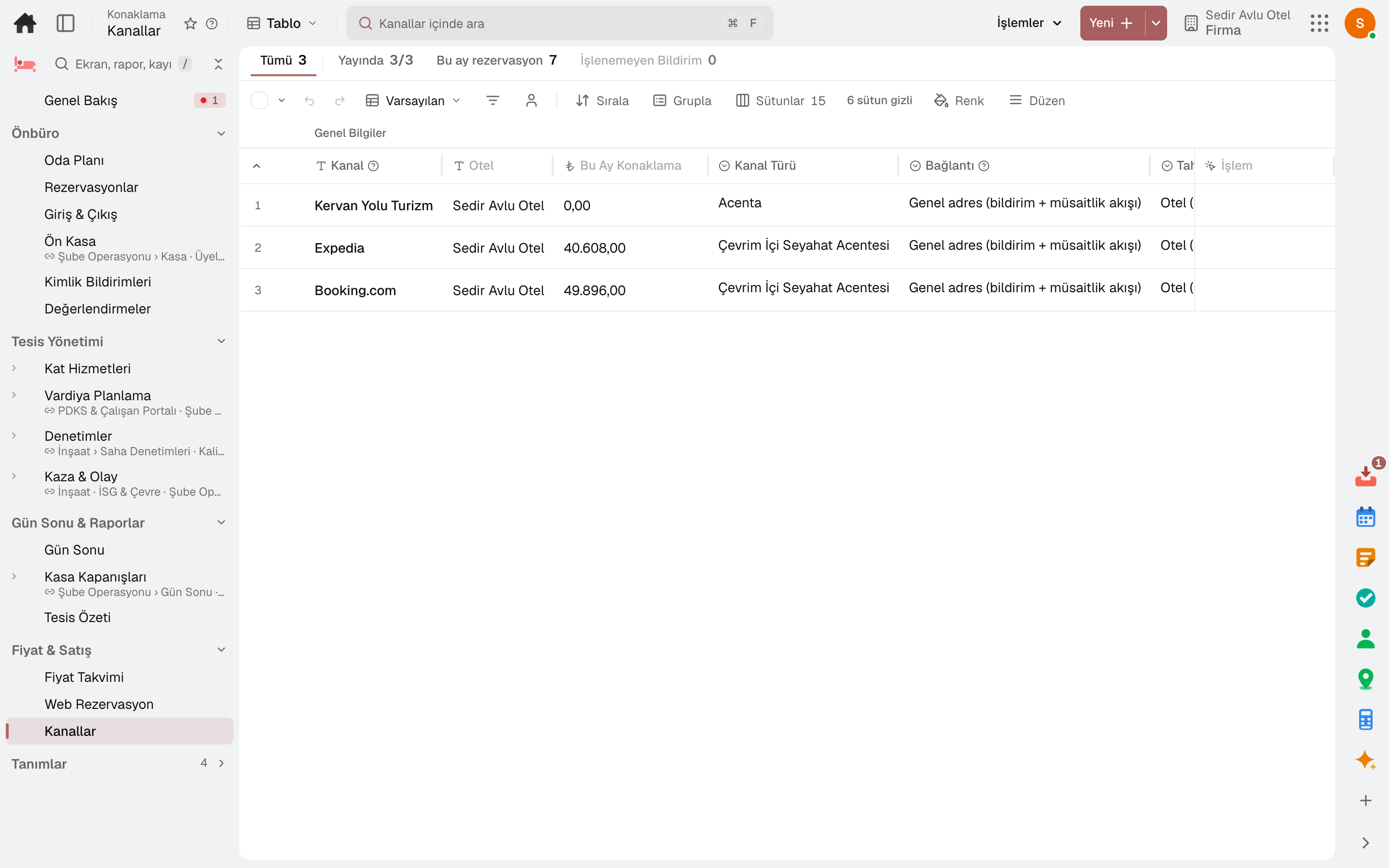
Rates are kept by plan, room type and date range. Channels and the hotel's own booking page sell the same available room.
Screen in the productRate CalendarRate PlansChannelsOnline Booking
Channels
Screen in the product
  • Channels

Rate plans

Board type (room only, breakfast, half board, full board, all inclusive), free cancellation period and currency are set in the plan.

Price calendar

Nightly rate per plan, room type and date range; minimum stay and closed-to-sale rules. A night without a rate is not sold.

Bulk Rate Change

Rates for selected nights change in bulk by percentage or amount, with optional rounding.

Occupancy-based suggestions

A rate suggestion based on occupancy arrives as a notification; you change the rate yourself.

Channels

Commission, channel rate difference and allotment for Booking.com, Expedia, Airbnb and agencies; sales on a channel can be closed for a date range.

Web booking

Guests pick dates and party size on the hotel's own page, see available room types and rates, and book themselves.

05 / 08

Housekeeping

Every room's status and work for today in one list. Housekeepers start and finish their rooms from the phone; the supervisor inspects.
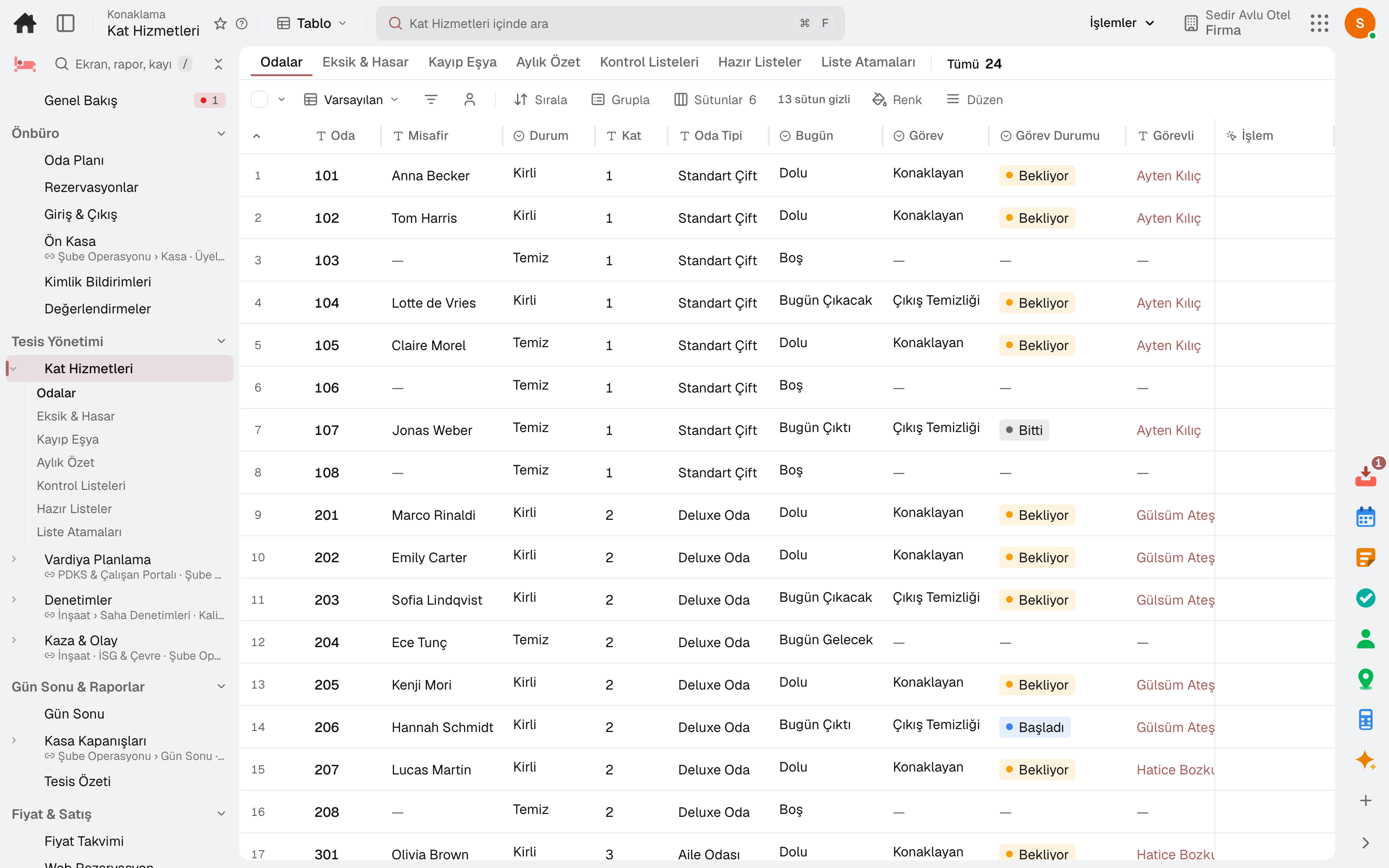
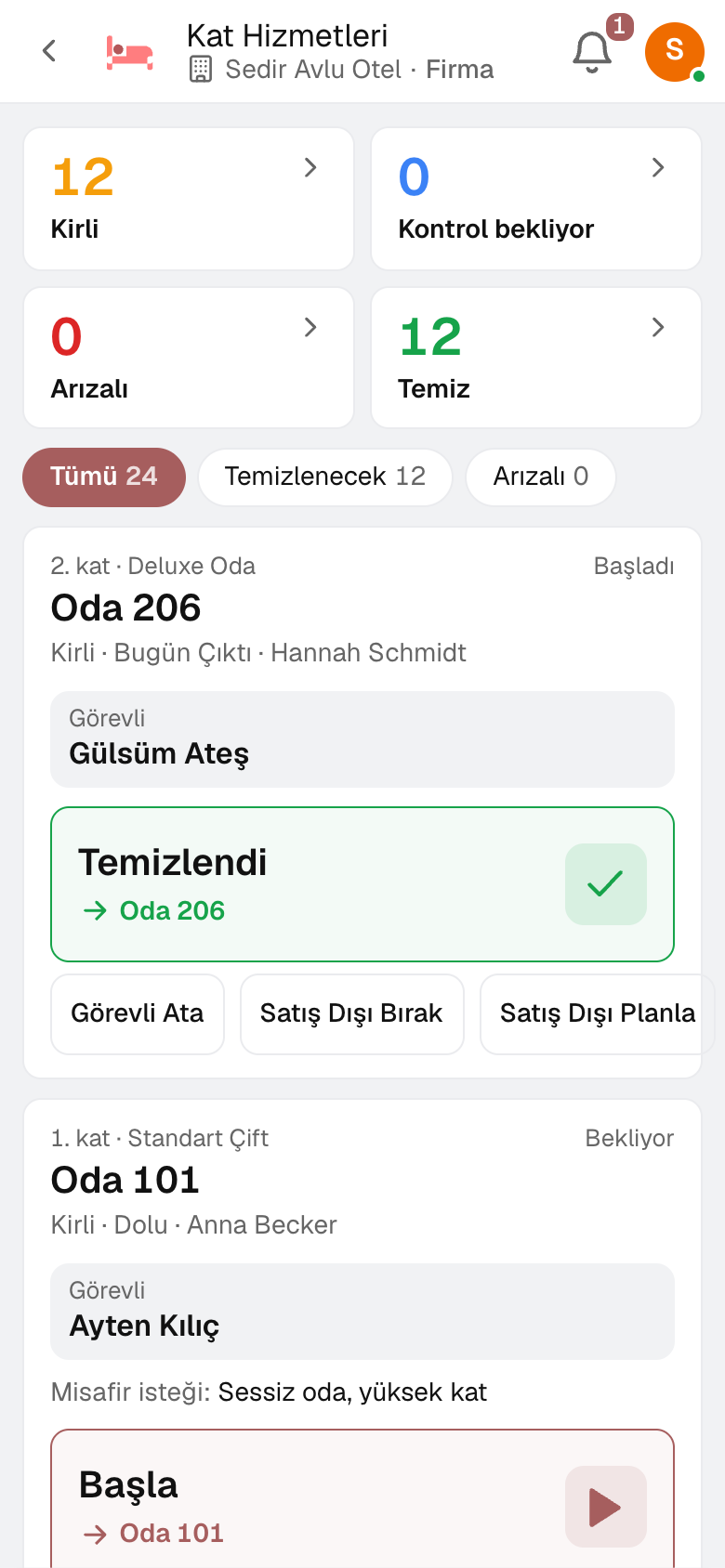
Screen in the productHousekeeping
Housekeeping
Housekeeping
Screen in the product
  • Housekeeping

Today's rooms

Cleaning status, occupancy (departing today, checked out, arriving), today's task and housekeeper, and open faults in one list.

Housekeeper on the phone

Housekeepers see their rooms on the phone and tap Start and Cleaned; the guest's request is shown on the card.

Balanced assignment

Today's tasks are shared out evenly among housekeepers by cleaning credits.

Inspection and send-back

The supervisor approves the room with a checklist; a room with defects goes back to the same housekeeper with the reason.

Faults to Maintenance

A fault goes to Maintenance as a work order; when the work order is completed, the room goes back to cleaning.

Minibar and items

Minibar counts, missing or damaged items and lost property are sections of the same screen.

06 / 08

Identity reporting

Guests' official registration report is queued person by person at check-in, room move and check-out; each guest's status shows on the booking and in the report list.
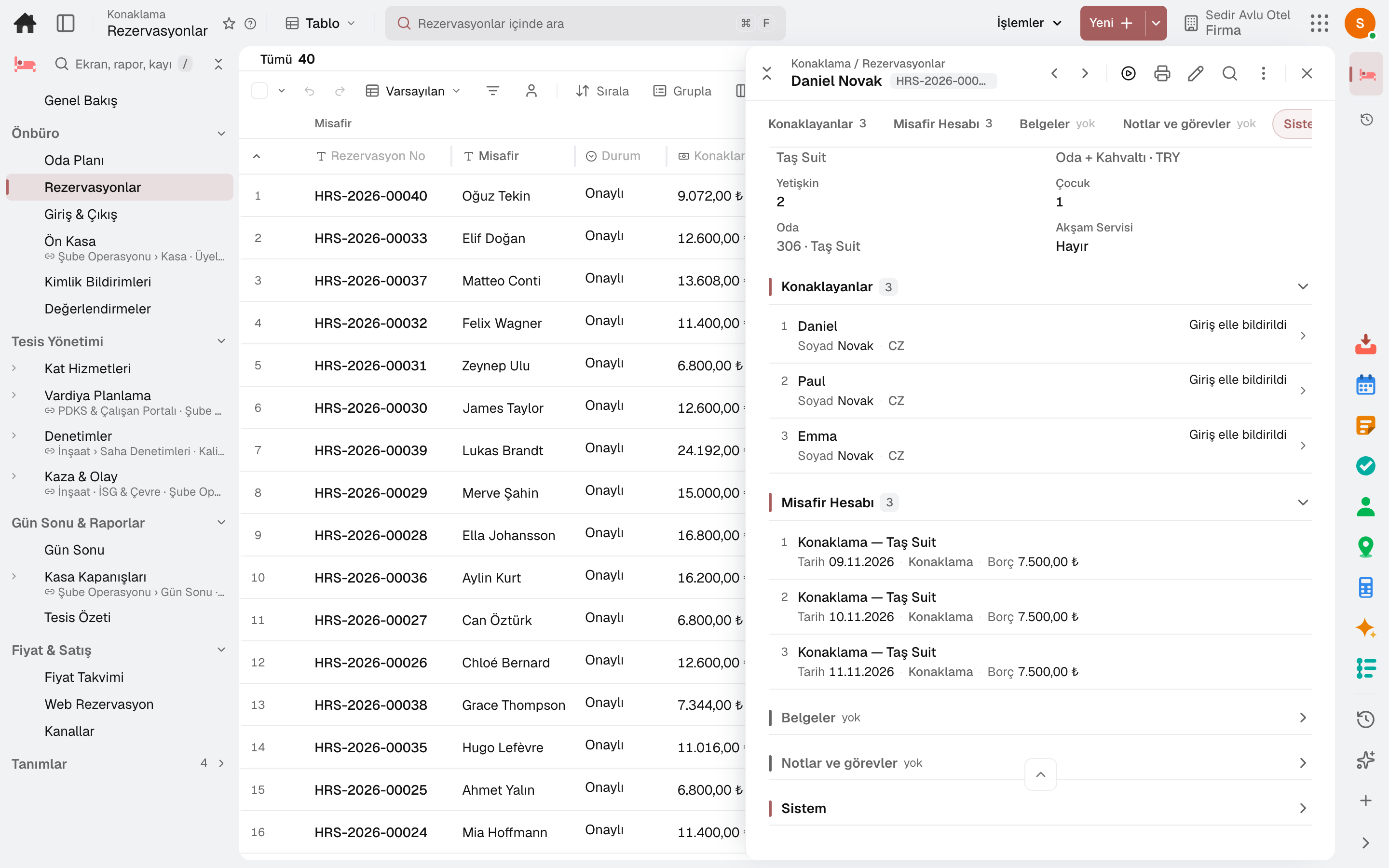
Screen in the productGuest Reports
Reservations
Screen in the product
  • Reservations

Person-by-person queue

Check-in, room move and check-out are separate report lines for each guest, listed with booking, room and nationality.

Police KBS (Emniyet)

Guests to be reported are listed; a guest entered in the KBS screen is marked «Reported Manually».

Queued and rejected

Queued and rejected reports have their own tabs; a rejected guest is corrected and resent.

Fix

When a reported guest's identity is corrected, an erroneous-entry check-out for the old record and a new check-in for the correct one are queued automatically.

Foreign guests

Foreign guests are registered with passport or document number, gender and date of birth.

07 / 08

The guest's link

Every booking has a stay link sent to the guest: the guest sends requests from there and the front desk replies.

Screen in the productGuest ReviewsGuest Segments

Requests and replies

The guest sends a request from the link; the front desk takes it on, completes it or replies.

Add-ons and upgrades

Early check-in, late check-out and room upgrade offers appear on the link by guest segment.

Self check-in

For apartments and units, the address is on the guest's link; check-in instructions, door code and Wi-Fi appear once online check-in is done and the arrival day comes.

Rating

After check-out the guest gives a score; a score below the threshold raises an alert at the front desk.

08 / 08

End of day and reports

The hotel closes the day every night. Occupancy, room revenue and average daily rate come from the night audit; multiple hotels sit side by side in the Property Overview.

Screen in the productEnd of DayProperty Overview

Night audit

The night audit closes no-shows, accrues the night for in-house guests and rolls the business day over.

Occupancy and room revenue

Each day's occupancy, room revenue and average daily rate in the night audit list.

Month-end accrual

On the last day of the month, revenue for nights not yet invoiced is accrued in accounting.

Property Overview

Each hotel's occupancy tonight, arriving and departing guests, dirty rooms and the next 14 nights on one row.

Sub-modules

Lidyos Hotel: 4 sub-modules

This list is generated from the product itself; it grows as new functions are added to a sub-module. Master data and settings are the shared ground of every module and are not counted as sub-modules.

Front office

  • Room PlanRooms × days chart: who is staying in which room, which rooms are free; free rooms of each room type for every night and reservations not yet assigned a room. Click a bar to assign a room.
  • ReservationsAccommodation reservations: the guest books a room type and a room is assigned later; the rate is taken from the plan and written to each night. If the room type is full or the room is in another reservation, the record isn't opened.
  • Check-In & Check-OutThe front office's work today: the top strip shows guests arriving today, in-house, departing today and the number of pending guest requests; the list you click opens. Check in, post extras to the account, take payment, check out; process, complete or answer requests that come from the guest's stay link. Payments post to Accounting, the checkout invoice to Invoice.
  • RegisterCashier screen: pick a table from the floor plan, tap menu items to add them, take payment and close the check. The fiscal receipt is printed by the fiscal cash register (ÖKC); by default it runs without an ÖKC integration.
  • Guest ReportsOfficial notification of in-house guests: at check-in, room change and check-out, every person is reported to the authority. In Türkiye it goes to Jandarma KBS automatically; if the authority rejects it, the person is corrected and resubmitted. Because Emniyet KBS has no open web service, the persons to be reported are listed here, entered in the KBS screen and marked. The hotel's authority, facility code and web service officer are in 'Notification Settings'.
  • Guest ReviewsGuest satisfaction: the review after check-out (overall score, cleanliness, staff, room and comment). A score below the hotel's review invitation threshold raises an alert to the front office and shows flagged here; the average score is in the top strip.

Property Operations

  • HousekeepingRooms' status and work today: cleaning status, occupancy (departing today · departed · arriving), the day's task and attendant, open breakdowns. The room attendant starts and finishes on their phone; a breakdown goes to Maintenance as a work order, and when the work order is completed the room returns to cleaning.
  • Shift PlanningCreates the roster by assigning employees to daily shifts. Builds the roster automatically based on workload and constraints; publishes and fills open shifts that have no employee assigned. Shift swaps (offer + manager approval) and employees' weekly availability/preferences are parts of the same screen; the hourly staffing demand forecast from POS sales and the labor cost ratio (plan/actual variance) are read together in the Analysis section for the same location and range.
  • AuditsPlans environmental and occupational safety audits and tracks their findings; in the Audit Program section, recurring audits are linked to the plan and created automatically when due; in the Checklist Templates section, the templates used in audits are defined by section and question.
  • Accidents & IncidentsRecords and investigates workplace accidents and environmental incidents. In the Root Cause Analysis section, the root causes of incidents are analyzed; in the Frequency Rates section, accident frequency rates of recent years (TRIR · LTIR · DART) are compared side by side, and you can drill down from a row to that year's incidents; in the QR Reporting Points section, QR-coded points for reporting incidents in the field are defined.

End of Day & Reports

  • End of DayClosing the hotel's day (night audit): no-shows are closed, tonight's in-house nights are accrued and the business day rolls over. Each day's occupancy, room revenue and average daily rate are here; on the last day of the month, revenue from nights not yet invoiced is accrued in Accounting.
  • Cashier ClosingsTill sessions and Z reports: opening float, sales, collections, count difference; till movements (expense · cash in · tip payout). The Z slip is posted to the selected treasury cash box and to accounting.
  • Property OverviewEvery hotel in the chain on one row: rooms on sale today, rooms occupied tonight and occupancy, arrivals and departures, dirty rooms; occupancy, average daily rate, revenue per available room and room revenue from this month's closed days; occupancy for the next 14 nights. The hotel's room plan opens from the row.
  • Profit CentresDefines the profit centers where revenue and expense are tracked on a profitability basis; profit center groups, which hierarchically group the centers for reporting, and the actual revenue-expense result of profit centers are sections of the same screen.

Rates & Sales

  • Rate CalendarNightly rate for plan × room type × date range; minimum nights and closed-to-sale rules. A night without a rate can't be sold. Rates are Sales price records (the plan's list, the room type's service material).
  • Online BookingThe hotel's public booking page: the guest picks dates and guests, sees available room types and their rates and makes the reservation themselves. If prepayment is required, they pay by card to the company's virtual POS; the collection is posted to Accounting, and if unpaid the room is released when the time runs out. The page only sells rate plans marked 'Sold on the web'.
  • ChannelsThe hotel's sales channels (Booking.com, Expedia, Airbnb, channel manager, agency): who collects, commission, channel price difference; channel codes and allotment of room type × plan, closing sales over a date range. Inventory is a single pool: a room opened to a channel is the hotel's free room. A channel connects either with two addresses (notification and availability) or through Channex: Connect to Channex opens room types and plans, OTAs are connected from the OTA Connections screen, and reservations arrive every minute. The channel's availability and incoming notifications open from the row; 'Unprocessed notifications' in the top strip shows the unprocessed ones of all channels.

Setup master data and settings

  • Room TypesThe unit of sale: the room type the guest books (capacity · bed layout). Inventory is kept by room type, and the room number is assigned later.
  • RoomsThe hotel's physical rooms: number, type, floor, block and cleaning status. A room out of order can't be assigned to a reservation.
  • Rate PlansThe terms a room type is sold on: board (room only · breakfast · half · full · all inclusive), free cancellation period and currency. Every plan is a Sales price list.
  • Extra ServicesItems posted to the guest folio with a single tap (minibar, laundry, transfer): VAT-inclusive price and VAT rate. Every service is a service material, and its price is a Sales price record.
  • Guest SegmentsGuest audiences: how the reservation arrived, sales channel, price plan, room type, nights and number of guests, whether there are children, whether they have stayed before and whether it is a group. If an extra service and room upgrade offer is linked to a segment, it shows only to that audience on the stay link. The list shows the number of reservations matching in the next 60 days.

Take your first booking today.

Try it free for 15 days; no credit card needed. We reply to your questions within one business day.