Room plan and reservations
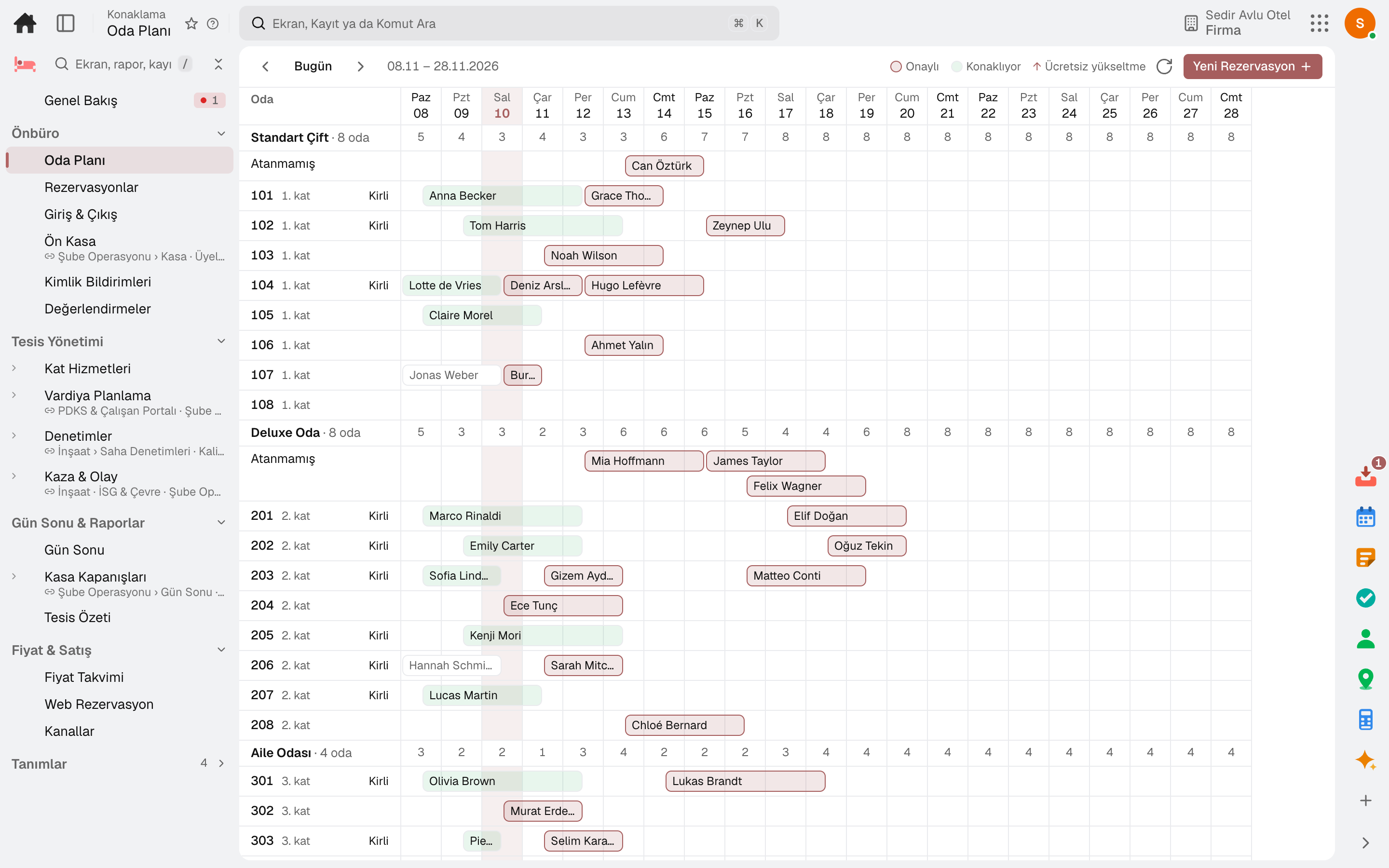
The room plan shows rooms day by day; availability is kept by room type, and a free or paid upgrade is recorded with its reason.
Hotel software for boutique hotels, guesthouses, serviced apartments and short-term rental units. Nothing to install: room plan and bookings, check-in, check-out and guest folio, rate plans and channels, housekeeping, guest registration reporting and night audit come ready.
No credit card, nothing to install.
Who it's for
The same software, set up for your property: hotel, serviced apartment or short-term rental is chosen during setup.
Reception, housekeeping and accounting on one screen: a small team, complete records.
Boutique hotel and guesthouse softwareFrom booking to cleaning, every apartment's calendar on one plan.
Serviced apartment and short-term rental softwareHighlights
The room plan shows rooms day by day; availability is kept by room type, and a free or paid upgrade is recorded with its reason.
Today's arrivals, in-house guests and departures on one strip; check-in, extras to the folio, payments and check-out are done here, and an invoice is created at check-out.
The rate calendar holds the nightly rate for each plan, room type and date range, with minimum-stay and closed-to-sale rules; a night without a rate cannot be sold.
Commission, channel rate difference and allotment for Booking.com, Expedia, Airbnb and agencies; inventory is a single pool, and a room opened to a channel is one of the hotel's free rooms.
On the hotel's own booking page the guest picks dates and party size, sees the available room types and rates, and makes the reservation themselves.
Guests send requests from their stay link; early check-in, late check-out and room upgrade offers appear according to the guest segment.
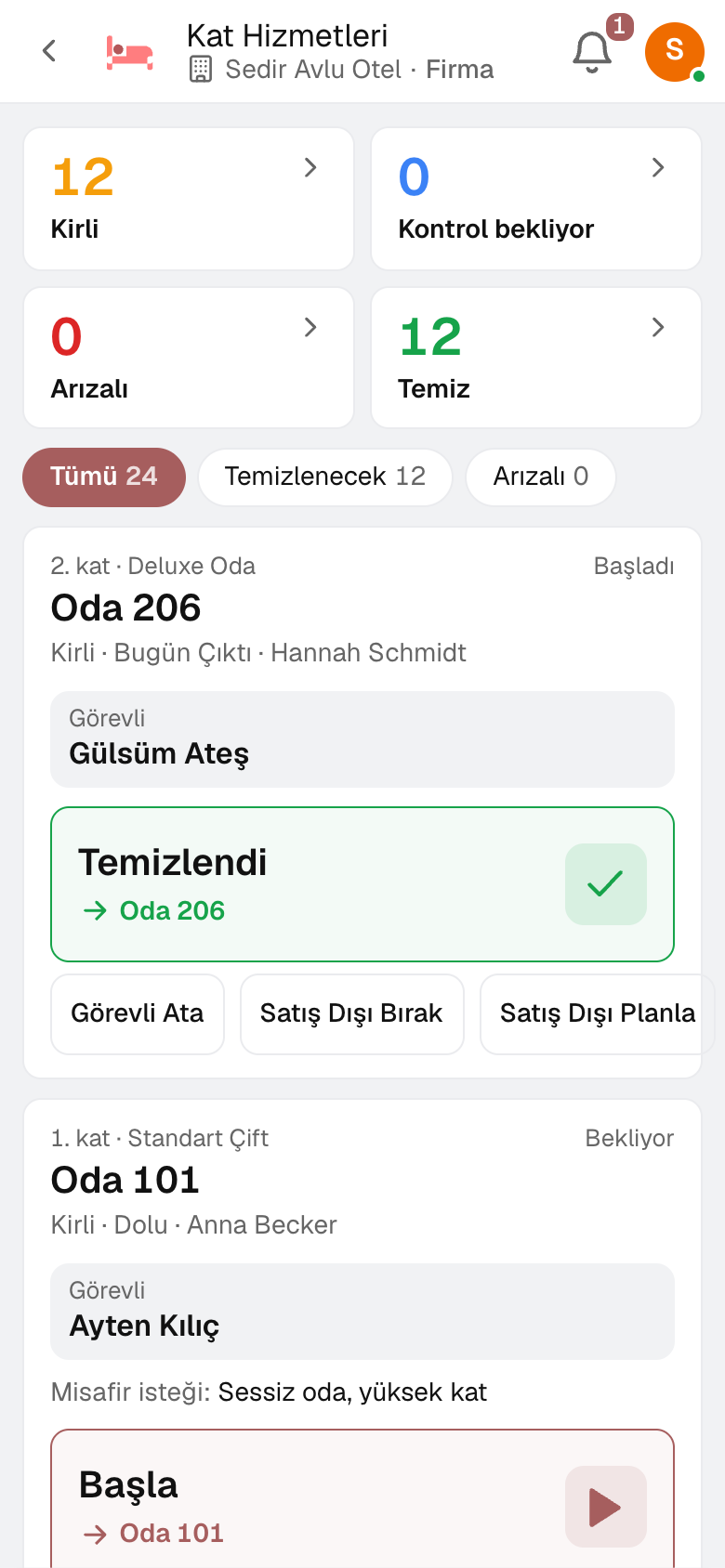
Night audit closes the business day and processes no-shows; the room attendant runs the cleaning from their phone, and a fault lands in Maintenance as a work order.
Guests are queued for registration reporting at check-in, room move and check-out; a low score in the post-stay review raises an alert at the front desk.
The restaurant check is posted from the till to the room; Property Overview shows the occupancy of all hotels side by side.
A day
Every step works on the same data: a record entered in one step is never keyed in again in the next.
The booking is made for a room type and priced from the plan; the room is assigned on the Room Plan.
The registration card is filled in and the guest checks in; registration reporting is queued.
Extras post to the folio; the guest's request comes in through their link and the front desk replies.
The housekeeper cleans the room from the phone and the supervisor inspects it.
The folio is settled to the cash desk or bank and the invoice is issued.
No-shows are closed, the night is accrued and the business day rolls over.
As you grow
When the hotel's restaurant or a second property opens, you continue in the same account: guests, rates and past stays stay in place. Accounting, purchasing and inventory share the same data.
Restaurant management software — for restaurants, cafés, patisseries and fast food outlets.
5 modules in the packageAccounting software
In the journal the moment the invoice is issued; no waiting for month end.
13 sub-modulesCash and finance management software
See your cash today, and next week from today.
6 sub-modulesPurchasing software
From requisition to invoice, every purchase approved and traceable.
10 sub-modulesRegister, tables, branch orders and shelves on one branch screen.
10 sub-modulesMaintenance management software
Breakdowns reported by QR, maintenance plans from the calendar.
5 sub-modulesFrequently asked
Yes. Each hotel is a branch; the room plan opens branch by branch, and Property Overview shows them all together.
Yes. The restaurant till is part of the same product; the check is charged to the guest's room and appears on their folio at check-out.
Guests are queued for reporting at check-in, room move and check-out. For Police KBS (Emniyet), guests to be reported are listed; a guest entered in the KBS screen is marked in the list.
No. On the phone, Housekeeping opens as the housekeeper's screen: they see their rooms and start and finish the cleaning.
No. Payments post to accounting and the check-out invoice to billing; accounting, purchasing and inventory are open in the same account.
Yes. The property type is chosen during setup; each unit is a room on the plan.
Yes. You can take your data out at any time via Excel, CSV or the API.
Free for 15 days
Every app is open for 15 days. No credit card, no installation; your team signs in from the browser.
Try it free for 15 days; no credit card needed. We reply to your questions within one business day.