Skip to content
Lidyos
Sales & Marketing

MarketingSocial media, Google and your website on one panel.

Social media posts and incoming messages, Google Business profiles, email, SMS and WhatsApp campaigns and website content are managed in one app. Applications from web forms land with the relevant unit.

  • 6 sub-modules
  • 24 modules at the same price

Industries: Retail and store chains · E-commerce and omnichannel sales · Dealer and franchise networks

Roles: Sales representative · Marketing specialist
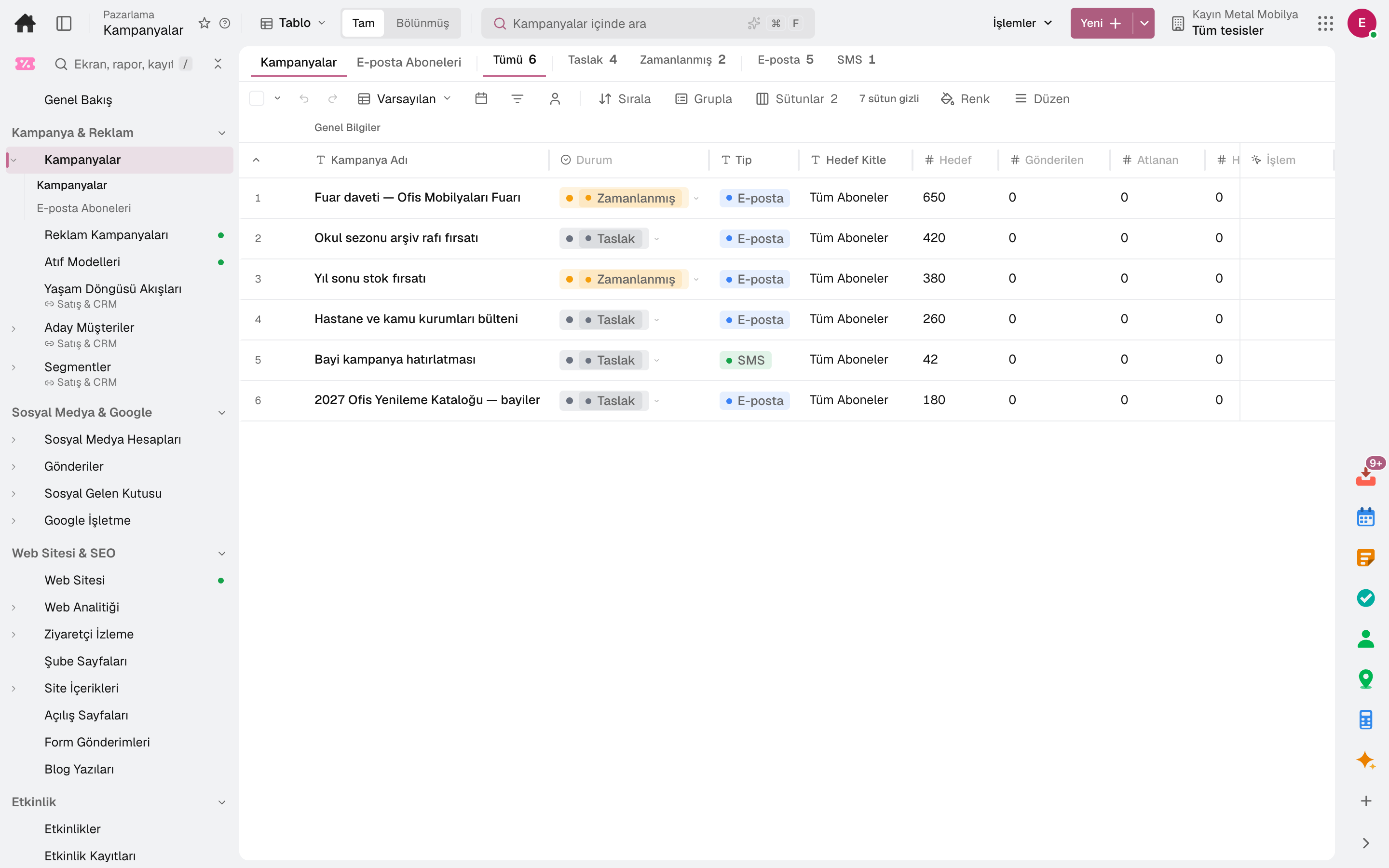
Campaigns
Screen in the product
  • Campaigns

What is it, and why do you need it?

What is Marketing for?

As the number of branches grows, each branch's Google profile, social media account and web page becomes a separate workload; reviews go unanswered and campaigns look different on every channel.

The Marketing app plans posts on one calendar, gathers comments and messages in one inbox, and manages branch pages and landing pages. Web analytics shows which content works.

Scope: Runs marketing activities such as campaigns, subscribers, social media, Google Business, SEO, the website and events (tickets, registration page, QR badges, check-in desk).

Highlights

What do you do with Marketing?

01

Post calendar

Posts to several platforms with images and hashtag groups; publish now or on a schedule, on one calendar together with campaigns.

02

Social inbox

Comments, messages and mentions on connected accounts are gathered and answered in one inbox.

03

Google Business

Branches' Google profiles, ratings and reviews; posts to profiles, review replies and view statistics per branch.

04

Campaigns and subscribers

Email, SMS and WhatsApp campaigns; subscribers are kept with per-channel consent and opt-out requests are processed.

05

Website and branch pages

The company website is built with its top menu, footer and home page sections, edited with a live preview and published; branch pages, landing pages and the blog are in the same place.

06

Web analytics

Visits and traffic sources from GA4 data, Google search queries and page performance.

07

Events

An event is opened with its date, venue, capacity and ticket types; a public registration page is published, and registration closes automatically when capacity is reached. At the check-in desk the QR code on the badge is scanned and attendance recorded.

08

Venue hire and private events

For hotels and restaurants, an enquiry for a wedding, corporate dinner or meeting comes in from the form embedded in your website; it moves through new, in discussion, proposal and won.

09

Visitor tracking

Visitors browsing your site with cookie consent are tracked; a visitor recognised by e-mail is linked to their CRM record, and the owner is notified when they view a hot page.

Sub-modules

Marketing: 6 sub-modules

This list is generated from the product itself; it grows as new functions are added to a sub-module. Master data and settings are the shared ground of every module and are not counted as sub-modules.

Campaigns & Ads

  • CampaignsSets up email, SMS and WhatsApp campaigns with target audience and content; tracks delivery and results. The Email Subscribers section manages marketing subscribers with their channel-based consents; it processes subscription and unsubscribe requests.
  • Ad CampaignsCampaigns of linked ad accounts (Google · Meta · LinkedIn) in the selected interval: cost (in the account's currency), clicks, impressions, click-through rate, conversions counted by the network, CRM leads matched to the campaign and cost per lead; selecting a row opens the campaign's day-by-day measurement.
  • Attribution ModelsMulti-touch attribution models that share a marketing conversion's value among the customer's earlier touches: first touch, last touch, linear, time decay, position-based, W-shaped, or a custom weighted model where you set the first · middle · last percentages. A model is set up as a draft, applied to conversions once activated and retired when archived; each model's attributed conversions, value (per currency) and channel breakdown are shown.
  • Lifecycle FlowsManages lifecycle flows such as win-back and after-sales; configures record distribution and the trigger threshold.
  • Lead 360Tracks lead information and the conversion process on a single screen.
  • SegmentsDivides the CRM universe (contact · account · lead) into RULE-based dynamic segments and measures segment overlap; in the Customer Value (RFM) section, divides customers into 11 segments by recency-frequency-turnover score and sets the quintile thresholds.

Social Media & Google

  • Social Media AccountsDefines and manages connected social media accounts (platform, permission and profile); in the Analytics section of the same screen it compares follower, reach and engagement metrics by platform over periods.
  • Social PostsPrepares social media posts (multiple platforms, image, hashtag group; immediate or scheduled publishing) and tracks them on a single calendar together with scheduled campaigns; keeps hashtag groups in a section of the same screen.
  • Social InboxCollects comments, messages and mentions received on connected accounts in a single inbox and replies to them.
  • Google BusinessManages Google Business profiles (branch, rating, review count); in sections of the same screen it shares posts to profiles, replies to customer reviews and shows impression, search and direction request statistics by branch.

Website & SEO

  • WebsiteBuilds the company's website: top menu, footer, home page sections (products, blog, branches, careers, contact form) and appearance; edits with a live preview and publishes.
  • Web AnalyticsSummarizes the website's visitor, session, traffic source and engagement metrics using GA4 data; in sections of the same screen it shows Google search queries (clicks, impressions, CTR, position, opportunity band) and page performance (Core Web Vitals).
  • Website VisitorsTracks those who browse your site with cookie consent; links a visitor recognized by e-mail to the CRM card and notifies the owner when they view a hot page.
  • Branch PagesManages the branches, kiosks and temporary points published on the website with their address, working hours and location.
  • Site ContentManages the website's published content on a single screen: home page and campaign banners (image, link, publication date), announcements (publication range, priority) and corporate page content (About Us, data protection (KVKK), franchise; publication approval and version history).
  • Landing PagesCreates landing pages linked to campaigns; builds and publishes their content with the block editor.
  • Form SubmissionsCollects submissions from website forms, landing pages and ad forms in a single list; creates a lead and routes it to the relevant unit.
  • Blog ManagementManages website blog posts with draft, publish and archive steps; schedules a post for a future date.

Events

  • EventsEvents: date, location, capacity, ticket types (paid/free, capacity per type), agenda and e-mail schedule. Open Registration publishes the public registration page; registration closes automatically when the event is full.
  • RegistrationsTickets bought in one go: contact person, tickets, registration questions, payment and invoice. A paid registration is confirmed once the payment is received; a draft invoice is created and the collection is posted to accounting.
  • Check-In DeskThe attendant at the door selects the event and scans the QR on the badge (barcode reader or camera), and attendance is recorded; a second scan tells the first entry time. Below is the event's ticket list: name correction, ticket PDF, undo entry. Badges are printed in bulk from here.

Private Events & Venues

  • Event InquiriesRequests from those who want to hold a private event at the venue (wedding · engagement · birthday · corporate dinner · meeting). The request form is embedded in your site; a request that comes by phone is entered manually. On the kanban: new → in discussion → quotation → won / lost.
  • Private EventsA single customer's event at the venue (wedding · engagement · corporate dinner): quotation items (menu · package), day schedule (BEO), hall and deposit. The hall is held on option and on firm booking; the guest views the quotation page, signs and pays the deposit.
  • Event Sales ReportThe venue sales report: requests received and quotations opened in the selected period by source, loss reason, sales representative, event type and month — requests, converted to quotation, won, lost, canceled, conversion, revenue and the post-event survey's average satisfaction with NPS.

Brand & Budget

  • DesignsDesigns posters, social media images, price labels, menu boards, member cards and certificates from ready templates or a blank size; templates take on the company's brand kit (logo, colours, fonts). Designs are stored in Documents and exported as PNG or PDF.
  • Budget Roll-UpDistributes budget entry tasks to cost center owners; tracks who has entered, who is late and the approval status.
  • Advertising Fund
  • Corporate Identity Library

Setup master data and settings

  • DomainsConnects the site's own domain: shows the DNS records for www.yourcompany.com, checks ownership and the certificate, selects the primary address; shows the free subdomain.
  • Ad AccountsConnects your Google Ads, Meta Ads and LinkedIn Ads accounts: campaign spend, clicks, impressions and conversions are pulled every night, CRM leads are matched to campaigns and cost per lead is calculated. Sub-accounts of a Google manager (MCC) account can be selected; if you wish, a won opportunity is uploaded to the ad network as a conversion (Google offline conversion · Meta and LinkedIn Conversions API).
  • Lead Ad FormsTakes people from Google Ads, Meta and LinkedIn ad forms into Form Submissions and makes them CRM leads.
  • Menus and PackagesThe venue's ready items added to a quotation: menu, beverage, decor and technical packages — category, unit (per person · piece · fixed), price including VAT and content. In a private event, 'Add from Package' copies the selected ones into the quotation as items.
  • Venue DefaultsPrivate event defaults per hall: minimum spend including VAT and setup/teardown allowance. They are applied automatically to a new event opened in that hall; when the hall changes, values that were not manually edited switch to the new hall's.
  • Event Task TemplatesRecurring work in every private event: when the event is confirmed, put on option or the quotation is sent, the matching template's task is opened; the due date is ± days from the event day or the trigger day, assigned to the sales representative or a selected user. It lands in the Task Inbox and the calendar.

Frequently asked

About Marketing

Where do the website forms go?

Contact, quotation and franchise application forms are listed in Form Submissions and routed to the relevant unit.

Do we update branch pages one by one?

Branches, kiosks and pop-up points are managed on one screen with their address, opening hours and location.

How are campaign consents kept?

Subscribers are kept with their per-channel consents; subscribe and unsubscribe requests are processed and recorded.

Close next month end without a reconciliation marathon.

Try it free for 15 days; no credit card needed. We reply to your questions within one business day.