Skip to content
Lidyos
Production & Inventory

Lidyos ManufacturingProduction planning and tracking software

From order to batch, planned and produced side by side.

Bills of materials and recipes, demand planning and MRP, production orders and confirmations, capacity and OEE in one app. Discrete and process manufacturing run on the same engine; batches, serial numbers and industry-specific data (e.g. allergens in food) are part of production.

  • 7 sub-modules
  • 24 modules at the same price

Industry packages: Lidyos Fashion

Industries: Machinery, metal and automotive suppliers · Textiles and apparel · Chemicals, plastics and cosmetics · Food and beverage

Roles: Production planner · Production operator · Quality specialist · Maintenance technician · Shift supervisor · Cutter and sewing operator · R&D specialist
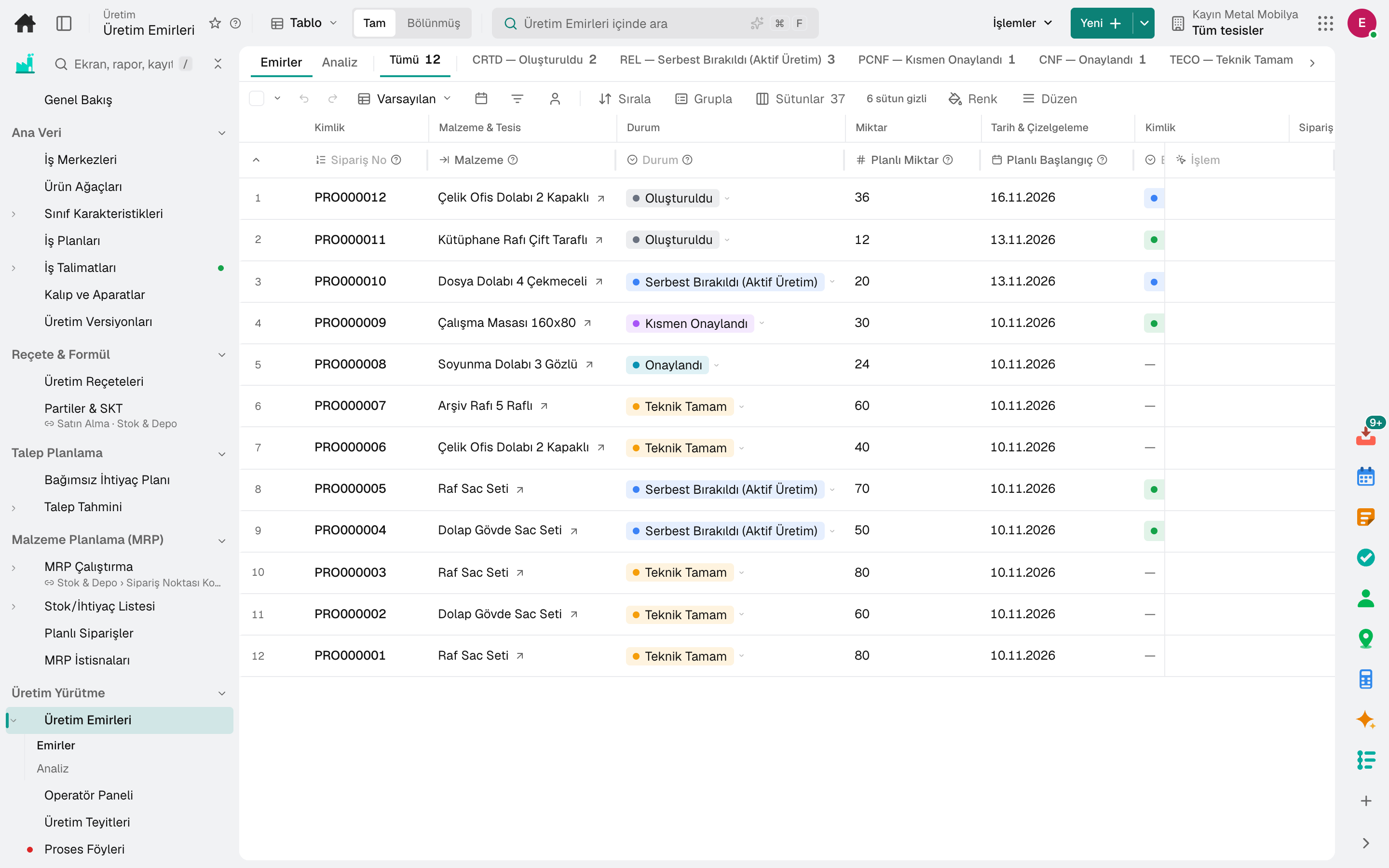
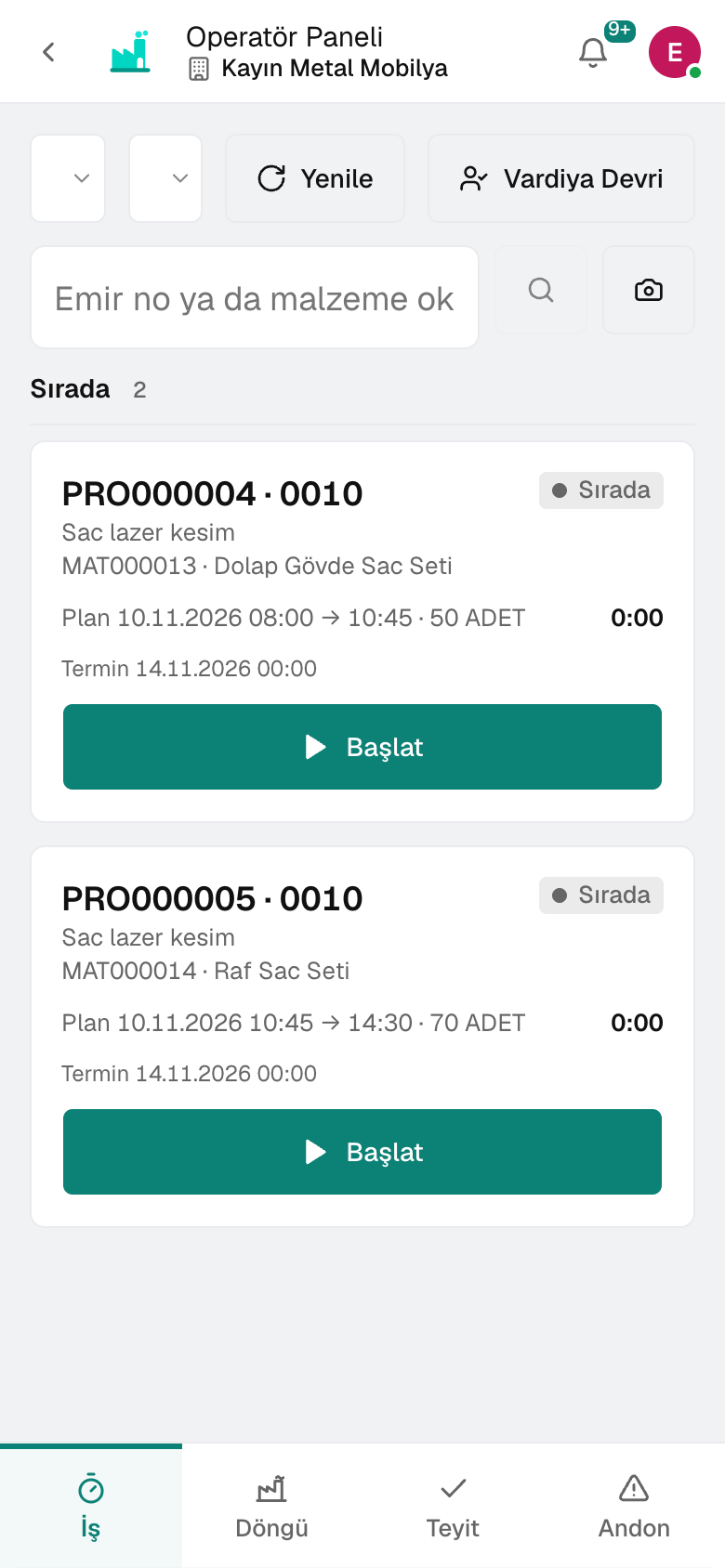
Process Order
Operator Panel
Screen in the product
  • Process Order
  • Operator Panel

What is it, and why do you need it?

What is Lidyos Manufacturing for?

When the production plan is in a spreadsheet, the recipe in another file and actual consumption in the shift log, nobody can tell what was under- or over-produced and why; material requirements are worked out by guesswork.

With Lidyos Manufacturing, the demand forecast and the sales and operations plan feed MRP, and MRP generates planned orders and purchasing requirements. When a production order is confirmed, stock and cost update instantly; the operator panel and andon collect data from the shop floor.

Scope: Manages production processes such as production planning, work orders, recipes and capacity.

Highlights

What can you do with Lidyos Manufacturing?

01

Recipes and bills of materials

Bills of materials, routings, production versions and the work centers that define lines and tanks; engineering changes on record.

02

Product attributes and industry data

Attributes such as colour and size are defined as class characteristics; in food, the allergen declaration (EU 1169), composition table and product claims are kept together with the recipe.

03

Demand and MRP

Demand forecasting, planned independent requirements, sales and operations planning; MRP runs, planned orders and exception lists.

04

Production orders and confirmation

Production orders, confirmations and repetitive manufacturing; the operator panel and andon board show what is happening on the floor.

05

Capacity and scheduling

Scheduling, setup matrix, secondary resources such as operators and moulds, kanban loops and an alert monitor.

06

OEE and cost

OEE from availability, performance and quality; cost estimates and costing settings.

07

Breakdown

A carcass, whole fish or log is weighed and broken down into parts; the parts enter stock under the input's batch number, the input's cost is shared across the parts by weight and coefficient, and waste carries no cost.

08

Work instructions

The operator completes the instruction step by step at the station; an instruction is assigned to a work centre and product, and the job cannot close until a mandatory instruction is finished.

09

Cutting optimisation

For cutting profiles, pipes, sheet metal, glass and panels, the required parts are nested with the least stock and waste; kerf and edge allowance are deducted, and the patterns are drawn.

Sub-modules

Lidyos Manufacturing: 7 sub-modules

This list is generated from the product itself; it grows as new functions are added to a sub-module. Master data and settings are the shared ground of every module and are not counted as sub-modules.

Recipe & Formula

  • Master RecipeDefines the master recipe of process manufacturing.
  • Recipe BooksGroups recipes into named, ordered books: pizza station, desserts, summer menu. A book links recipes instead of copying them. It prints in one go (each recipe on its own page) and feeds the requirements list; if visible plants are chosen, only users with access to those plants see it.
  • Allergen (EU 1169)Defines the allergen content of products per EU 1169.
  • Food Composition TableNutrients per 100 g of raw materials (energy, fat, carbohydrate, sugar, protein, salt, fiber); standard rows come from USDA FoodData Central, and the material card's nutritional values are filled from here.
  • Product ClaimsDefines the RULE for label claims such as "Gluten-Free". Evidence is derived from the product's component tree; you can see the result in the "Product Claims" section of the Material card.
  • Batch MasterDisplays and updates the master data of existing batches.

Demand Planning

  • PIRDefines planned independent requirements.
  • ForecastGenerates material demand forecasts from past consumption; runs and models, AI forecast, store clustering · new product (NPI) · cross-product impact enrichment are sections of the same screen.
  • SOPCarries out sales and operations planning (SOP).

Material Planning (MRP)

  • MRP RunRuns material requirements planning (MRP); the MRP list produced by the runs and the comparison of two runs are sections of the same screen.
  • Stock/Requirements ListShows the stock and requirements balance of a material.
  • Planned OrderManages the planned orders proposed by MRP.
  • MRP ExceptionsShows the exceptions and warnings flagged by MRP.
  • LTP Long-Term PlanningSimulates long-term planning scenarios.

Production Execution

  • Process OrderCreates production orders, plans and tracks their materials and operations; analyzes the order portfolio by status, completion and delay.
  • Operator PanelProvides the production operator with a work order and confirmation panel on a tablet.
  • ConfirmationConfirms the actual quantities and times of production operations.
  • PI SheetRecords the step measurements of the production sheet and has a second person sign them.
  • Repetitive ManufacturingRepetitive manufacturing shift board (start cycle · add production · close + backflush), its profiles (product · version · line) and cycle history on one screen.
  • Kanban CyclesManages Kanban control cycles and container statuses; a consumption signal generates a replenishment suggestion.
  • Cutting OptimizationCalculates patterns that fit the required pieces with the least stock and waste when cutting bars (profiles, pipes, timber) and sheets (metal, glass, panels, fabric); deducts saw kerf and edge margins, compares the required stock quantity with available stock and draws the patterns.

Capacity & Scheduling

  • SchedulingSchedules production orders to work centers: operation plan (operation-level Gantt — with routing order, shift, maintenance and leave; drag and drop, right click, plan by rules), capacity load and its runs, balancing plans and scheduling runs.
  • Setup Group and MatrixDefines setup groups and the changeover matrix.
  • Secondary Resources (Operator/Mould)Manages the operator pool, die and tool resources, and the requirements of routing operations.
  • Demand-Supply PeggingShows the link chain between demand and supply.
  • Planning AlertsAlarms of matching and scheduling runs — unmet or late demand, work center with high setup, overdue operation; from an alarm you move to the material and the order, approve and resolve.
  • Production Line SimulationTests a decision on a new line, additional machine or shift before building it: with station, operator, buffer, break and breakdown definitions, it measures daily output, flow time, intermediate stock and the bottleneck; compares saved scenarios.
  • Line BalancingDistributes a product's operations among the line's operators: stations are consecutive operations, a heavy operation is shared among multiple operators; the bottleneck is minimized. Balance efficiency, units per shift, takt for the target quantity and the number of operators required are calculated; operators are assigned to stations or suggested from the Skills Matrix (the operator's measured efficiency in each operation).

Monitoring & OEE

  • Andon BoardShows production line stoppage and problem signals on a live andon board.
  • OEE MetricsCalculates and tracks overall equipment effectiveness (OEE). Classification: World class ≥85% · Good ≥75% · Average ≥60% · Weak ≥40% · Low <40% (bands come from the calculation engine).

Breakdown

  • Disassembly TemplatesReverse bill of materials: the parts a disassembled material (carcass, whole fish, log, fabric roll) is split into. For each part you enter what percentage of the input weight it is (expected yield) and what share of the cost it takes (coefficient); the remainder is expected loss. In a disassembly, the lines are filled from here.
  • DisassembliesWeighing a batch (carcass, whole fish, log) and splitting it into parts: parts are filled from the template and each part's weight is entered. «Finalise» issues the input from stock and receives the parts into stock with the input batch's number; the input's cost is shared among the parts by weight × coefficient, and loss carries no cost. Unsold parts are reversed with «Undo».
  • Disassembly WeighingThe cutting-room bench screen: pick a draft breakdown, tap a part, read the scale or type the weight; each weighing adds to the part's total and, if wanted, prints that pack's label (net kg · batch · expiry date · barcode). A wrong weighing can be undone; when finished, «Post».
  • Disassembly YieldEvery part of the disassemblies finalised in the last 90 days: the weighed yield is compared with the template's expected yield (deviation in points and kg), with its cost and cost per kilo; each document's loss is a separate row. Grouping by part or template shows totals at the bottom.

Master Data

  • Work CentreDefines production work centers with their capacity and cost.
  • Bill of MaterialsDefines the bill of materials (BOM) of products.
  • Variant ConfigurationDefines a configurable product's profile (characteristic class + base price), the selection condition and quantity formula of super BOM items, and surcharges on characteristic values; «Configure» derives the BOM and price from the values and stores the configuration linked to the quotation/order.
  • CharacteristicDefines the characteristics used in classification.
  • RoutingDefines the product's production operation routing and times.
  • Work InstructionsStep-by-step work instructions the operator completes at the station: write an instruction or take one from the ready-made library, assign it to a work centre and product, and set the skills the station requires; a job cannot be closed until its mandatory instruction is done.
  • Tools & Moulds
  • Engineering ChangeManages product and recipe changes with an engineering change record.
  • Production VersionDefines the valid BOM and routing combination for a product.
  • Engineering WorkbenchEdits BOMs and routings in bulk: browser, comparison, bulk item and operation changes, reordering, before/after log (SAP CEWB).
  • Cost EstimateCalculates the standard cost of a product from the recipe and routing.

Setup master data and settings

  • Costing SettingsDefines the variant and components of product cost calculation: costing type, valuation variant, date control and costing sheet.
  • Production SettingsProduction scheduling settings: operation control keys, time reduction levels, batch search strategies and scheduling profiles.
  • Stock Movement TypeDefines the ledger direction, value/quantity update and reversal type of stock movement types.
  • Order TypeOrder type and plant × type parameters. Defines production order types as master data (code · name · number range · defaults); a new type is created from here.
  • MRP SettingsManages MRP area, MRP type, lot-sizing procedure and MRP group parameters, along with the company's MRP defaults.

Frequently asked

About Lidyos Manufacturing

Are batches and serial numbers tracked?

Yes. Every batch produced is recorded, with an expiry date where required; serialised materials are tracked through goods movements. Batch traceability shows the chain from raw material to shipment.

Can we run discrete and process manufacturing together?

Yes. Discrete manufacturing with routings and bills of materials and process manufacturing with recipes and PI sheets are in the same app; the production version determines which one the product is made with.

Can tablets be used on the shop floor?

The operator panel and andon board are designed for touchscreens; confirmations and downtime are entered on the shop floor.

Close next month end without a reconciliation marathon.

Try it free for 15 days; no credit card needed. We reply to your questions within one business day.