Skip to content
Lidyos
Logistics & Transportation

LogisticsYour own fleet and your carriers in one control tower.

Vehicles and drivers, shipments and proof of delivery, freight orders and carrier tenders, settlements and customs declarations in one app. The control tower shows every load and alert on the road.

  • 11 sub-modules
  • 24 modules at the same price

Industry packages: Lidyos Logistics · Lidyos Rental · Lidyos Trade

Industries: Chemicals, plastics and cosmetics · Food and beverage · E-commerce and omnichannel sales · Wholesale and distribution · Vehicle and equipment rental

Roles: Warehouse manager and warehouse worker · Shipping planner and driver
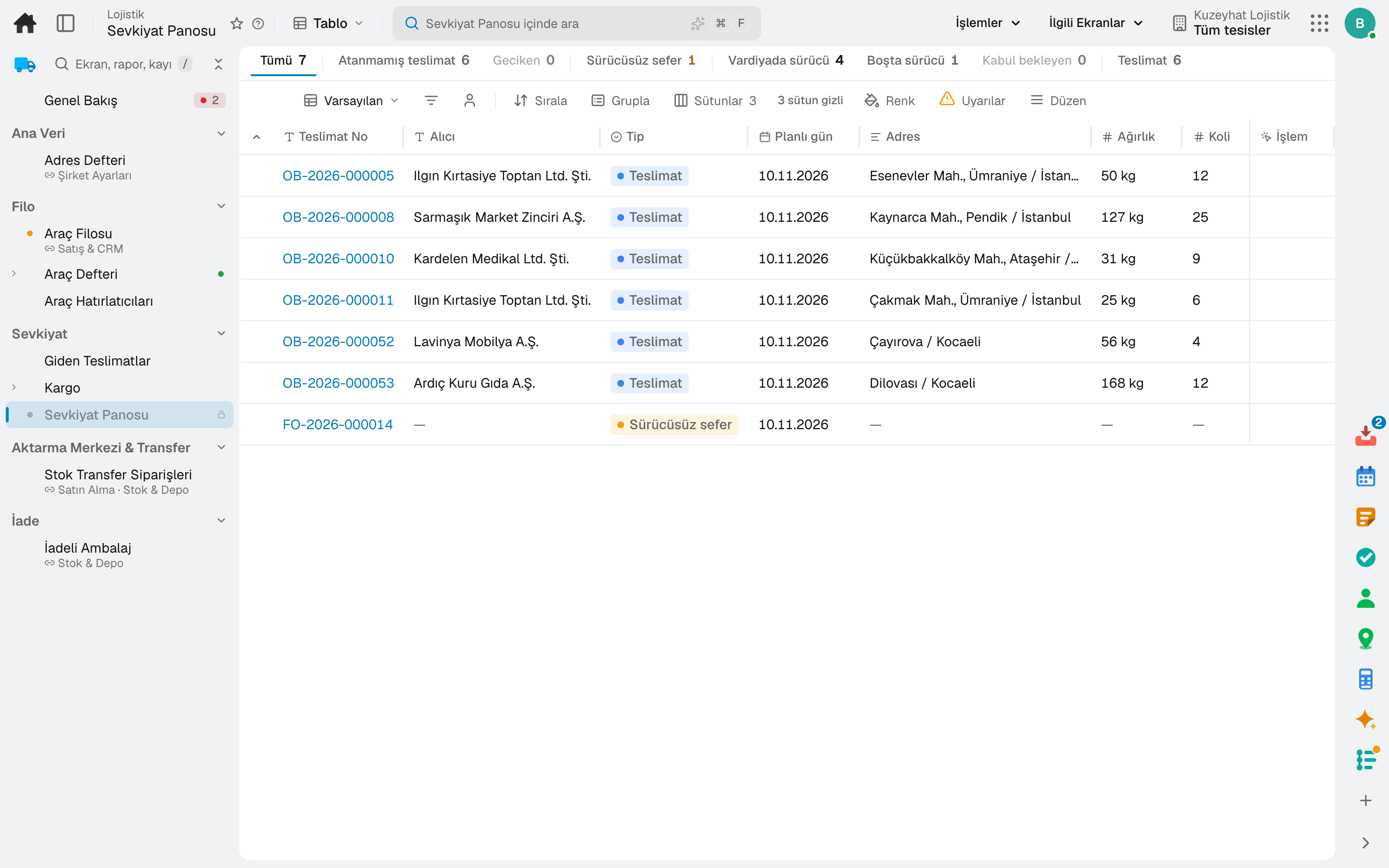
Dispatch Board
Screen in the product
  • Dispatch Board

What is it, and why do you need it?

What is Logistics for?

When deliveries are tracked by phone, there's no answer when a customer asks "where's the truck?"; carrier invoices are often paid without being compared with the work done.

The Logistics app plans shipments, assigns vehicles and collects proof of delivery from the field. Carrier invoices are compared with the freight tariff; fleet cost is shown per trip and driver performance on the scorecard.

Scope: Runs transport and foreign trade work such as fleet, shipments, deliveries and returns, carriers, freight orders, settlements and customs declarations.

Highlights

What do you do with Logistics?

01

Fleet management

Vehicles and the driver roster, fuel, accidents and damage, vehicle inspection forms, tyre tracking and service orders.

02

Shipping and delivery

Outbound deliveries, loading lists, handling units, hazardous goods and proof of delivery.

03

Control tower

Vehicle location and route history, vehicle events and alerts, live carrier tracking and driver working hours.

04

Freight and carriers

Freight orders, carriers, freight tariffs, inter-plant lanes, freight tenders and annual lane tenders.

05

Progress billing

Carrier invoices are compared with the tariff; the carrier scorecard and freight cost, and own-fleet trip cost.

06

Customs and returns

Customs declarations, HS codes, origin and licences, transit tracking; customer return requests and reverse logistics.

Process

Logistics from start to finish

The menu flows in this order; each step's sub-modules are below.

  1. 01Master Datalocations · branches · shipping points
  2. 02Fleetvehicles · drivers · operations · maintenance · performance
  3. 03Shippingdeliveries · hubs · tracking · control tower
  4. 04CarriageTM · freight orders · carriers · tenders · transit lanes
  5. 05Settlement & Invoicing
  6. 06Customs & Compliancedeclarations · tariffs · licences · sanctions
  7. 07ReturnsRMA · reverse logistics

Sub-modules

Logistics: 11 sub-modules

This list is generated from the product itself; it grows as new functions are added to a sub-module. Master data and settings are the shared ground of every module and are not counted as sub-modules.

Fleet

  • Vehicle FleetRegisters and manages the vehicle fleet with license plate, type, and technical information.
  • Vehicle Availability & AssignmentManages vehicle blocking periods (maintenance · repair · accident · reserved) and driver ↔ vehicle period assignments; shows both day by day on a Gantt chart.
  • Driver RosterManages the driver roster, their licenses (class · validity · suspension) and certificates (ADR · SRC · forklift) in one screen; candidates arriving from the application link enter the roster when approved in the Applications section.
  • Vehicle LogThe vehicle's usage log — fuel, charging for electric vehicles, km day by day and non-fuel/maintenance expenses in one screen; it fills from the driver's phone, the card statement and the toll statement, and is written to the trip's and the vehicle's cost.
  • Vehicle RemindersThe vehicle's regular renewals (comprehensive insurance, traffic insurance, motor vehicle tax, lease installment, subscription) and vehicle inspection — interval by time or km; the next due date advances automatically as expenses or inspections are entered, and the expense of a period that falls due can be recorded automatically.
  • Accident & DamageTracks vehicle accident and damage records and their costs.
  • Vehicle Check FormPre-/post-trip vehicle inspection form (DVIR) — records defects and passes them on to maintenance.

Fleet Maintenance & Performance

  • Fleet Operating CostCalculates and posts shipment freight costs; shows on the same screen the shares of the allocated cost that fall on shipment line items (allocation ledger); the calculation of driver bonuses and entitlements (hourly · km · trip · mixed · fixed monthly) is a section of the same screen.
  • Fleet Performance & CostMeasures fleet utilization and efficiency indicators (driver · vehicle · delivery · route); shows the total cost of ownership per vehicle (fuel + maintenance + accident) with a per-km scorecard, fuel exceptions, and utilization rate, benchmarked against the fleet (TCO).
  • Driver Performance ScorecardThe SINGLE source of the driver performance score: derives a 0-100 score + A/B/C/D/F grade from trip/on-time arrival, accident, and HOS records, and also produces the ranking within the fleet. Vehicle/fleet measurement is on the “Fleet Performance & Cost” screen. Carrier (3PL) drivers are also here — the carrier field is filled. The fleet incident register (accident · fine · late delivery · reward) that is the source of the scorecard and the coaching cycle are sections of the same screen.
  • Vehicle Service OrdersOpens and runs vehicle service orders: plan/calendar, completion, invoice linking. Parts and labor line items are entered in the «Parts & Labor» section of the service detail.
  • Vehicle Fault RecordsEngine fault codes from the telematics device or workshop reader (OBD-II · J1939) — alerts by severity and a service order.
  • Tyre ManagementTracks tires by position; records tread depth measurements and warns about any below the legal minimum.

Shipping

  • DeliveriesCreates, picks, and ships outbound deliveries.
  • Handling UnitSHIPMENT window of handling units (HU — carton/pallet): which handling unit is on which outbound delivery, with a delivery-based filter. Creation is done at the packing station (“Packing & Handling Unit”).
  • ShippingParcel shipping with carriers: compares the volumetric-weight tiered prices of your agreements for the same shipment, gets a tracking number and prints a label per parcel (PDF · ZPL), adds labelled shipments to the day's handover list and hands them to the courier at the end of the day; carrier events (query · notification · manual) are written to the shipment history.
  • Loading ListConsolidates deliveries to be loaded onto a vehicle in a loading manifest.
  • Container LoadingTracks containers and handling units.
  • Dispatch BoardShows deliveries without a trip and trips without a driver, drivers on shift with their open jobs, vehicles and last locations in one screen; assigns the job to a driver in one click — it is added to the driver's trip that has not yet departed, or a new trip is opened.
  • Own Fleet TripsPlans your own fleet trips with their stops and runs them in the field — the transport-side surface of the same ledger is the "Freight Orders" screen.
  • Delivery PerformanceMeasures your own vehicles' deliveries per day and driver: number of deliveries and failed deliveries, on-time rate, average time from delivery creation to departure, in transit and in total, rate delivered within the threshold (20 · 40 min); recipients' post-delivery ratings are in the Reviews section.
  • Delivery RoutesDefines delivery routes in one place: facility, transport zones, trip days, transit time, order cut-off time, delivery window and cost. The delivery plan, van sales route, shipment, and the delivery calendar of the branch and customer portal read this route.
  • Hazardous GoodsManages dangerous goods cards (UN · class · transport permits) under ADR/IMDG/IATA rules; holds the safety advisor appointment, certificate expiry and the annual activity report.
  • Proof of DeliveryCollects proof of delivery (signature/photo) and matches it with the delivery.
  • Cash on DeliveryTracks the amount to collect at the door, what the driver collected (cash · card · transfer) and the end-of-day hand-over to the till; money handed over is posted to the customer's account as a receipt.

Hub & Transfer

  • Transfer HubsDefines logistics transshipment hubs and points. Trunk-line transfers between hubs are a section of the same screen.
  • Stock Transfer OrderCreates and ships stock transfer orders between facilities. Replenishment planning from the central warehouse to multiple branches in a single run is on the Stock & Warehouse › Forecast-Based Replenishment Suggestions screen; this screen redirects there.
  • Cross-Dock Day PlanCross-docking DAILY PLAN: time window, dock allocation, and number of planned/completed tasks by plant and date. The 3rd link of the cross-docking chain (rule → decision → DAILY PLAN → task tracking).
  • Stock in Transit AnalysisTracks stock in transit during transfers between plants: its quantity, value and how many days it has been in transit. The Transfer Shipment Tracking section shows the rows together with the transfer order and opens receipt on arrival.
  • Direct Flow Rules & DecisionsCross-docking rules and decisions: the Rules tab defines for which supplier/customer/material/quantity range direct flow is permitted (auto-apply, require approval, priority); the Decisions tab approves, applies or cancels the decisions GENERATED from the rule that matches the goods receipt document — a decision is not opened manually, it is created by the engine via “Evaluate”. The first two links of the cross-docking chain (RULE → DECISION → day plan → task tracking).

Tracking & Control Tower

  • Control TowerDistributes open exceptions in the supply chain across the planning, procurement, production, shipment, and warehouse links and shows where the chain is blocked on a single screen.
  • Vehicle Location & Route HistoryShows the real-time location of vehicles on a map with driver and shift status; when a driver, day, or shipment is selected, draws the historical route trace. Vehicle geofence zones (boundary definition · entry/exit warning) and the delivery arrival estimate (ETA) from the last location + speed are sections of the same screen.
  • Transit Customs TrackingTracks the customs status of the trip; the declaration's master record is in the «Customs Declarations» screen — it is only selected here.
  • Vehicle Events & AlertsCollects vehicle-originated events and warnings (DVIR defect, tire, fuel, document due date, cold chain violation) in a single feed.
  • TM Alert CentreTransport exceptions on a single screen: warnings compiled from 8 sources, freight order delay events (cause · severity · escalation), and carrier trip temperature readings with cold chain violations.
  • RTV Live TrackingCarrier trip visibility on a single screen: real-time location · geofence · ETA from device data, status and arrival tracking of freight orders in transit, and the telematics provider integrations that supply the tracking data.
  • Driver Hours / HOSTracks driver working and driving time (HOS) rules.

Output & EDI

  • HistoryShows the history of generated document outputs.
  • EDI MessagesElectronic document interchange (EDI) with business partners: partner profile (business partner ↔ GLN, EDIFACT/JSON, transport webhook · email · external API), posts incoming ORDERS messages as sales orders (line EAN mapping, ORDRSP response), sends shipments and invoices as DESADV/INVOIC; tracks incoming/outgoing messages with envelope number, status and partner acknowledgement.

Carriers & Tendering

  • Carriers / 3PLManages carrier companies and their agreements; framework contracts made with the carrier (term, renewal, notice, volume commitment) are also here.
  • Carrier ScorecardScores carriers by on-time delivery and cost performance.
  • Freight Order TenderingCollects carrier prices for a freight order: opens a multi-carrier tender for a single order and awards it to the best quote, or records a spot quote from a single carrier without opening a tender — the annual lane tender is in the Annual Lane Tenders screen.
  • Annual Lane TendersOpens a lane-based annual carrier tender; collects multi-lane bids and ties them to a contract — the single-order tender is on the "Freight Tenders" screen.
  • Carrier Capacity AllocationAllocates capacity to carriers by period (vehicle/pallet/kg); tracks the commitment rate and utilization.
  • Freight TariffFreight price master data on a single screen: carrier freight agreements, lane × tier price tables, calculation sheets, charge types (freight items), and an instant freight comparison with contracted tariffs.
  • Inter-Plant LanesDefines transit lanes between your own facilities: distance and time, transport mode, default and backup carrier, weight · pallet limit, permission for dangerous goods · cold chain · oversize; the constraints of the lane linked to a freight order are checked at approval and at departure.

Settlement & Invoicing

  • Carrier Freight CostCalculates shipment freight costs and posts them to accounting; creates the carrier freight settlement and reconciles it by matching line items with invoice lines.
  • Carrier InvoiceMatches and checks carrier freight invoices; the invoice's auto-approval and ledger posting rules are also defined here.

Customs

  • DeclarationsPrepares customs import and export declarations.
  • HS Codes (GTİP)Manages the GTİP codes used to calculate declaration tax, and their rates; the HS tariff hierarchy (chapter · section · level · parent code) and the code life cycle are also here.
  • Customs Master DataDefines customs master data (EORI, broker, FTA, sanctions list, country embargo) and screens business partners against sanctions lists.
  • Licence / PermitManages import and export licenses and permits; the master record of the authorities that issue the licenses is also kept here.
  • Transport & Origin DocumentsManages the electronic international transport document (e-CMR).

Returns

  • Customer Return RequestsLists customer return orders and their statuses; collects inspected return line items awaiting a decision in a separate queue — the head of the chain; the logistics side is in the «Return Logistics» screen. The return reason code catalog (returns are grouped by this code) is a section of the same screen.
  • Return LogisticsRuns returns logistics on one screen: pickup plan, receipt at the warehouse, goods receipt, inspection and decision; approval and credit belong to the sales return.
  • Returnable PackagingTracks the circulation of returnable packaging/pallets: customer and supplier balances, aging and stock movements.

Master Data

  • LocationsDefines the address, location and pickup hours of your own sites (plant, branch, warehouse, franchise, kiosk); the map view shows them with type, geofence circle and contact. Customer and dealer addresses are entered in the Addresses section of the business partner card. It holds no stock; the location field on the plant card links to this screen.
  • Shipping Point Master DataDefines shipping points.

Setup master data and settings

  • Output TypeDefines document output types (invoice · quotation · purchase order · shipment): through which channel, with what subject and text they are sent.
  • ConditionDefines the condition under which the output is generated.

Frequently asked

About Logistics

Can we work with our own vehicles and carriers together?

Yes. Own-fleet trips and carrier freight orders are in the same shipping plan; their costs are tracked separately.

How is proof of delivery collected?

Proof of delivery is collected as a signature or photo and matched with the delivery.

We export; is customs work done here?

Customs declarations, HS codes, certificates of origin, EORI and licences are inside Logistics; transit customs tracking is in the control tower.

Close next month end without a reconciliation marathon.

Try it free for 15 days; no credit card needed. We reply to your questions within one business day.