Skip to content
Lidyos
Human Resources

Lidyos HRHuman resources software

From hiring to exit, the employee's whole story on one card.

Recruitment and onboarding, personnel files and the organisation chart, goals and performance, training, asset assignments, expenses and travel in one app. Personal data access logs are here too.

  • 10 sub-modules
  • 24 modules at the same price

Industry packages: Lidyos Farm

Industries: Agriculture and livestock · Services and project businesses

Roles: OHS specialist · HR specialist · Every employee · Department manager · IT specialist
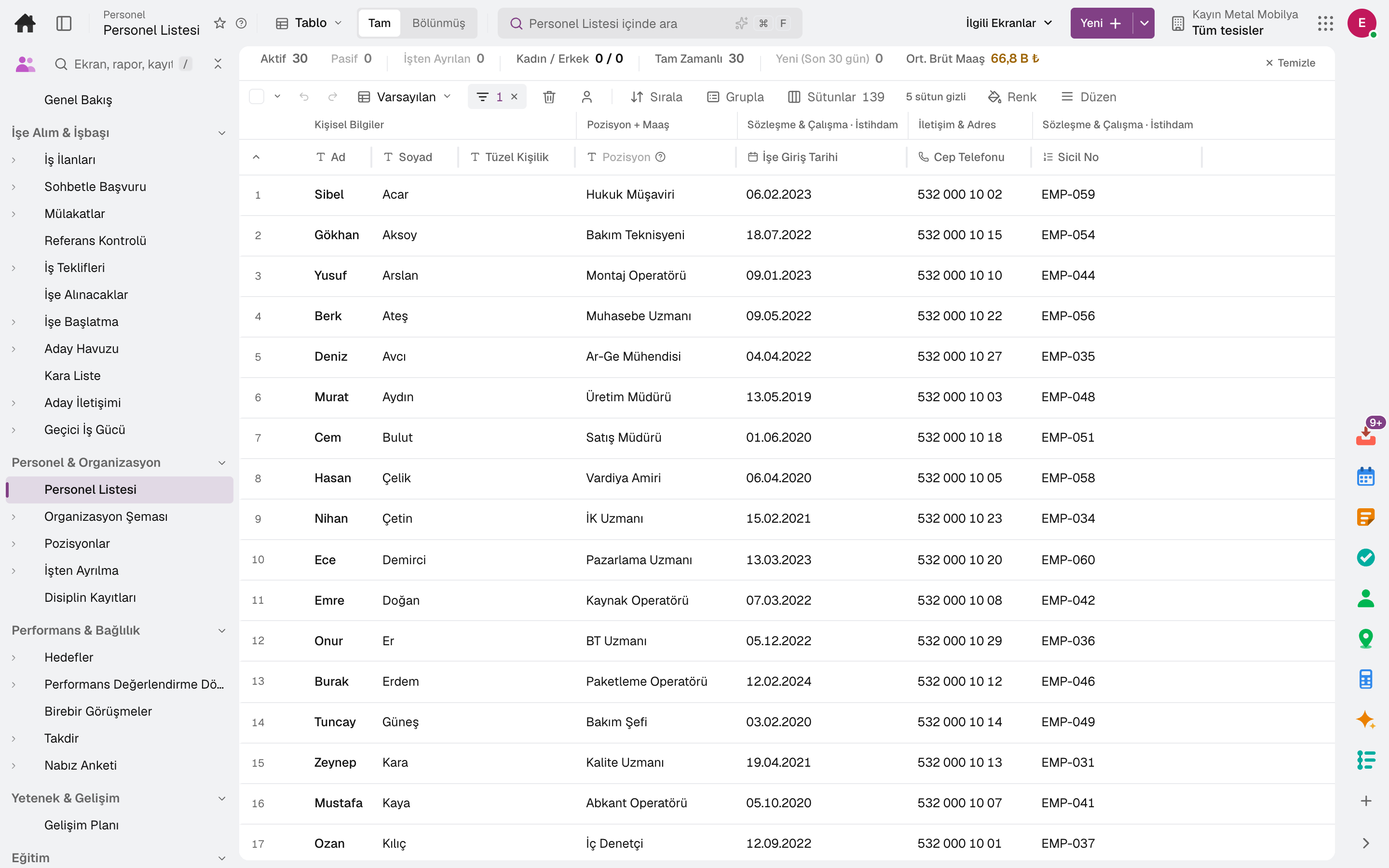
Employee List
Screen in the product
  • Employee List

What is it, and why do you need it?

What is Lidyos HR for?

When candidates live in email, personnel files in a cabinet, training records in a spreadsheet and performance reviews in Word, decisions about employees get harder, and the document an auditor asks for can't be found.

Lidyos HR links candidates to hiring, employees to the organisation, and goals to performance and development plans. Document expiry dates and mandatory training are flagged before they lapse.

Scope: Runs employee records, organisation, leave, shift and performance processes.

Highlights

What can you do with Lidyos HR?

01

Recruiting and onboarding

Job postings and the candidate funnel, interviews, reference checks, job offers, hiring and onboarding; talent pool.

02

Personnel files and organisation

Employee list, org chart, positions, disability employment quota (İŞKUR in Türkiye) and offboarding.

03

Performance and development

Goals, OKRs and KPIs, performance cycles, 360-degree feedback, one-on-ones, succession and career paths.

04

Training

Curricula and course sessions, training assignments and certificates, micro-lessons, exams, e-learning packages, external training budget.

05

Assigned equipment and documents

Equipment assigned to employees, employee document expiry dates and work permits for foreign staff.

06

Expenses and travel

Travel requests, per diem and mileage rates, expense receipts.

07

Temporary workforce

Hiring temporary workers through agencies: the request goes to agencies, candidates are assessed and weekly hours approved; the agency invoice is matched against approved hours and rate.

08

HR help desk

An employee opens an HR question as a request and gets the answer on the same record.

09

Skills matrix

Competencies are defined and mapped to positions; a per-person gap analysis and a skills matrix are produced.

Sub-modules

Lidyos HR: 10 sub-modules

This list is generated from the product itself; it grows as new functions are added to a sub-module. Master data and settings are the shared ground of every module and are not counted as sub-modules.

Recruiting & Onboarding

  • Job PostingsPublishes job postings for open positions and tracks candidates stage by stage.
  • Conversational HiringA candidate writes the trigger word or the job code to the company's WhatsApp number; the bot offers open positions, collects KVKK consent, name and the job's screening answers, opens the application and lets the candidate pick a free interview slot. HR takes over any conversation it wants; flows are published with a poster link and QR code.
  • InterviewsSchedules candidate interviews; collects and compares interviewers' evaluation scorecards in one place.
  • Reference CheckSchedules calls with the references provided by the candidate and records the feedback.
  • Job OffersPrepares job offers for candidates, sends them and tracks the response; keeps frequently used packages as templates.
  • HireConverts a candidate who accepted the offer into an employee in a single step: person record, employment, compensation, benefits from the offer and onboarding process.
  • OnboardingManages the onboarding and task list of new hires.
  • Life Event GuidesGuides the employee step by step through events such as a promotion, a department change or a return from long leave.
  • Candidate PoolGathers candidates who have not yet applied (passive candidate CRM) and the uploaded CV pool in one place; links them to a job posting.
  • BlacklistRecords people who should not be rehired.
  • Candidate CommunicationSends emails to candidates one by one or in bulk; every email sent and the candidate experience survey answers show up here. Templates and sequences live in Recruiting Setup.
  • Contingent WorkforceRuns temporary staffing through agencies end to end: the request (position, skills, headcount, duration, hourly rate band, budget) is sent to agencies, and when agency candidates are evaluated and approved an assignment is opened; weekly hours are approved, and the agency invoice is matched to approved hours × rate. Budget thresholds and contract end dates trigger warnings.

Personnel & Organization

  • Employee ListLists and manages all employees' personal, position and contact details. Mass actions that apply a raise, position, location or department change to the selected employees at once start here; an action that reaches the approval threshold is applied once it is approved in the Inbox. The address map is a view of the list, and the mass action history is in the Related Screens menu.
  • Org ChartShows organizational units (legal entity › business unit › department) in a tree chart; unit creation/editing, reporting hierarchy and headcount summary are here.
  • Position ManagementManages headcount positions, the filled/vacant status derived from assignments, operational quotas and the headcount report.
  • OffboardingRuns the exit process of a departing employee (asset assignments, access, paperwork closure, knowledge transfer) and records the exit interview; reasons for leaving are analyzed with periodic trends.
  • Disciplinary RecordsRecords employee disciplinary incidents, defenses and sanctions.

Performance & Engagement

  • GoalsManages individual and team goal plans, OKR cycles and KPI tracking from one place; progress and approval flow are here.
  • Performance Review CycleRuns periodic performance appraisals: cycle and form definition, calibration session among managers, placement of results in the 9-box (performance × potential) matrix, and definition/tracking of improvement plans (PIP) for low-performing employees.
  • FeedbackCollects feedback on one screen: named form/cycle-based 360 reviews, a 360 summary per person and period (anonymous responses stay hidden until the threshold is reached) and free-form feedback requests to an employee on a specific topic (response status is tracked).
  • One-on-OnesRecords manager-employee one-on-one meeting notes and agendas.
  • RecognitionLets employees give each other recognition and badges.
  • Pulse SurveyMeasures employee engagement (eNPS) with short pulse surveys.

Talent & Development

  • Succession PlanningTracks successor candidates and their readiness levels for critical positions.
  • Career PathsDefines career progression paths between positions.
  • Development PlanPlans the employee's development goals and training steps.
  • CompetenciesDefines the competency ITSELF and maps it to positions; provides person-level gap analysis and a competency matrix; the AI recommendation, which uses artificial intelligence to suggest to employees the competencies they should develop, is part of the same screen — the job class weighting model is on the “Position Competency Model” screen.
  • Internal GigAssigns employees to short-term internal projects.

Training

  • Training CatalogDefines training programs and curriculum content; course sessions and their quotas (course openings) created from the curriculum are parts of the same screen.
  • Training AssignmentsAssigns the curriculum to employees (per person and in bulk from the catalog), tracks certificates and monitors completion status.
  • Micro LessonsDelivers short, topic-based microlearning content.
  • Quiz QuestionsDefines, per training, the multiple-choice questions asked in the curriculum's exam steps; the employee takes the exam in My Trainings, and the server calculates the score.
  • E-learning PackagesUploads SCORM 1.2 · SCORM 2004 · xAPI content packages; a package opens to employees as a curriculum step, and progress and completion are read from the content.
  • External Training RequestsRuns employees' requests for training outside the catalogue (courses · conferences · certificate programmes) with manager and HR approval; compares the annual training budget with actual, committed and pending requests.

HR Support & Communication

  • AnnouncementsPublishes corporate announcements for employees and tracks whether they are read.
  • HR Help DeskHelp desk where employees open their HR questions as requests and receive answers.
  • HR FAQProvides ready answers and routing for frequently asked HR topics through keyword matching (not an LLM); converts unresolved ones into a help desk request.

Assets & Documents

  • Asset AssignmentTracks fixtures and equipment assignments issued to employees.
  • Licence/Document TrackingMonitors and alerts on document/license validity periods of all employees (read-only dashboard). Driver's license/SRC is in its own ledger: Logistics › Driver Licenses.
  • Foreign Worker PermitTracks the work permits of foreign employees by application, validity and extension due dates; separates expired and rejected ones.

Expenses & Travel

  • Travel RequestsOpens business travel requests, routes them for approval and tracks their budget; expense receipts are linked to this request.
  • Expense ReportsEnters employee expense receipts, submits them for approval and links them to payment. Collects receipts in the expense report, which is the employee's reimbursement package. Scans the receipt and reads its fields with OCR.

HR Analytics & Planning

  • Work Pattern AnalysisAnalyzes the team's work and working-hours patterns with anonymous, aggregate metrics.
  • Strategic Headcount PlanningPlans workforce needs using headcount, demand and retirement projections; compares the cost of saved assumption scenarios.

Compliance

  • Data Subject RequestsTracks data subject requests (access · correction · deletion · restriction · objection · portability) within the legal period of the company's data protection law, regardless of whether the person is an employee, customer, supplier or candidate.
  • Data Access LogLogs who accessed personal data, for audit purposes.
  • Data InventoryInventories the categories of personal data processed and the purposes of processing.
  • Disability Quota (İŞKUR)Shows compliance status with the disabled employment quota (4857/Art. 30 — private sector 3%), vacant positions and the Turkish Employment Agency (İŞKUR) workforce schedule.

Setup master data and settings

  • Foundation DataDefines HR's organisational structure: legal entities and business units, social security workplaces, employee groups (blue-collar, civil servant), personnel action types (hiring, termination) and payroll period groups run on the same payment calendar.
  • Jobs & Pay StructureDefines the job catalogue and pay structure: job title, job family, probation period and social security occupation code; pay grades and each grade's salary band. Employee records and job postings require a job definition; salary suggestions and out-of-band warnings on offers come from here.
  • Department DefinitionsDefines organizational department units and their hierarchy.
  • Recruiting SetupRecruiting setup: careers site, agencies, interview kits, candidate tests, offer · email · onboarding templates and email sequences.
  • Per Diem RatesTwo rate tables that feed travel expenses: domestic/international per diem allowances (by duration band and effective date — the per diem accrual of a travel request comes from here) and per-km reimbursement rates for travel in one's own vehicle (by vehicle type — the distance on the expense receipt is converted to an amount from here).
  • Custom FieldDefines custom additional fields for standard HR screens.
  • Account ProvisioningCreates an account in the company's Google Workspace or Microsoft Entra directory for a new hire, closes the account of a leaver, updates the profile when department · title · manager changes; if defined, assigns a license, syncs the department group, and hands over files and mail on exit — it shows first in a preview.

Frequently asked

About Lidyos HR

Can we track mandatory training?

Yes. Training assignments and certificates are kept with their validity periods; expiring training and certificates are flagged in advance.

How do we handle personal data requests?

Data subject requests and the data inventory are managed in the KVKK group in Legal & Contracts; access logs are in the Compliance group in HR.

Can employees see their own information?

In the employee portal they see their own requests, training and meetings; the personnel file stays under HR's authority.

Close next month end without a reconciliation marathon.

Try it free for 15 days; no credit card needed. We reply to your questions within one business day.